FAQ
Which data sources does Aloudata CAN support?
See Connect External Data Sources.
How do I upload file data to Aloudata CAN?
See Upload Local Files.
How do I import external data into Aloudata CAN?
Aloudata CAN uses StarRocks or Doris as its data source engine. See Import Internal Tables to learn how to import data into StarRocks or Doris.
How do I update a downstream dataset model after fields change in the source physical table?
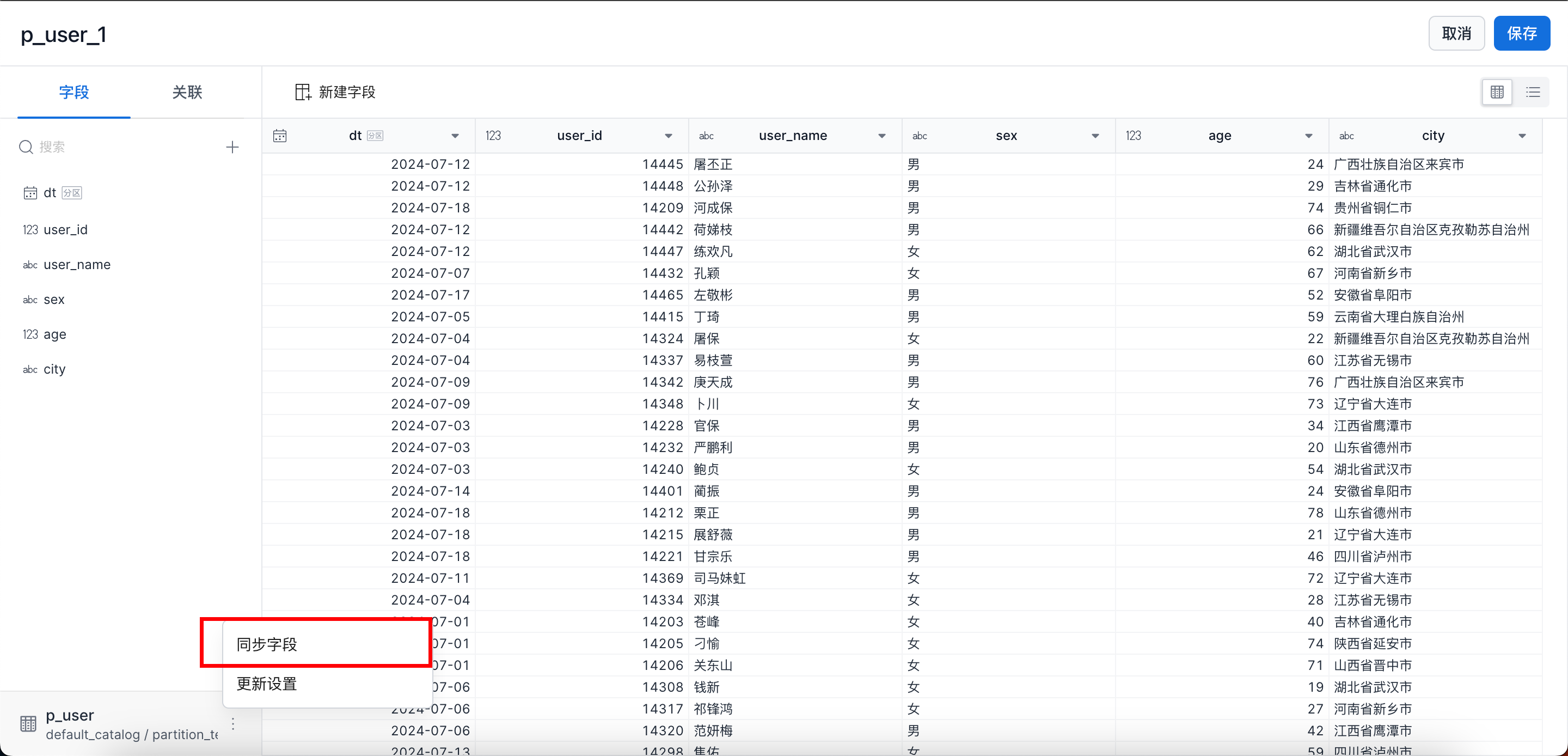
On the dataset edit page, click Sync Fields to synchronize the updated fields into the dataset model.
How do I configure relationships between datasets?
See Configure Dataset Relationships.
How can different users see different data?
Administrators or super administrators can use row-level permissions to control which data different users can see. See Row-Level Permissions.
Will a newly created materialized acceleration plan backfill historical data on the next day?
Historical data is not backfilled automatically. If the data is partitioned and partition incremental updates are configured, incremental data is automatically backfilled on the next day. To backfill historical data, see Backfill Materialized Data.
How do I backfill data in a materialized table?
See Backfill Materialized Data.
How do I manually update materialized data?
See the data update section in Manage Materialized Tables.
Will changes to metric logic trigger automatic changes to acceleration plans?
Yes.
How do I configure the automatic refresh time for materialized acceleration data?
See the materialization plan configuration section in Create a Materialization Plan.
How do BI tools connect to the metric platform?
See BI Tool Integration Guide.
How can I configure the metric request and approval process?
See Approval Management.
Does Aloudata CAN support real-time query scenarios?
Yes. Aloudata CAN currently supports queries down to minute-level granularity. For best practices, see Real-Time Metric Querying.
What are basic metrics, derived metrics, and composite metrics?
- Basic metric
A basic metric is defined as a business process plus a measure. It defines the aggregation logic for the measure and represents the most granular business metric. Examples include transaction amount and actual construction output value. Financial metrics that have already been calculated in a business system can also be treated as basic metrics.
- Derived metric
A derived metric consists of a basic metric plus a time period and business constraints. It narrows the statistical scope of a basic metric. Examples include year-to-date transaction amount and tax-included construction output value under a specific management scope.
- Composite metric
A composite metric is calculated from two or more basic or derived metrics through a secondary expression. For example, if basic metrics A and B exist, composite metric C can be defined as A / B. Examples include operating output ratio, target completion rate, and average order value.
What are the recommendations for defining derived metrics in Aloudata CAN?
| Scenario | Define in advance? | Advantages | Disadvantages |
|---|---|---|---|
| Business constraints contain many combined conditions, including multi-level AND/OR nesting. Derived metrics are used in composite metric calculations, and numerator and denominator dates cannot be aligned. | Yes | Metric logic is unified and less ambiguous. Metrics are easier to use. | Metric management cost is higher. |
| Dimensions are dynamically combined. Business constraints are simple and unlikely to cause ambiguity. | No | Metric management cost is lower. | Users may interpret metrics differently. The threshold for using metrics is higher. |
Which calculation scenarios are currently unsupported in Aloudata CAN?
Year-over-year calculation with year-to-date ranges
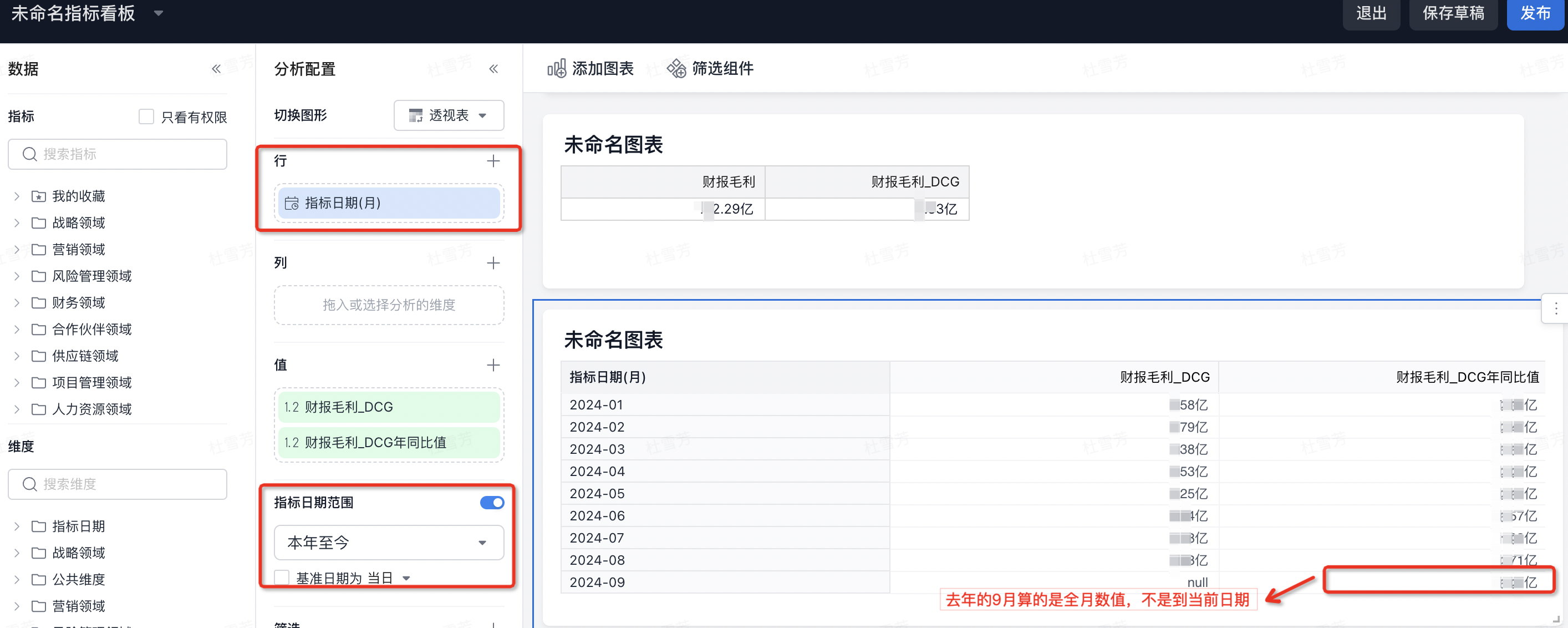
- When the metric date range is Year to Date and the dimension is Metric Date (Month), the platform currently calculates the full value for each month in the previous year. It does not calculate the previous year's year-to-date value for the same partial period. For example, if today is September 25, 2024, the September 2024 year-over-year value is compared with the full value for September 2023, not September 1 to September 25, 2023.
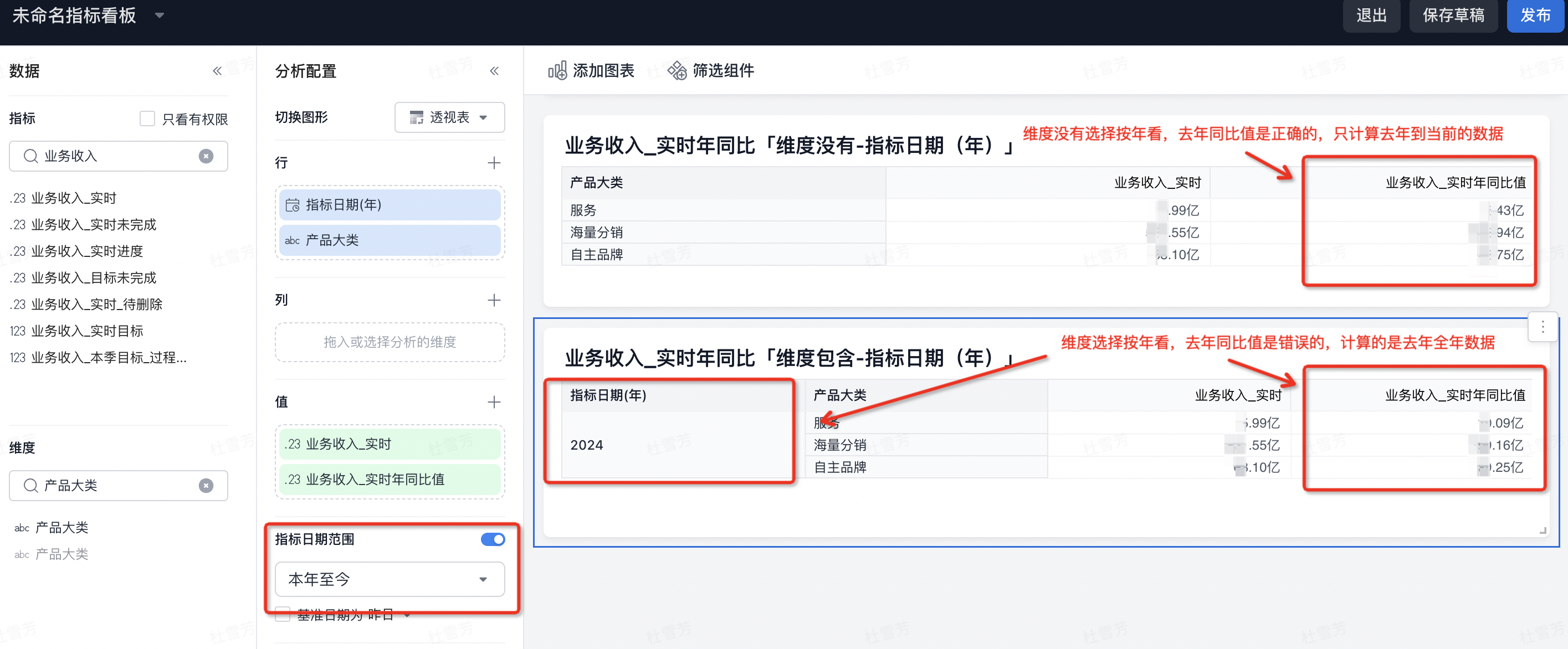
- When the metric date range is Year to Date and the dimension is Metric Date (Year), the platform currently calculates the full-year value for the previous year. It does not calculate the previous year's year-to-date value. For example, if today is September 25, 2024, the real-time year-over-year value for 2024 business revenue is compared with the full-year value for 2023, not January 1 to September 25, 2023. As a short-term workaround, use Year to Date without adding Metric Date (Year) as an analysis dimension. The product may support this scenario in the future.
Atomic metric plus period-over-period derivation without a date
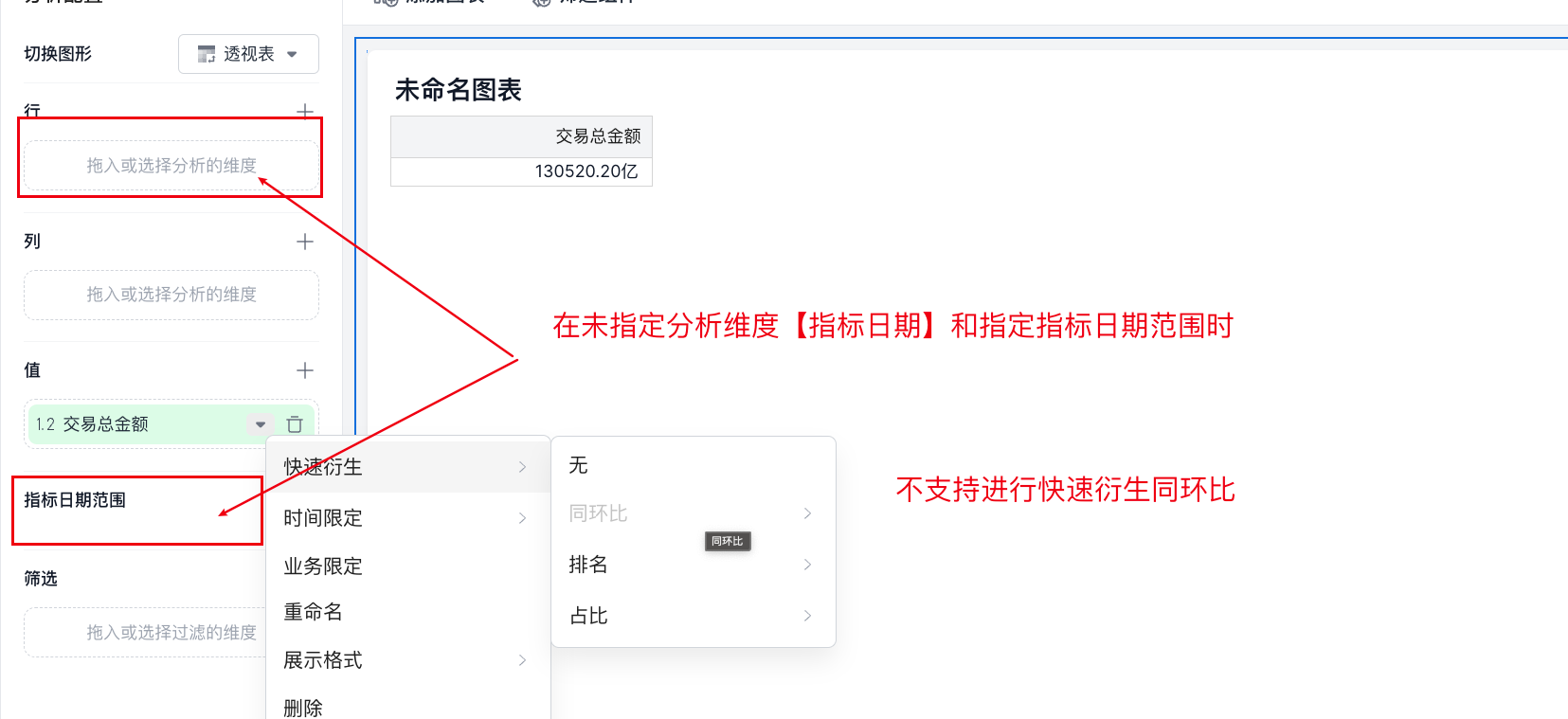
The platform currently does not support period-over-period derivation directly on an atomic metric when there is no metric date dimension and no metric date range filter.
Multi-level nested metrics
- The platform currently does not support this nested calculation pattern: semi-additive metric -> composite metric -> multi-level derivation.
In the example below, Total Amount Ratio is a composite metric calculated from Total Transaction Amount_1 / Total Transaction Amount_2, where Total Transaction Amount_1 is a semi-additive metric. The composite metric is then used to create a derived metric such as Total Amount Ratio for the Same Year One Year Ago. This scenario is not currently supported.

Semi-additive calculation behavior
- Derived metric plus semi-additive metric:
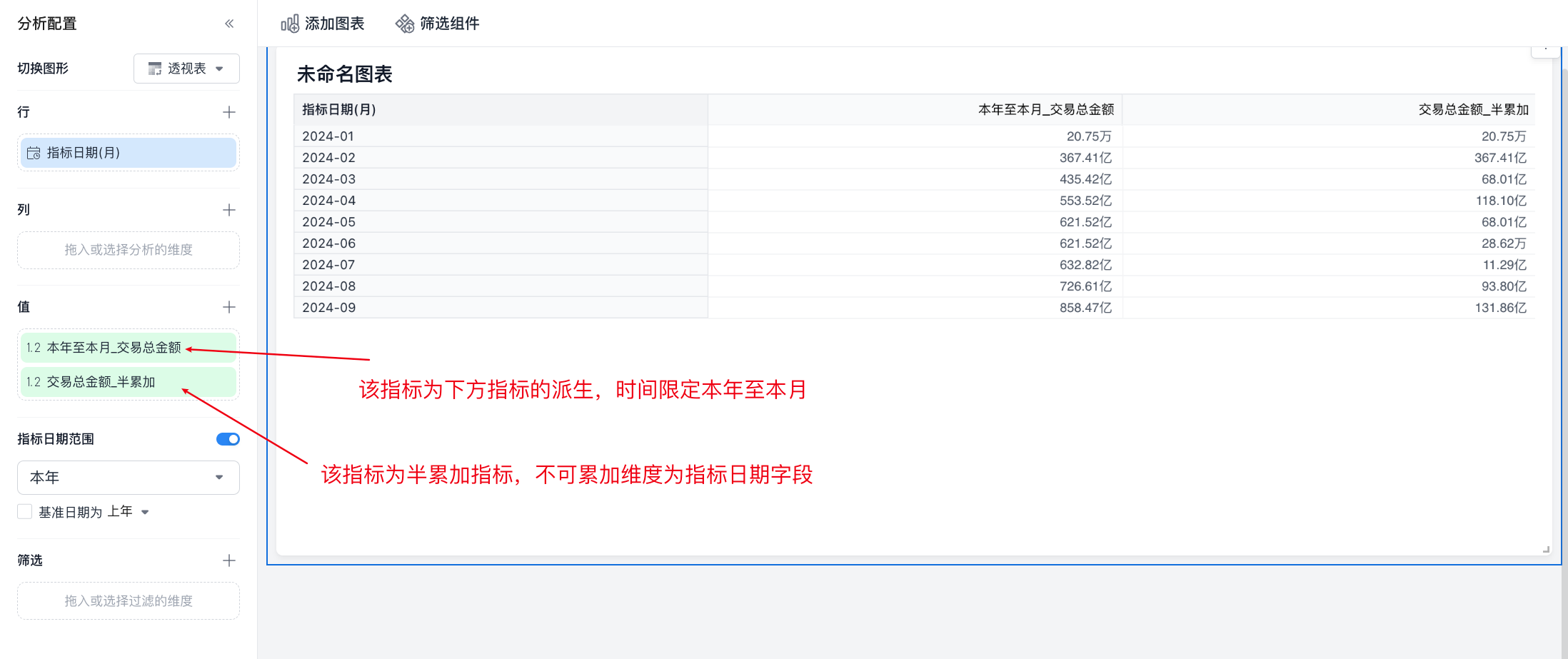
When deriving a year-to-current-month calculation for a semi-additive metric, and the dimension is Metric Date (Month), the platform currently accumulates the maximum value month by month. It does not calculate the maximum value over the full cumulative date range. In the example below, February equals the semi-additive value for January plus the semi-additive value for February, and so on. It does not calculate the maximum value from January to February.
Why did an accelerated query not hit acceleration, and how should I check it?
When querying data with acceleration, both the data range and hit strategy must be correct. Use the following checks.
Data range checks
-
Full data check: Make sure full data has already been processed and checked.
-
Incremental data check: For incremental data, check whether the partition data range meets the requirement. The query date range must be within the backfilled range of the materialized acceleration data.
Single-level aggregation hits
-
Count Distinctquery: -
If the query contains
count(distinct), the acceleration dimensions must exactly match the query dimensions. -
Non-
Count Distinctquery: -
If the query does not contain
count(distinct), the query can roll up and hit an existing materialized table. In this case, the query dimensions can be fewer than the materialized table dimensions. -
Filters:
-
Filters must be applied to dimension fields.
Multi-level aggregation hits
-
Dimension consistency:
-
Query dimensions and acceleration dimensions must be consistent. If the accelerated metric is a derived metric, the date granularity can be different. For example, an acceleration plan at month granularity can be used by a query at day granularity.
-
Filters:
-
Filters must be applied to dimension fields.
How do I choose the right time granularity in metric analysis?
The Derived Rules page explains derived metrics at different time granularities and how to choose the corresponding analysis granularity.
What is the query logic for metric cards in My Favorites on the Aloudata CAN Home page?
Does Aloudata CAN support multiple tenants, and how do I create a tenant?
Aloudata CAN supports a multi-tenant architecture and provides effective isolation between tenants. To create a tenant, refer to the tenant creation guide.
Why does reading MySQL DATE or DATETIME fields fail?
Error:
This happens because JDBC throws an exception by default for invalid DATE or DATETIME values. You can use the zeroDateTimeBehavior parameter to control this behavior.
Available values:
exception: throw an exception.convertToNull: convert the value toNULL.round: convert the value to0001-01-01 00:00:00.
Add zeroDateTimeBehavior=convertToNull to the end of the jdbc_url when creating the Catalog. Example:
With this configuration, JDBC converts 0000-00-00 or 0000-00-00 00:00:00 to null, allowing the data to be read normally.
Why does Doris report Invalid operation: result set is closed. ERRORCODE=-4470 when reading IBM Db2 through JDBC Catalog?
- Add the following connection parameters to the
jdbc_urlwhen creating the IBM Db2 Catalog:allowNextOnExhaustedResultSet=1;resultSetHoldability=1.
Example:
- If the referenced object is a LOB, the most common cause is that the LOB value exceeds the supported range. Set the
progressiveStreamingproperty to2.
Example:
What is the difference between result acceleration and metric/detail acceleration?
Aloudata CAN provides two main acceleration strategies for query performance: result acceleration and metric/detail acceleration.
| Acceleration strategy | Use case | Advantages | Disadvantages |
|---|---|---|---|
| Metric/detail acceleration | Suitable for business self-service analysis. Supports metric acceleration from a single model. | Applies to more scenarios than result acceleration. Supports secondary roll-up calculation. For example, if acceleration is configured with dimensions D1, D2, and metric M1, a query that uses only D1 and M1 can still use the acceleration. |
Performance is lower than result acceleration, but higher than direct metric data queries. |
| Result acceleration | Suitable for fixed report acceleration. Supports metrics from multiple models. | Provides the highest query performance. | The materialized table dimensions must exactly match the query request to use acceleration. |
What is the impact of changes to the result acceleration mechanism in Aloudata CAN?
-
Query hits are not affected by upstream changes: Changes to data sources, datasets, metrics, or dimensions do not prevent existing acceleration tasks from being hit by queries. However, if old and new query logic differ, the returned data may be incorrect.
-
Acceleration logic updates require resaving: To ensure an acceleration task uses the latest logic, such as updated metric calculation logic, dimension definitions, or field structures, resave the acceleration task configuration.
-
Materialized view reconstruction requires resaving and rebuilding: Some changes require both resaving the configuration and rebuilding the underlying materialized table so its structure fully matches the new logic.
The following table summarizes the impact of different change types and the required actions.
| Change category | Example change | Impact on acceleration logic | Impact on materialized table | Required action | Notes |
|---|---|---|---|---|---|
| Definition update | Update metric calculation logic or dimension definition. | Acceleration logic must be updated to use the new definition. | No rebuild required. | Resave the acceleration task. | Ensures acceleration uses the new logic. |
| Key element removal or type change | Remove a metric or dimension used by the acceleration task from the system metric or dimension list. | The removed element becomes invalid and the original dependency is broken. | Rebuild required. | Resave the acceleration task and rebuild the materialized table. | Invalid configuration must be removed. The physical table must be rebuilt to remove the dependency. |
| Key element removal or type change | Remove a metric or dimension from the acceleration task configuration. | Configuration changes and no longer contains the element. | Rebuild required. | Resave the acceleration task and rebuild the materialized table. | The physical table must be rebuilt to exclude the element. |
| Key element removal or type change | Delete a field from a dataset or source table when that field is used by the acceleration task. | The underlying data is missing and the original dependency is broken. | Rebuild required. | Resave the acceleration task and rebuild the materialized table. | The physical table must be rebuilt to remove the dependency on the deleted field. |
| Key element removal or type change | Change the data type of a system metric or dimension. | Configuration changes and dependencies are broken. | Rebuild required. | Resave the acceleration task and rebuild the materialized table. | Invalid configuration must be removed and the physical table must be rebuilt. |
Key recommendations:
-
Query hits remain available: Existing acceleration tasks do not lose query-hit capability because of upstream changes.
-
Logic updates require resaving: Any definition or structure change requires resaving the acceleration task so the acceleration engine can use the new rules. This does not break the existing physical table.
-
Element removal or type changes require physical table rebuilds: If a metric or dimension used by an acceleration task is removed or its type changes, you must resave the configuration and trigger a full rebuild of the materialized table. The original physical storage may contain invalid or missing information and must be rebuilt to ensure correctness.
How do I get the query SQL when a query record is running?
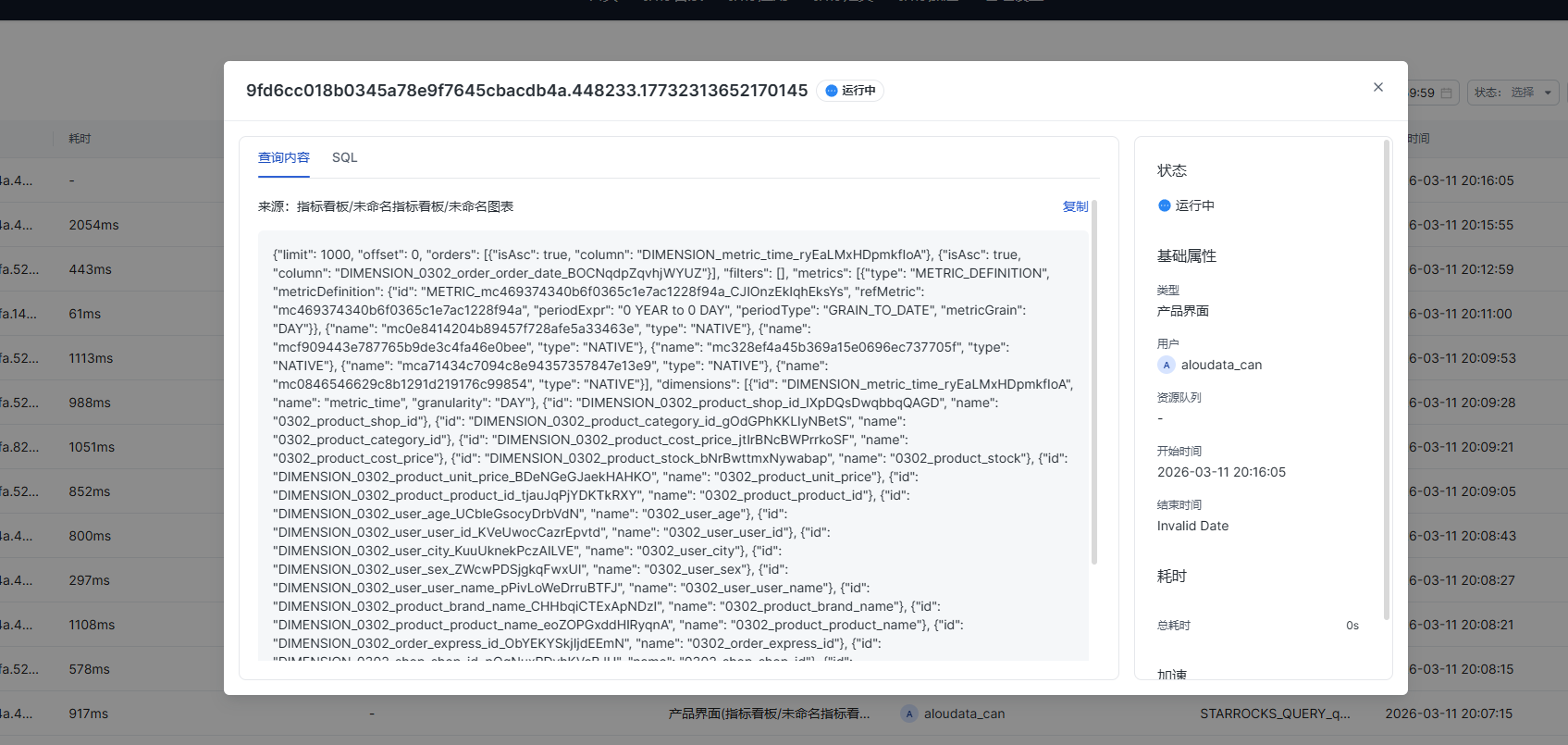
When a query record is running, you can get the executed SQL as follows:
-
Copy the query content from the query record, as shown in the example above.
-
Use the copied request content in the metric query API and add
queryResultType=SQLto the request. Example:
curl --location --request POST 'http://127.0.0.1:8085/semantic/api/v1.1/metrics/query' \
--header 'tenant-id: xx' \
--header 'auth-type: UID' \
--header 'auth-value: xxxx' \
--header 'Content-Type: application/json' \
--data-raw '{
    "limit": 4000,
    "metrics": [
        "sum_return_amount"
    ],
    "dimensions": [
        "metric_time__day"
    ],
    "timeConstraint": "DateTrunc(['\''metric_time'\''], \"DAY\") = Now()",
    "queryResultType": "SQL"
}'
For more information about the metric query API, see Query Metric Data.