Query Environment Priority
Before You Start
Metric queries may involve data filters in multiple places.
To describe the query runtime environment more simply, this page treats grouped dimensions as filter dimensions.
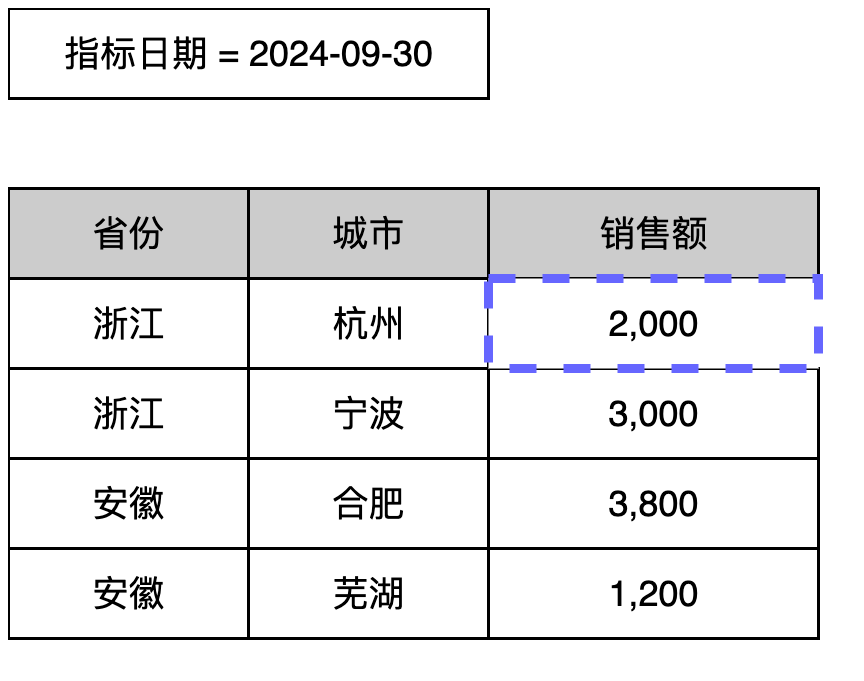
The Sales Amount metric result in the example on the left can be understood as having three filters:
Metric Date = 2024-09-30
Province = Zhejiang
City = Hangzhou
With this understanding, the following descriptions of query environment calculation order are based on filters.
Query Environment
When a user queries a metric result in the interface, the metric definition may be nested across multiple layers. For example, a derived metric may reference a basic metric. The system therefore generates multiple nested query environments.
The following example uses a slightly complex metric definition:
Metric name: Average Monthly Inventory of Hot-Selling Products in Recent 12 Months
Type: derived metric
Base/composite metric: Inventory
Time limit: recent 12 months, monthly average
Business limit: Product ID satisfies Sales Volume in Recent 12 Months > 1000
Metric name: Inventory
Type: basic metric
Aggregation content: SUM([Inventory])
Semi-additive metric: enabled
Non-additive dimension: Date
Window selection: Maximum
Metric name: Sales Volume in Recent 12 Months
Type: derived metric
Base/composite metric: Sales Quantity
Time limit: recent 12 months
Metric name: Sales Quantity
Type: basic metric
Aggregation content: COUNT([Order ID])
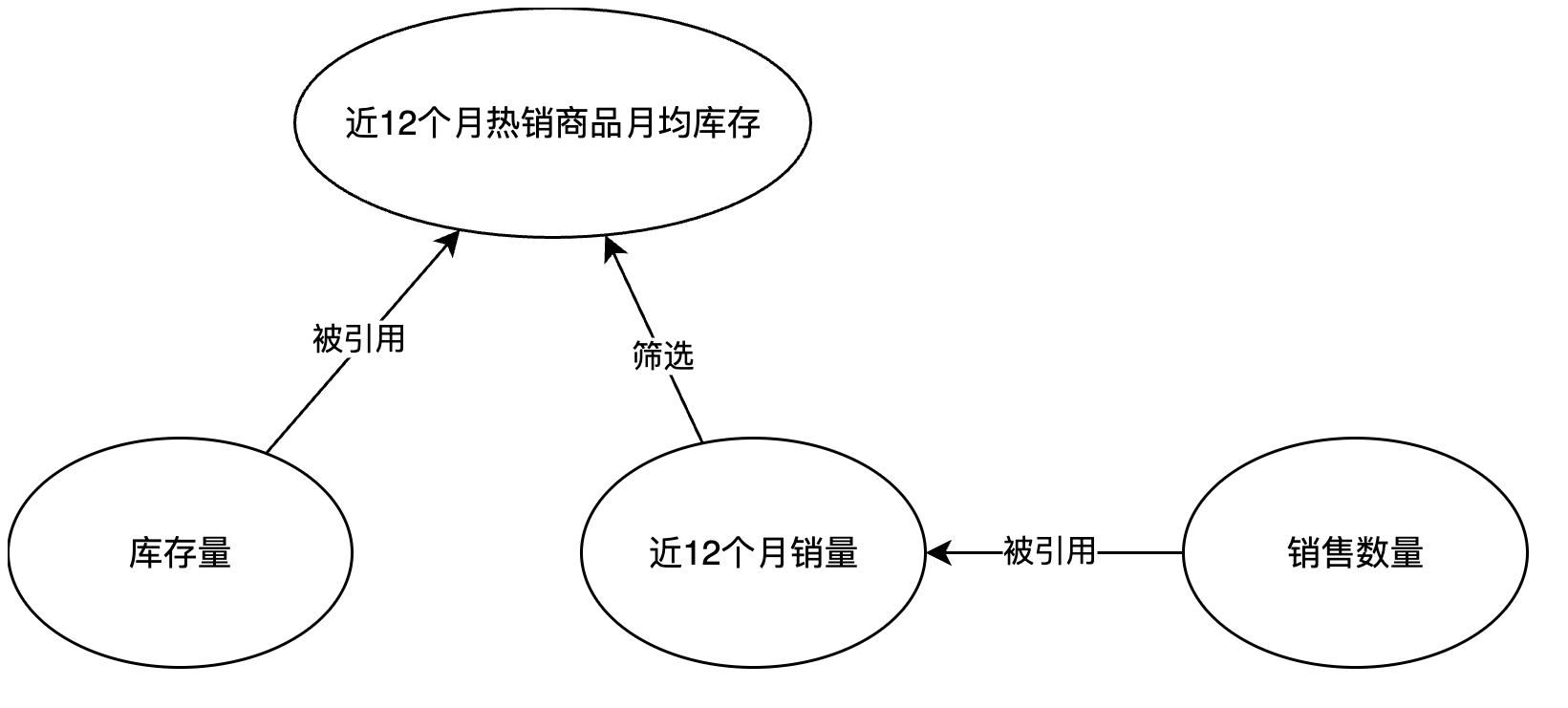
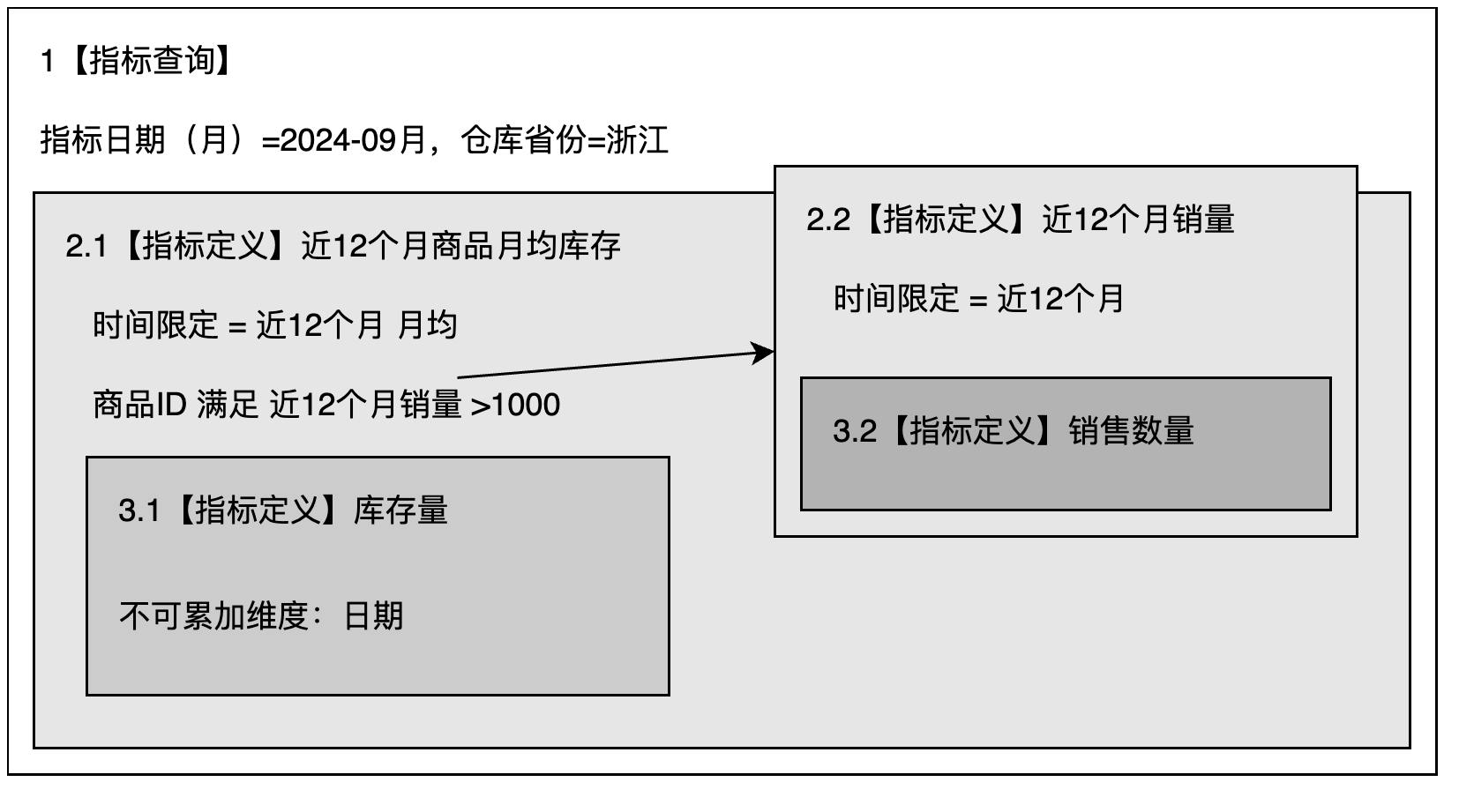
The query conditions in the metric query are: Metric Date (Month) = 2024-09 and Warehouse Province = Zhejiang.
The following diagram shows the relationship between query environments:
Rules
Rules
-
The query environment is passed from outside to inside, and data calculation is performed from inside to outside.
-
Filter conditions in query environments at the same level do not affect each other.
Based on these rules, the calculation logic can be broken down into the following query environments:
| Step | Environment | Processing Logic |
|---|---|---|
| 1 | 1 | Generate filters: - Metric Date (Month) = 2024-09 - Warehouse Province = Zhejiang Pass these filters to environment 2. |
| 2 | 2.1 | Receive the filters from environment 1 and merge them with its own filters: - Metric Date (Month) = 2024-09 - Warehouse Province = Zhejiang - Product ID satisfies Sales Volume in Recent 12 Months > 1000 Because a time limit exists, adjust the metric date passed from environment 1: - Metric Date (Month) = 2023-09 ~ 2024-09 - Warehouse Province = Zhejiang - Product ID satisfies Sales Volume in Recent 12 Months > 1000 |
| 2.2 | Calculating the filter Product ID satisfies Sales Volume in Recent 12 Months > 1000 uses the metric result of Sales Volume in Recent 12 Months. Receive filters from environment 1:- Metric Date (Month) = 2024-09 - Warehouse Province = Zhejiang Because a time limit exists, adjust the metric date passed from environment 1: - Metric Date (Month) = 2023-09 ~ 2024-09 - Warehouse Province = Zhejiang |
|
| 3 | 3.1 | Receive the filters from environment 2.1: - Metric Date (Month) = 2023-09 ~ 2024-09 - Warehouse Province = Zhejiang - Product ID satisfies Sales Volume in Recent 12 Months > 1000 |
| 3 | 3.2 | Receive the filters from environment 2.2: - Metric Date (Month) = 2023-09 ~ 2024-09 - Warehouse Province = Zhejiang |
The calculation runs through the following steps:
Using the query cell for **Metric Date (Month) = 2024-09** and **Warehouse Province = Zhejiang** as the example:
Calculate within environment [3.2]:
- Use
Product IDas the grouping dimension, calculate the result forMetric Date (Month) = 2023-09 ~ 2024-09andWarehouse Province = Zhejiang, and obtain multiple rows of data.
| Product ID | Sales Volume in Recent 12 Months |
|---|---|
Calculate within environment [3.1]:
-
Use
Metric Date (Month)as the grouping dimension to calculate the semi-additive metric withinMetric Date (Month) = 2023-09 ~ 2024-09andWarehouse Province = Zhejiang. -
Because this is a semi-additive metric and the filter conditions contain the non-additive dimension
Metric Date (Month), the metric first keeps the maximum date data within theMetric Date (Month)range. -
On the filtered result from the previous step, filter
Warehouse Province = Zhejiangand keep theProduct IDvalues whose values in [3.2] are greater than 1000. This returns multiple rows of data from 2023-09 to 2024-09.
| Metric Date (Month) | Inventory of Hot-Selling Products in Recent 12 Months |
|---|---|
- Calculate the average of the data result from step 3 to obtain the final result:
Average Monthly Inventory of Hot-Selling Products in Recent 12 Months.