Create a Dataset
API Description
Use this API to create a dataset in the metrics platform.
API URL
For how to obtain anymetrics_host:anymetrics_port, see Calling APIs.
Common Request Parameters
| Parameter | Type | Required | Description |
|---|---|---|---|
tenant-id |
String | Yes | Tenant ID. Identifies the tenant for metric query content. |
auth-type |
String | Yes | Authentication method. Supported values: UID, TOKEN, ACCOUNT, and APIKEY. |
auth-value |
String | Yes | Authentication value corresponding to auth-type. |
How to Obtain Common Parameters
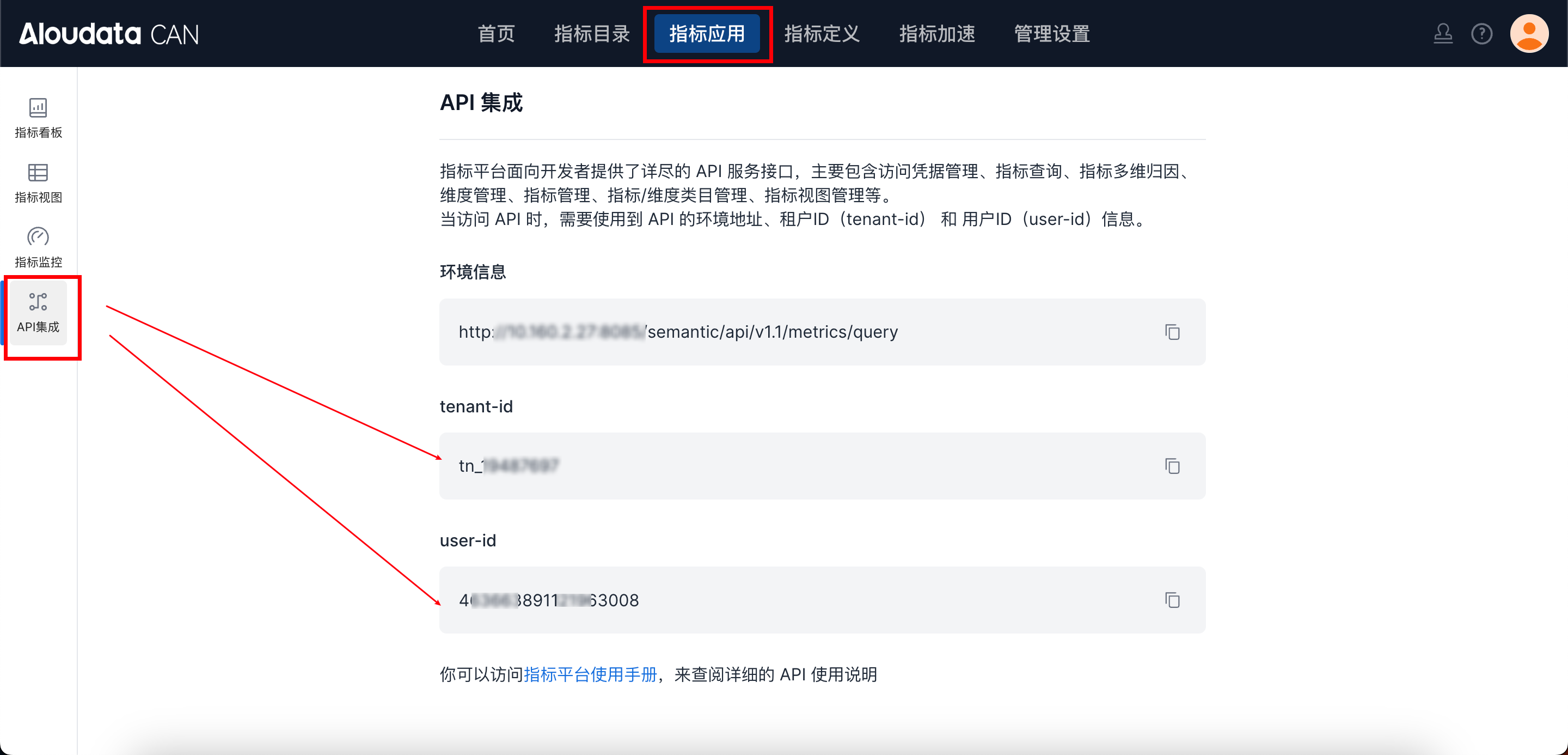
To obtain tenant-id, select a metrics application in the top navigation bar of Aloudata CAN, choose API Integration from the left navigation menu, and copy it from the API Integration page. Set auth-value according to the selected auth-type.
Request Parameters
Request Parameter Overview
| Parameter | Type | Required | Description | Example |
|---|---|---|---|---|
name |
String | Yes | Dataset code name. It must be globally unique and can contain letters, numbers, and underscores. | datasetName |
displayName |
String | Yes | Dataset display name. | dataset123 |
description |
String | No | Dataset description. | Transaction records dataset |
categoryId |
String | No | Category ID used to place the dataset under a category. | - |
sourceInfo |
Object | Yes | Data source information that specifies the underlying data source for the dataset. For details, see sourceInfo parameter details. | - |
defColumns |
Array | No | Dataset column definitions. If omitted, the system automatically pulls all columns from the data source. For details, see defColumns parameter details. | - |
partitionMapping |
Object | No | Partition mapping configuration used to accelerate query scenarios. | - |
filterExpr |
String | No | Dataset-level filter condition, as an expr expression string such as [column1] > 10. After the dataset is created, this filter condition is automatically appended to all queries on the dataset. |
- |
sourceInfo Parameter Details
| Parameter | Type | Required | Description | Example |
|---|---|---|---|---|
name |
String | Yes | Source data name, namely the physical table name. | datet |
displayName |
String | Yes | Source data display name. | dataset123 |
description |
String | Yes | Source table description. | Transaction records dataset |
content |
String | Yes | Source data identifier. For TABLE, pass the physical table GUID, such as engine.catalog.schema.table. For SQL, pass a SQL statement. For FILE, pass a file ID. |
starrocks.`default_catalog.jingming`.datet |
type |
String | Yes | Source data type. Valid values: TABLE and SQL. |
TABLE |
datasourceItems |
Array | Yes | Data source item array. Currently, only one element is supported. It must include the data source GUID, name, and engine type. | [{"id":"jmsr","name":"jmsR","queryEngineType":"STARROCKS"}] |
If the source type is TABLE, content must be the physical table GUID. If the source type is SQL, content must be the SQL statement.
datasourceItems[] Parameter Details
| Field | Type | Required | Description |
|---|---|---|---|
id |
String | Yes | Data source ID, namely the data source GUID. |
name |
String | Yes | Data source name. |
queryEngineType |
String | Yes | Query engine type. Enumerated values include AIR, STARROCKS, HOLOGRES, DATABRICKS, GAUSS, ADB, and HUAWEI_DWS. |
defColumns Parameter Details
| Subparameter | Type | Required | Description |
|---|---|---|---|
name |
String | Yes | Field name. It cannot be modified. |
displayName |
String | Yes | Field display name. |
description |
String | No | Column description. |
type |
String | Yes | Column type. Valid values: DIMENSION and MEASURE. |
expr |
String | Yes | Field formula, such as ['datet'/'date_type']. |
sourceColumn |
String | No | Source field. Required for physical table fields. |
Type Conversion Functions for expr Columns
Use type conversion functions in expr to convert physical columns to other data types. When you use a conversion function, set originDataType to the converted target type.
| Function | Display Name | Converted originDataType |
expr Format |
Description |
|---|---|---|---|---|
Text |
Text | VARCHAR |
Text(column reference) |
Converts any type to text. |
Int |
Integer | BIGINT |
Int(column reference) |
Converts any type to an integer. |
Double |
Decimal | DOUBLE |
Double(column reference) |
Converts any type to a floating-point decimal. |
Decimal |
High-precision decimal | DECIMAL |
Decimal(column reference, precision) |
Converts any type to an exact decimal. The second parameter is the number of decimal places. |
Date |
Date | DATE |
Date(column reference) or Date(column reference, "format") |
Converts to a date. Text columns require a format. |
DateTime |
Date and time | DATETIME |
DateTime(column reference) or DateTime(column reference, "format") |
Converts to a date and time. Text columns require a format. |
Bool |
Boolean | BOOLEAN |
Bool(column reference) |
Converts any type to a boolean. |
Json |
JSON | JSON |
Json(column reference) |
Converts text to JSON. |
Here, column reference uses the ['table name'/'column name'] format.
Example:
{

    {
      "description": "Standard physical column, no conversion",
      "expr": "['my_table'/'amount']"
    },
    {
      "description": "Convert INT to high-precision decimal, keeping 2 decimal places",
      "expr": "Decimal(['my_table'/'amount'], 2)"
    },
    {
      "description": "Convert INT to text",
      "expr": "Text(['my_table'/'amount'])"
    },
    {
      "description": "Convert VARCHAR to date. Text columns must specify a format.",
      "expr": "Date(['my_table'/'date_str'], \"yyyy-MM-dd\")"
    },
    {
      "description": "Convert DATE to date and time. Non-text columns do not need a format parameter.",
      "expr": "DateTime(['my_table'/'create_date'])"
    }

}
Notes:
- When the source column for
DateorDateTimeis a text type, you must pass the second parameter to specify the date format string. Otherwise, the value cannot be parsed. - Available date formats include standard Java date formats such as
"yyyy-MM-dd"and"yyyy-MM-dd HH:mm:ss". - The precision parameter for
Decimalis an integer that indicates the number of decimal places. The frontend default is 2.
Response Parameters
Request Examples
Create a Dataset from a Data Source Table
{
  "name": "multi_test_product1",
  "displayName": "multi_test_product1",
  "description": "",
  "categoryId": "77e32b47-622d-4c5d-9d5c-45cfa7dbd0d7",
  "sourceInfo": {
    "name": "multi_test_product",
    "displayName": "multi_test_product",
    "content": "aloudata_can_datasource.`xydb.public`.multi_test_product",
    "type": "TABLE",
    "datasourceItems": [
      {
        "id": "aloudata_can_datasource",
        "name": "aloudata_can_datasource",
        "queryEngineType": "STARROCKS"
      }
    ]
  },
  "defColumns": [
    {
      "name": "id",
      "displayName": "id",
      "description": "id",
      "type": "MEASURE",
      "originDataType": "INT",
      "sourceColumn": "id",
      "expr": "['multi_test_product'/'id']"
    },
    {
      "name": "stock",
      "displayName": "stock",
      "description": "stock",
      "type": "MEASURE",
      "originDataType": "DECIMAL",
      "sourceColumn": "stock",
      "expr": "Decimal(['multi_test_product'/'stock'], 2)"
    }
  ]
}