Get Metric View Details
API Description
Use this API to query the configuration details of a metric view by metric view name.
API URL
GET Http://{anymetrics_host:anymetrics_port}/anymetrics/api/v1/analysisview/queryByName?viewName = newView
For how to obtain anymetrics_host:anymetrics_port, see Calling APIs.
Request Parameters
Common Request Parameters (HEADERS)
| Parameter | Type | Required | Description |
|---|---|---|---|
| tenant-id | String | Yes | The tenant ID that identifies the tenant where the metric view belongs |
| auth-type | String | Yes | Authentication type. Supported values: UID, TOKEN, ACCOUNT, and APIKEY |
| auth-value | String | Yes | The authentication value that corresponds to auth-type |
How to Obtain Common Parameters
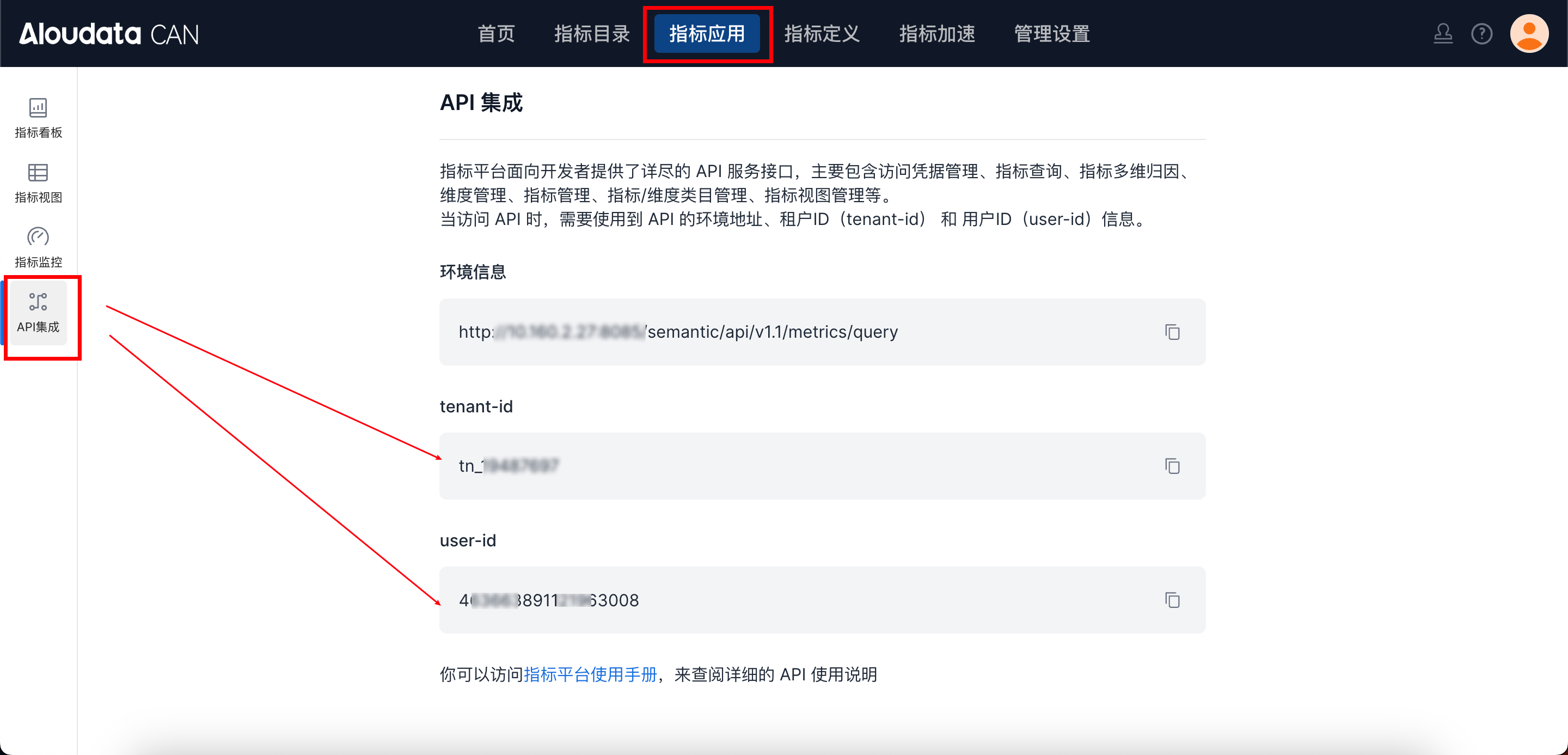
To obtain tenant-id, select a metric application in the top navigation bar of Aloudata CAN, choose API Integration from the left-side menu, and copy it from the API Integration page. Set auth-value to the authentication value that corresponds to the selected auth-type.
Request Parameters
| Parameter | Type | Required | Max Length | Description |
|---|---|---|---|---|
| viewName | String | Yes | Metric view name |
Response Parameters
| Parameter | Type | Required | Max Length | Description |
|---|---|---|---|---|
| id | Long | Yes | Metric view ID | |
| viewName | String | Yes | Metric view name | |
| displayName | String | Yes | Display name | |
| description | String | No | Description | |
| metrics | Array | Yes | Metric list | |
| dimensions | Array | Yes | Dimension list | |
| timeConstraint | String | No | Time constraint | |
| filters | Array | No | Filter list | |
| orders | Array | No | Sort list | |
| createFrom | String | Yes | Creation source |
Request Example
Response Example
{
  "id": 0,
  "viewName": "viewName_6da0cde1a773",
  "displayName":"Display Name",
  "description": "description_facf594a8f5a",
  "metrics": [
    "metrics_24f597e4ee0a"
  ],
  "dimensions": [
    "dimensions_5b28dbdcdb47"
  ],
  "timeConstraint": "timeConstraint_0616f4288352",
  "filters": [
    "filters_0367634f941b"
  ],
  "orders": [
    {}
  ],
  "createFrom": "Creation Source"
}