Basic Metric Calculation Logic
Overview
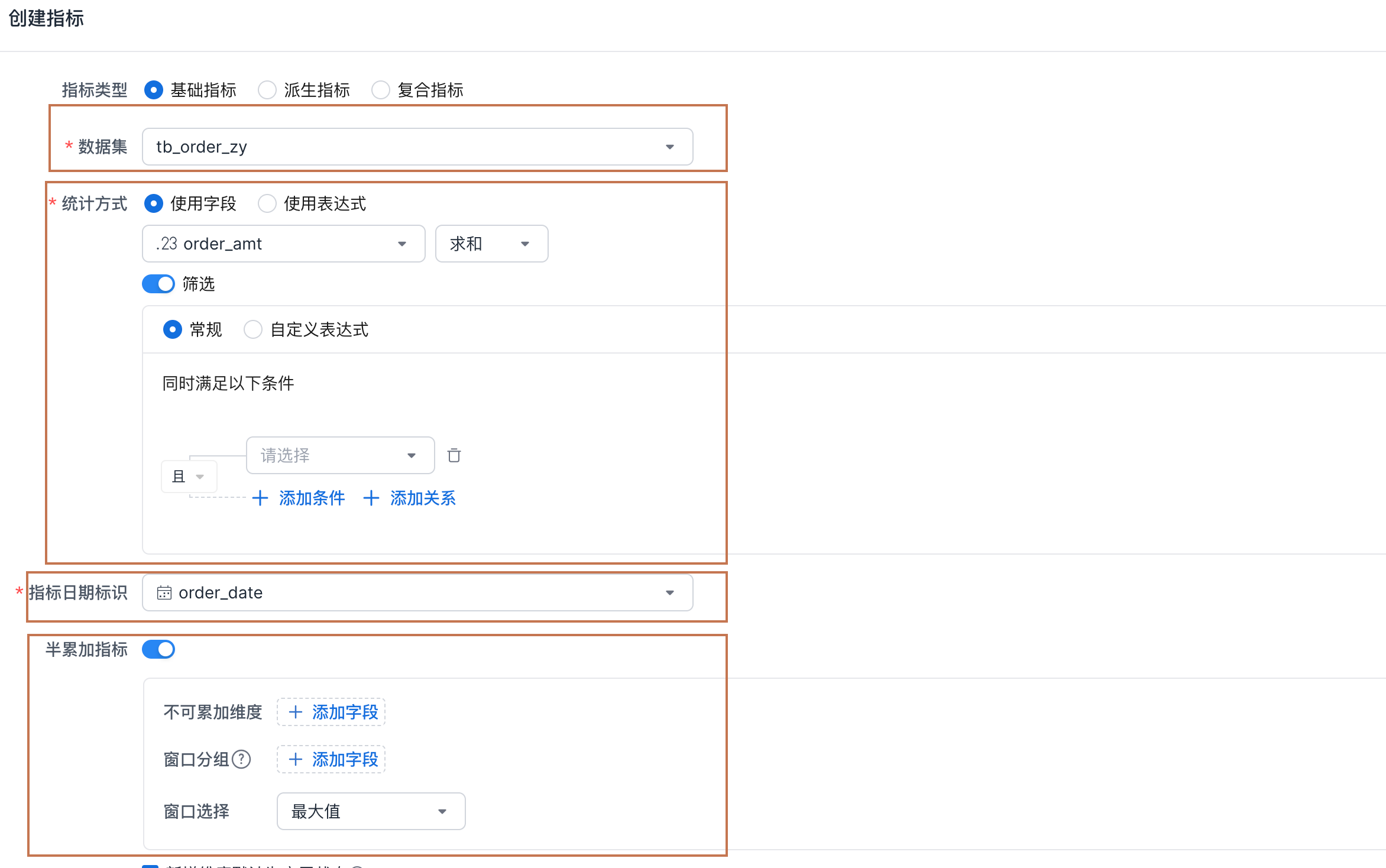
Basic metric definitions mainly include the dataset, aggregation method, metric date identifier, and semi-additive metric configuration. This page explains the role of each configuration item and how they work together.
Calculation Mechanism
Regular Basic Metrics
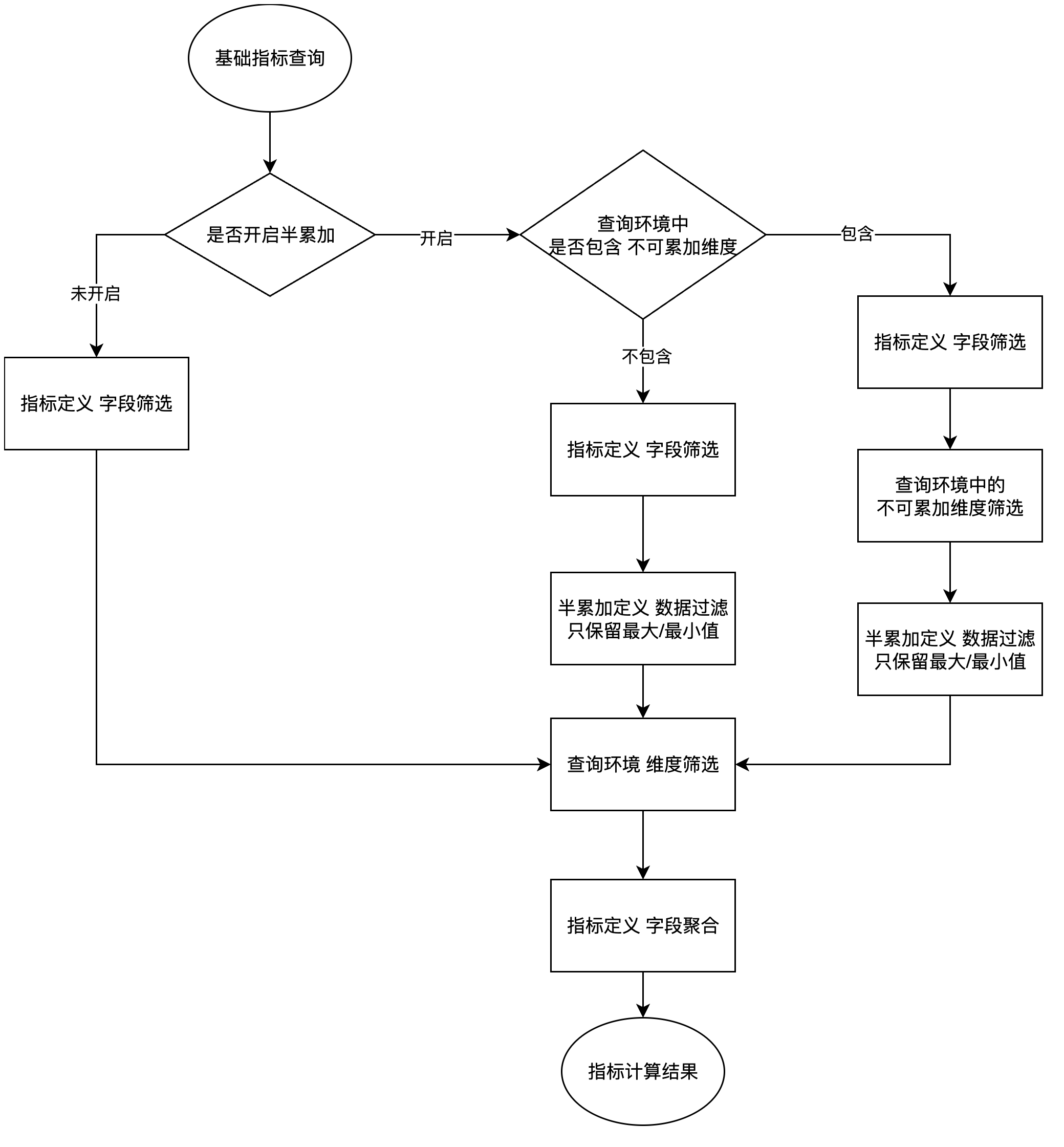
Regular basic metrics are basic metrics without semi-additive metric configuration enabled. When queried, this type of metric is calculated through the following steps:

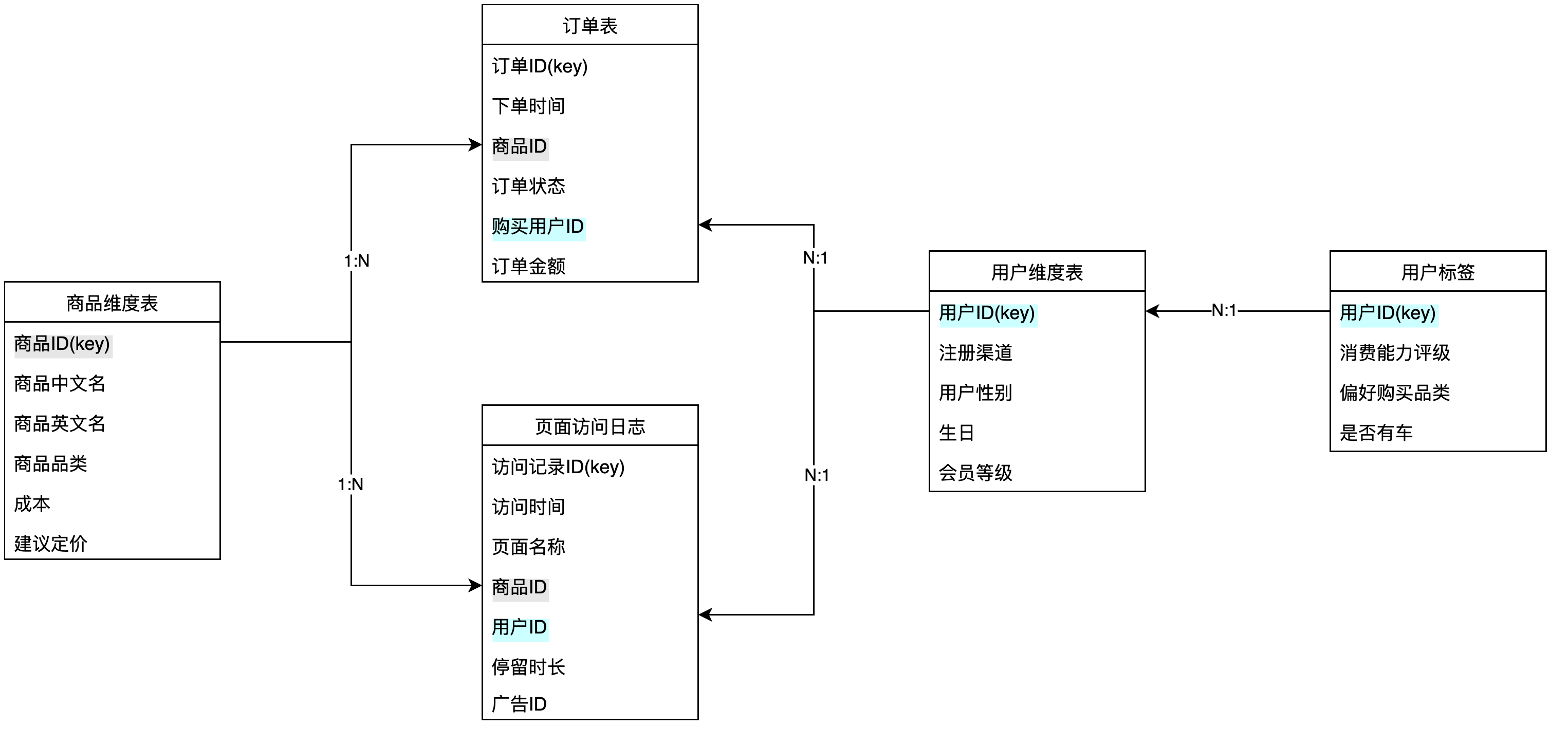
Based on this data model, assume there is a metric Order Gross Profit defined as follows:
Metric definition configuration:
-
Dataset: Order Table
-
Aggregation method:
SUM([Order Table/Order Amount] - [Product Dimension Table/Cost])
- Metric date identifier:
[Order Table/Order Time]
Query Order Gross Profit where Metric Date = 2024-09-30 and Product Category = Electronics.
-
Based on the metric Order Gross Profit, determine that the queried dataset is
Order Table. -
Based on the dimensions used in the query environment, determine that
Product Dimension TableandOrder Tableare required for the query, and join the data used fromProduct Dimension TabletoOrder Table. -
Apply the filters in the query environment to the expanded
Order Table. -
Metric date is converted according to the configuration into
[Order Table/Order Time], filtering[Expanded Table/Order Time] = 2024-09-30. -
Product category is converted into
[Product Dimension Table/Product Category], filtering[Expanded Table/Product Category] = Electronics. -
Based on the filtered data, execute the metric aggregation definition:
SUM([Expanded Table/Order Amount] - [Expanded Table/Cost]).
Semi-Additive Basic Metrics
A semi-additive metric is a special type of basic metric. It is called semi-additive because the metric aggregates only data that meets specific conditions during calculation.
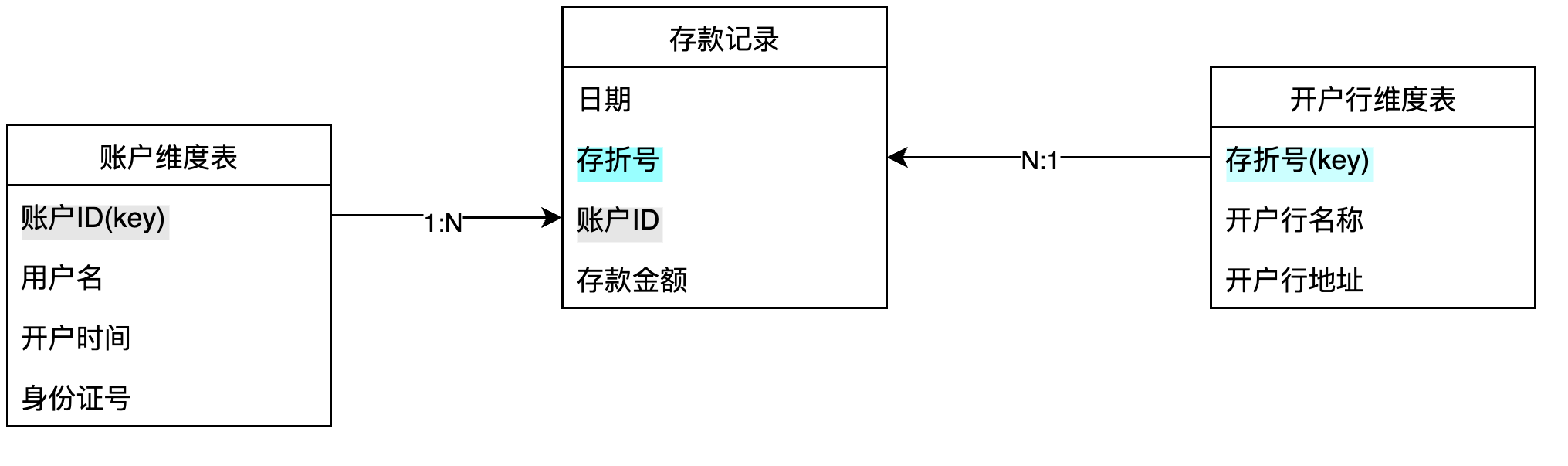
For example, in banking analytics, user deposit amount is an important metric. A bank generates a user deposit snapshot at 00:00 every day. The table structure is as follows:
| Date | Account ID | Passbook Number | Deposit Amount |
|---|---|---|---|
Note that each user may have multiple passbooks, and records are no longer updated after a user closes the account.
During business analysis, users want to view User Deposit Amount by month and account-opening branch to understand the deposit performance of each branch each month.
First, monthly user deposit amount cannot be calculated by directly summing deposit amounts like a regular metric. If you sum them directly, the user deposit amount becomes extremely large. The root cause is that the deposit table is a daily snapshot table. When using snapshot tables, you must distinguish what can be aggregated and what cannot.
For the current deposit snapshot data:
For dates, data from different dates cannot be added together. For example, yesterday's deposits and today's deposits should not be summed.
For passbook number or account ID, values can be added together. For example, you can view summary deposit data for different branches, where the dataset sums data across multiple account IDs and passbook numbers.
In the metric platform, you can configure a semi-additive metric to support this scenario.

-
Non-additive dimension: specifies which dimensions cannot have different values aggregated together. In the example above,
[Date]is non-additive. -
Window grouping: groups data by window first, and then selects non-additive data within each window. This feature is not currently recommended.
-
Window selection: selects the maximum or minimum value in the range.
After understanding when semi-additive metrics apply, the following example shows how they work.

Metric definition configuration
Dataset: Deposit Records
Aggregation method:
SUM([Deposit Records/Deposit Amount])
Metric date identifier: [Deposit Records/Date]
Semi-additive metric: enabled
Non-additive dimension: Date
Window selection: Maximum
Query Deposit Balance grouped by Metric Date (Month) and Account-Opening Branch Name, expecting to see the total user deposits for each branch in each month.
-
Based on the metric Deposit Balance, determine that the queried dataset is
Deposit Records. -
Based on the dimensions used in the query environment, determine that
Account Dimension Table,Account-Opening Branch Dimension Table, andDeposit Recordsare required for the query, and join the data used from the two dimension tables toDeposit Records. -
Because the metric is semi-additive, first check whether
[Deposit Records/Date]is used in the query environment. This dimension is used in the query, so the field filter is applied.
Note
Note this logic: Metric Date and Account-Opening Branch Name are used as grouping dimensions rather than filters in the query. However, at runtime, they can be understood as generating multiple combinations of filter values. The metric is calculated for each combination of dimension values in sequence.
This is only a conceptual explanation of converting groups into filters. It does not represent the actual code implementation.
-
Filter
Metric Date (Month) = 2024-09on the expanded dataset from step 2, keeping only rows where[Deposit Records/Date] = 2024-09. -
Execute semi-additive data filtering: the non-additive dimension is
[Deposit Records/Date], andMaximumis selected. Therefore, on the data result filtered in step 3, keep only rows where[Deposit Records/Date] = MAX([Deposit Records/Date]). -
Execute other filter conditions. The filter for account-opening branch name is applied after step 4.
-
Calculate the metric on the filtered data and generate the metric result.
Summary