Create an External Acceleration Plan
API Description
This API is the core step in creating an external materialization plan. It saves the split metrics, dimensions, materialized-table structure, scheduling display configuration, and related information, then generates the materialization plan. Before calling this API, call the metric split API
splitMetricto obtain the complete metric structure and split metric IDs.
API URL
Request parameters
Common Request Headers
| parameter | Type | required | Description |
|---|---|---|---|
| tenant-id | String | Yes | Tenant ID, used to identify the tenant for metric query content. |
| auth-type | String | Yes | Authentication method. Supports UID, TOKEN, ACCOUNT, and APIKEY. |
| auth-value | String | Yes | Authentication value corresponding to auth-type. |
How to Obtain Common parameters
You can view this in the top navigation of Aloudata CAN under Metric Applications > API Integration.
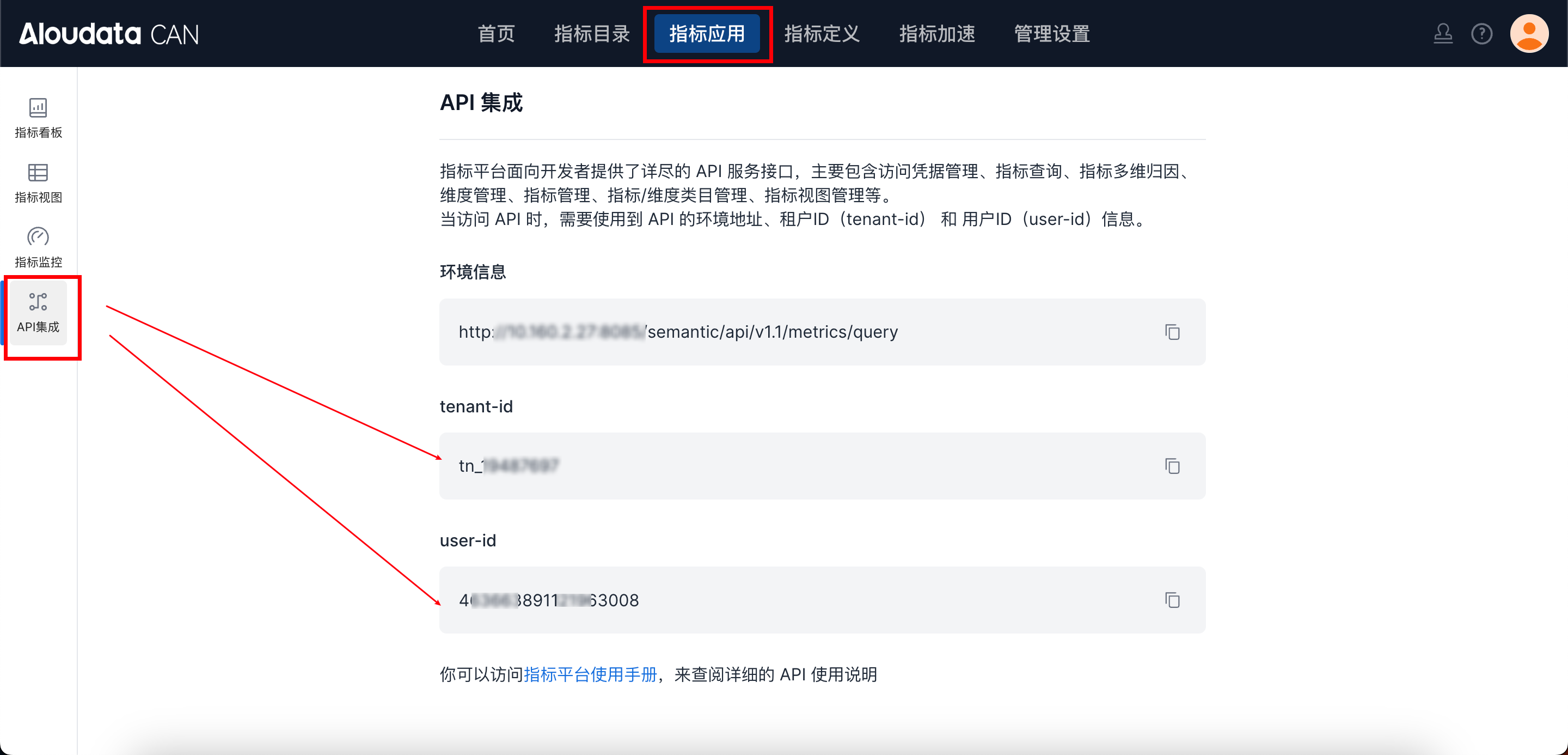
Request parameters
| Field | Type | required | Description |
|---|---|---|---|
| materializeType | String | Yes | Materialization type,Must be "EXTERNAL" |
| tablePath | Object | Yes | Target path of the materialized table (catalog/schema/tableName) |
| metrics | List | Yes | Original metric list |
| dimensions | List | Yes | Original dimension list |
| mtConfig | Object | Yes | Materialized-table field configuration, including original and split metrics |
| metricEntityList | List | Yes | Roll-up dimension configuration for metrics |
| refreshConfig | Object | No | Refresh configuration. This is displayed in the UI only and is not executed |
| timeConstraint | String | No | Metric date filter expression |
| metricDefinitions | Map | No | Quick derivation for original metrics |
| metricTimeFilters | String | No | Metric date filter written by code |
| dimensionFilters | List | No | Dimension filter written by dimension code |
| name | String | No | Plan name |
| displayName | String | No | Plan display name |
| categoryId | String | No | Category ID |
Request Example
{
  "name":"waigua",
  "displayName":"External",
  "materializeType": "EXTERNAL",
  "tablePath": {
    "tableCatalog":"default_catalog",
    "tableSchema":"aloudatacan",
    "tableName":"jiasu_table1"
  },
  "metrics": [
    { "name": "avg_order_amount" },
    { "name": "sum_order_amount" }
  ],
  "dimensions": [
    { "name": "metric_time__DAY" },
    { "name": "username" }
  ],
  "mtConfig": {
    "columnConfigs": [
      { "id": "mc99aca41a3824cb9ca79ada4c70208b", "type": "METRIC", "name": "sum_order_amount_111" },
      { "id": "mce5493438bb57b4e71b087aead42a03", "type": "METRIC", "name": "avg_order_amount_112" },
      { "id": "fe8c75ce30ff36b9ae92aa35f5fcce85", "type": "METRIC", "name": "avg_order_amount_sum_113" },
      { "id": "6e1b93fb4b5d6299cce9471f2abd6604", "type": "METRIC", "name": "avg_order_amount_count_114" },
      { "type": "DIMENSION", "id": "dmb9b604484bd9f5dd9bb8f1a2f22cb7", "name": "username_115" },
      { "type": "DIMENSION", "id": "metric_time__day", "name": "metric_time_115" }
    ]
  },
  "metricEntityList": [
    {
      "id": "mce5493438bb57b4e71b087aead42a03",
      "code": "mce5493438bb57b4e71b087aead42a03",
      "actualDimensionList": ["metric_time__day"]
    },
    {
      "id": "fe8c75ce30ff36b9ae92aa35f5fcce85",
      "code": null,
      "actualDimensionList": ["metric_time__day"]
    }
  ],
  "refreshConfig": {
    "isFullRefresh": false,
    "granularity": "DAY",
    "updateUpperInterval": -1,
    "updateLowerInterval": -3,
    "isScheduleUpdate": true,
    "cron": "0 0 0 * * ?"
  }
}
Response parameters
| Field Name | Type | Description |
|---|---|---|
| uuid | String | Unique plan identifier |
| name | String | English name |
| displayName | String | Display name |
Response Example
Usage Notes
-
metricsanddimensionscontain only original metrics and original dimensions
Do not put split metrics in these two fields. -
mtConfigmust contain all fields, both original and split fields
Each field must have a unique column name; otherwise saving fails. -
The materialized table is not created automatically
The user needs to create the table manually using the DDL returned by/queryReferenceScript. -
refreshConfigis used only for page display
The system does not automatically schedule external materialization tasks.