Approval Management
In Aloudata CAN, operations such as creating, editing, publishing, taking offline, and deleting metrics and dimensions can be managed through approval workflows. Approval workflows can be manually enabled or disabled. The following table describes the approval nodes for metrics and dimensions.
| Entity | Approval Node | Description |
|---|---|---|
| Metric | Publish New Metric | Triggered when a new metric is created and published. |
| Edit Metric | Triggered when a published metric is edited and a new version is published. | |
| Publish Metric | Triggered when a metric changes from offline to online. | |
| Take Metric Offline | Triggered when a metric changes from online to offline. | |
| Delete Metric | Triggered when a published metric is deleted. | |
| Request Metric Permission | Triggered when a user requests Use or Edit permission for a metric. | |
| Dimension | Publish New Dimension | Triggered when a new dimension is created and published. |
| Edit Dimension | Triggered when a published dimension is edited and a new version is published. | |
| Publish Dimension | Triggered when a dimension changes from offline to online. | |
| Take Dimension Offline | Triggered when a dimension changes from online to offline. | |
| Delete Dimension | Triggered when a published dimension is deleted. |
Enable Approval Settings
Entry Point
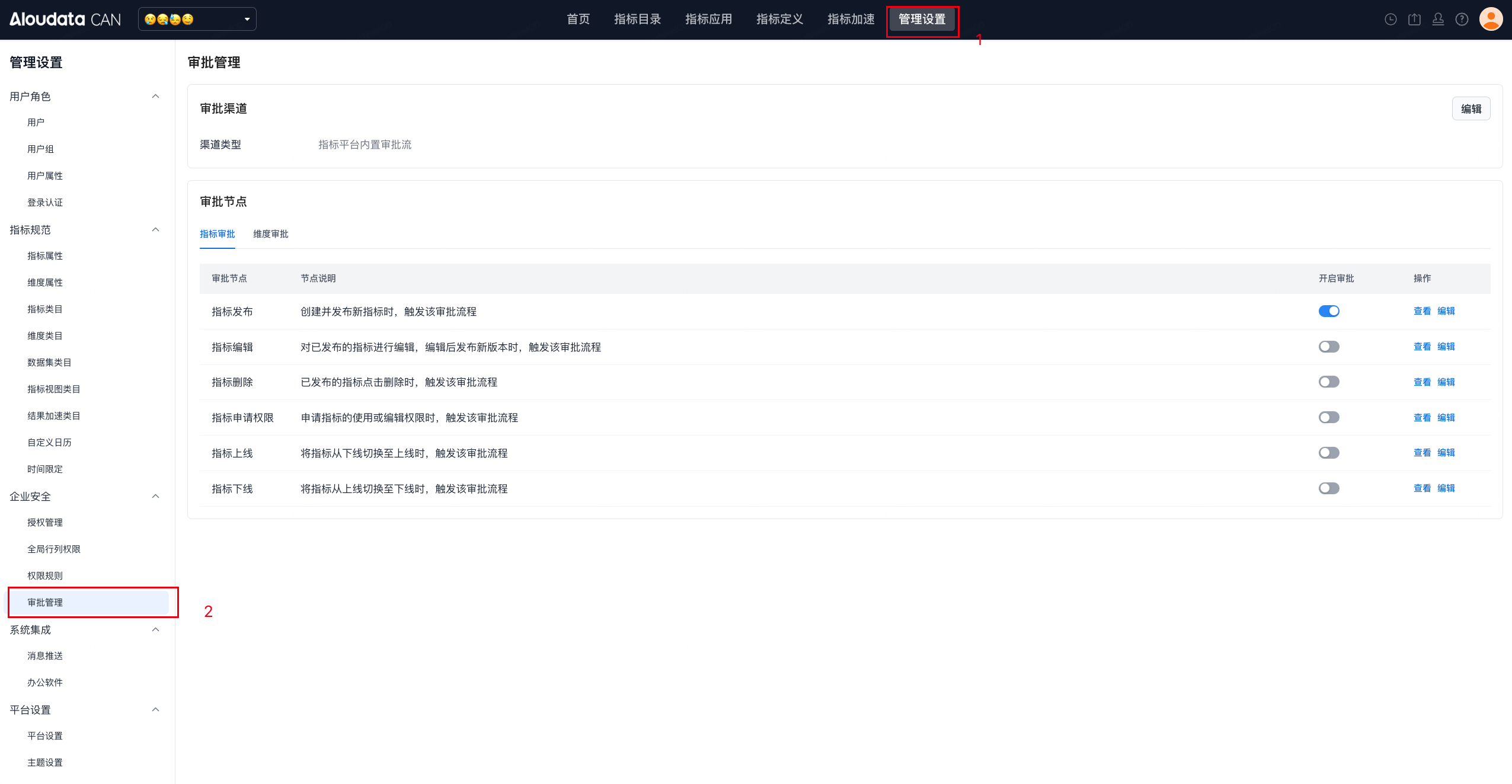
In the top navigation bar on the home page, select Management Settings. In the left navigation menu, select Enterprise Security -> Approval Settings to open the metric or dimension approval page, as shown below.
- Metric approval page
- Dimension approval page
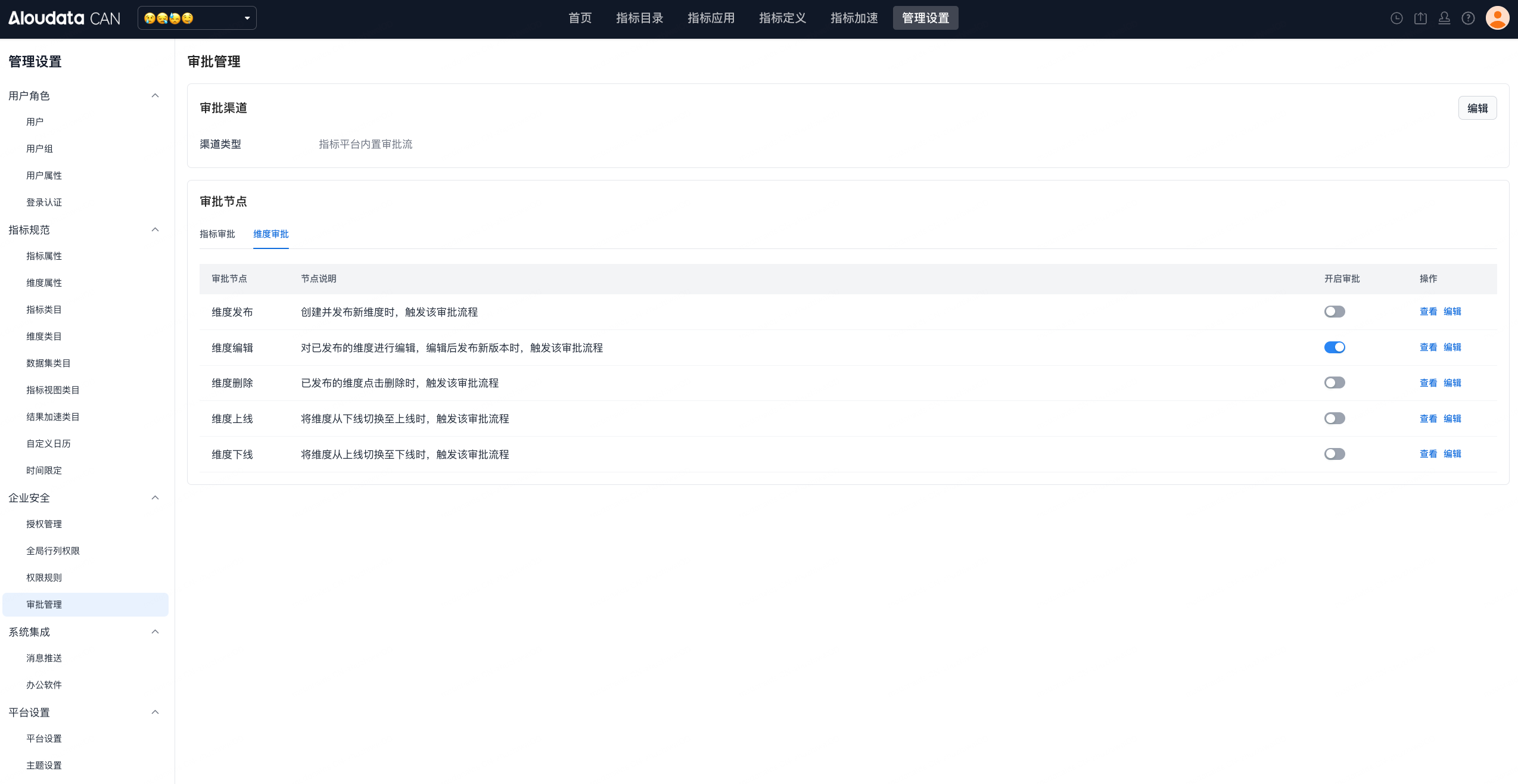
Click the enable approval button on the page to open the metric or dimension approval workflow page, as shown below.

Add an Approval Workflow
In a metric or dimension approval workflow, click New to add an approval workflow.
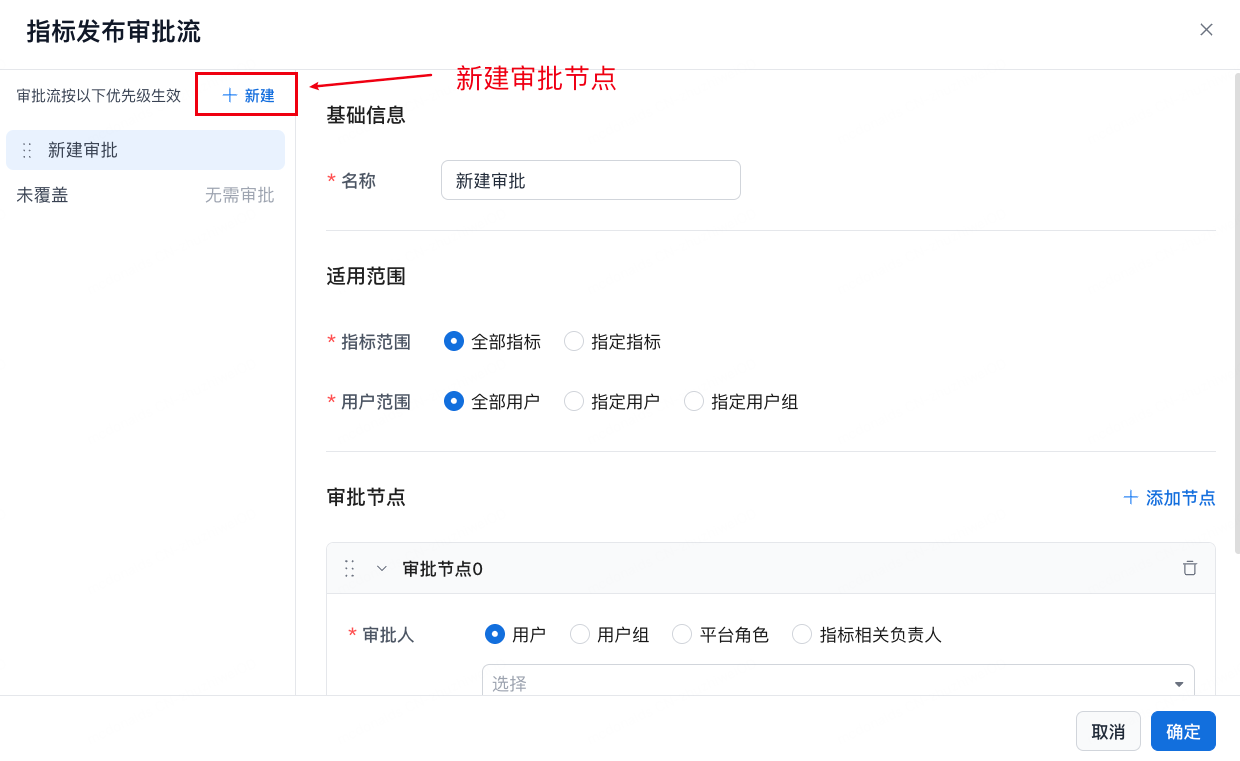
Select the Applicable Scope
Specify the metric scope and user scope that trigger the approval workflow.

| Item | Option | Description | |
|---|---|---|---|
| Applicable Scope | All Metrics | Applies to all metrics. | |
| Specific Metrics | By metric |  |
|
| By metric category | Approval is triggered when metrics under the specified category perform the specified action. | ||
| By metric attribute | System attributes: 1. Metric Metric display name, metric name, metric level, and business definition 2. Dimension, dimension display name, dimension name, and dimension description Custom attributes: Supports the following attribute categories: short text, long text, and single-select list.  |
||
| User Scope | All Users | The approval workflow is triggered when any user performs the specified action on a metric. | |
| Specific Users |  The approval workflow is triggered when selected users perform the specified action on a metric. The approval workflow is triggered when selected users perform the specified action on a metric. |
||
| Specific User Groups |  The approval workflow is triggered when selected user groups perform the specified action on a metric. The approval workflow is triggered when selected user groups perform the specified action on a metric. |
Configure Approval Nodes

| Item | Description | |
|---|---|---|
| Approver | User: |  Specify users as metric or dimension approvers. Specify users as metric or dimension approvers. |
| User Group: |  Specify all users in a user group as metric or dimension approvers. Specify all users in a user group as metric or dimension approvers. |
|
| Platform Role: |  Specify all users with a platform role as metric or dimension approvers. Specify all users with a platform role as metric or dimension approvers. |
|
| Metric-related Owner: |  |
|
| Approval Method | Or-sign: approval from any one approver is sufficient. Countersign: all approvers must approve. |  |
| When Approver Is Empty | Auto Approve | If no approver is available, metric or dimension approval passes automatically. |
| Transfer Approval |  If no approver is available, metric or dimension approval is transferred to the specified user or user group. If no approver is available, metric or dimension approval is transferred to the specified user or user group. |
In-Approval Status
| Approval Content | Description |
|---|---|
| Metric Use permission approval in progress | 1. You cannot request Use permission for the metric again. 2. To request a different permission type, such as changing from consumer to administrator, withdraw the current request and submit a new approval request. |
| Metric creation, metric editing, metric publishing, and metric offline actions in progress --- dimension creation, dimension editing, dimension publishing, and dimension offline actions in progress |  |
| Metric deletion --- dimension deletion |  |
View Approval Details
In the upper-right area of the top navigation bar, select Approval Center to view approval items.

Approvals for operations such as metric deletion, publishing, online status changes, and offline status changes are associated with the entity, so all users can see the approval workflow. The initiator can withdraw the request.
Metric and Dimension Status with Approval Status
| Status | Description |
|---|---|
| Unpublished | The metric or dimension has not been published. |
| Publishing | * Approval is in progress for changing from unpublished to online. * Approval is in progress for changing from offline to online. |
| Taking Offline | * Approval is in progress for changing from online to offline. |
| Offline | The metric is offline. |
| Saved, Not Published | The metric is online, but a draft exists. |
| Pending Deletion | A deletion request has been submitted for the metric and is pending approval. |
Third-Party Approval Workflow Integration
Overview
When the metric platform is integrated into enterprise systems, many organizations already have internal or third-party professional approval systems. Because approval workflows are often tightly connected to business processes, a dedicated approval platform may be required for fine-grained permission management.
The metric platform focuses on data management and data application rather than approval workflow execution. Aloudata CAN supports integration with external third-party approval workflows, helping enterprises manage both data and business processes with greater precision.
Integration Architecture
There are two common approaches for third-party approval workflow integration:
| Integration Method | Integration Diagram |
|---|---|
| Direct integration for a single and simple approval scenario where the third-party approval workflow exposes APIs that do not require authentication and whose request parameters do not contain nested JSON structures. | |
| Integration through an adapter layer |
Approval Configuration
Enable Third-Party Approval
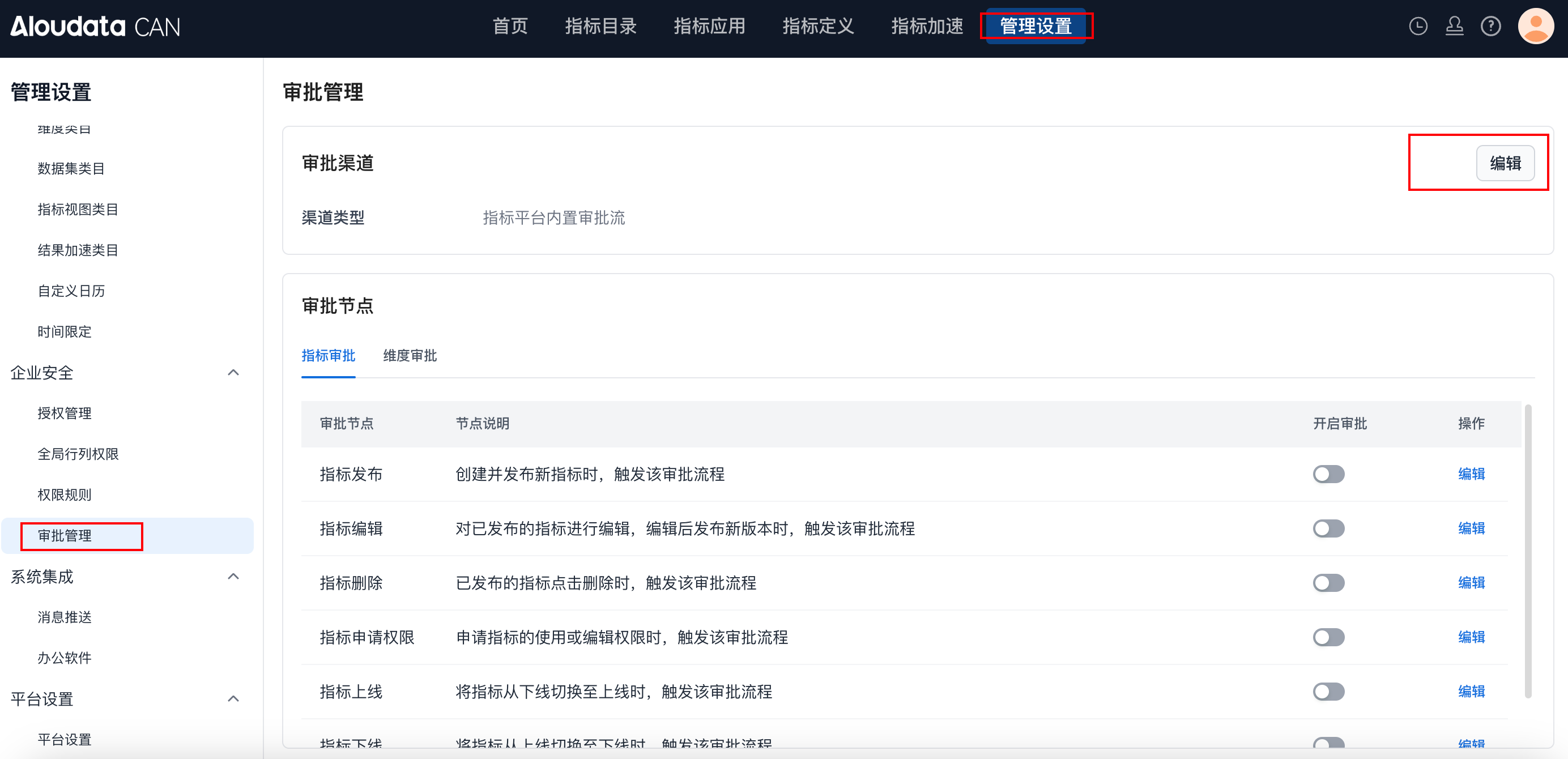
Configure the Approval Channel
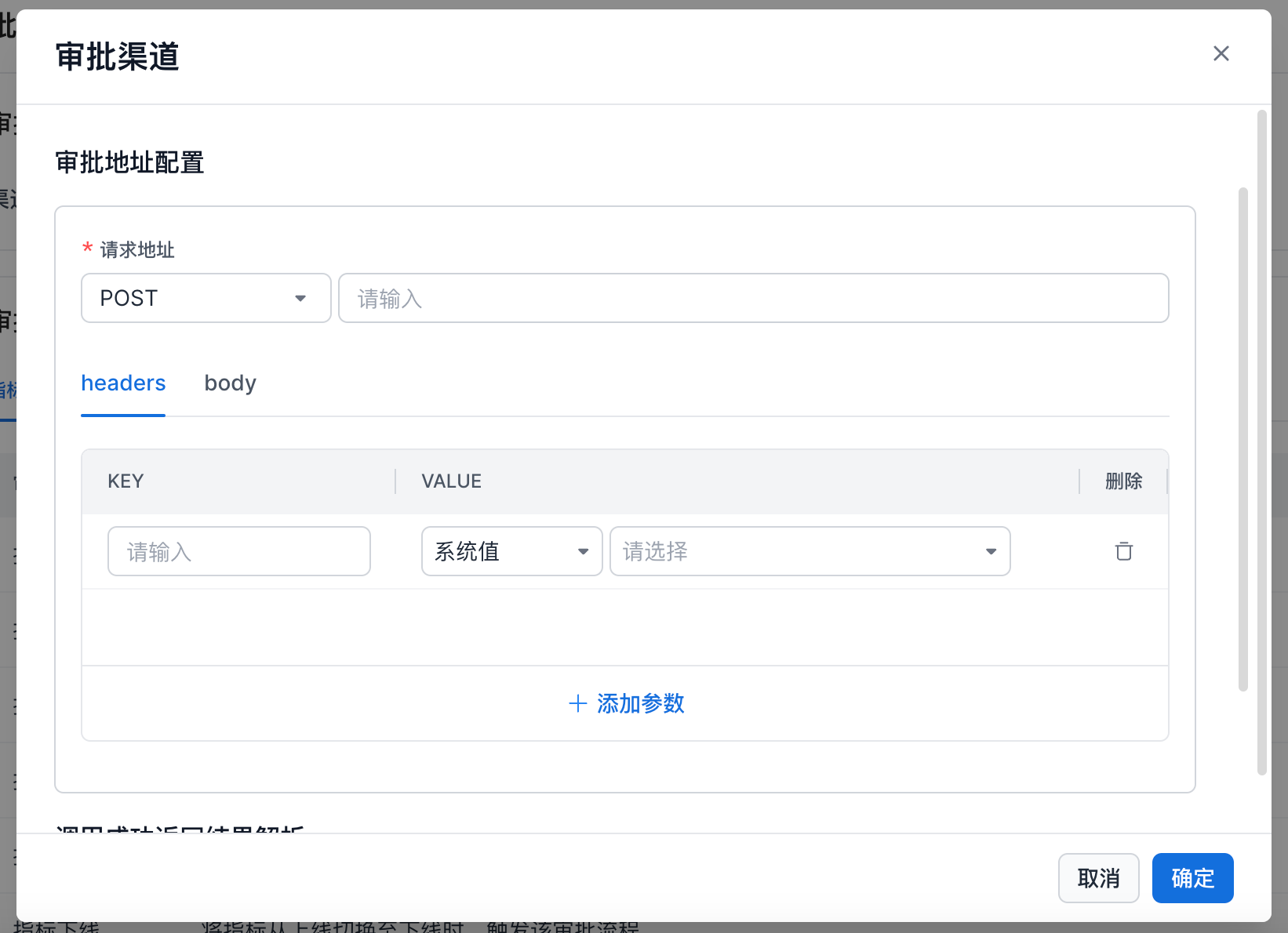
You can configure the request URL, request method, request headers, and request body.
The request body currently supports only single-level parameter definitions. Nested structures are not yet supported.

The system provides a rich set of built-in approval-related dynamic parameters. Use them as needed for your approval scenario.
| Parameter | Description |
|---|---|
| Approval Workflow ID | The approval workflow ID generated by the metric platform. |
| Initiator | The user who initiated the approval. The value is the account name. |
| Resource Type | Metric or dimension. |
| Operation Type | The trigger node for the approval, such as metric publishing, metric editing, or metric deletion. |
| Asset Category Attribute | The owner account names corresponding to the asset's current category, root category, first three category levels, and last three category levels in the metric platform. |
Configure Approval Nodes
On the page, click enable approval to configure the approval workflow for the corresponding node.
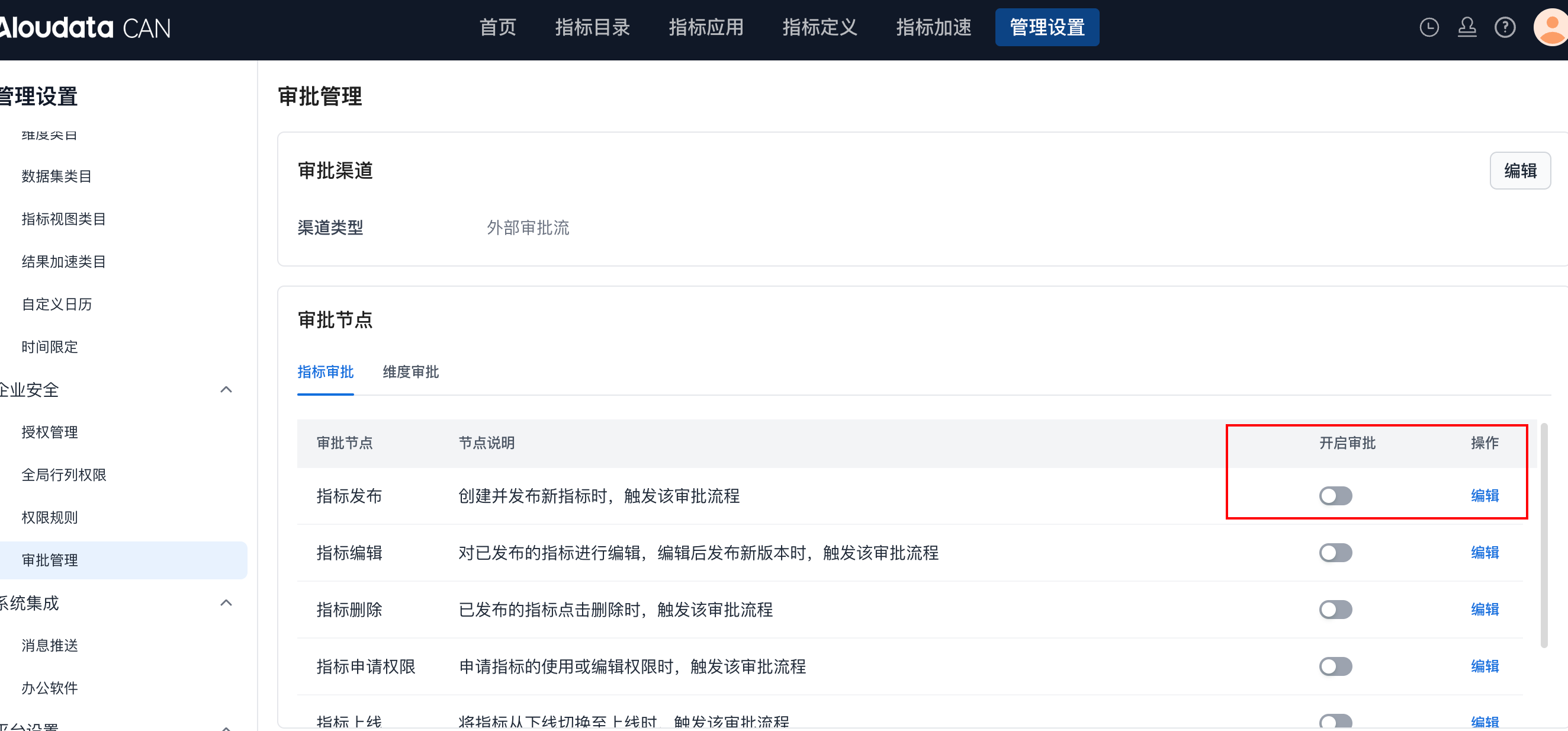
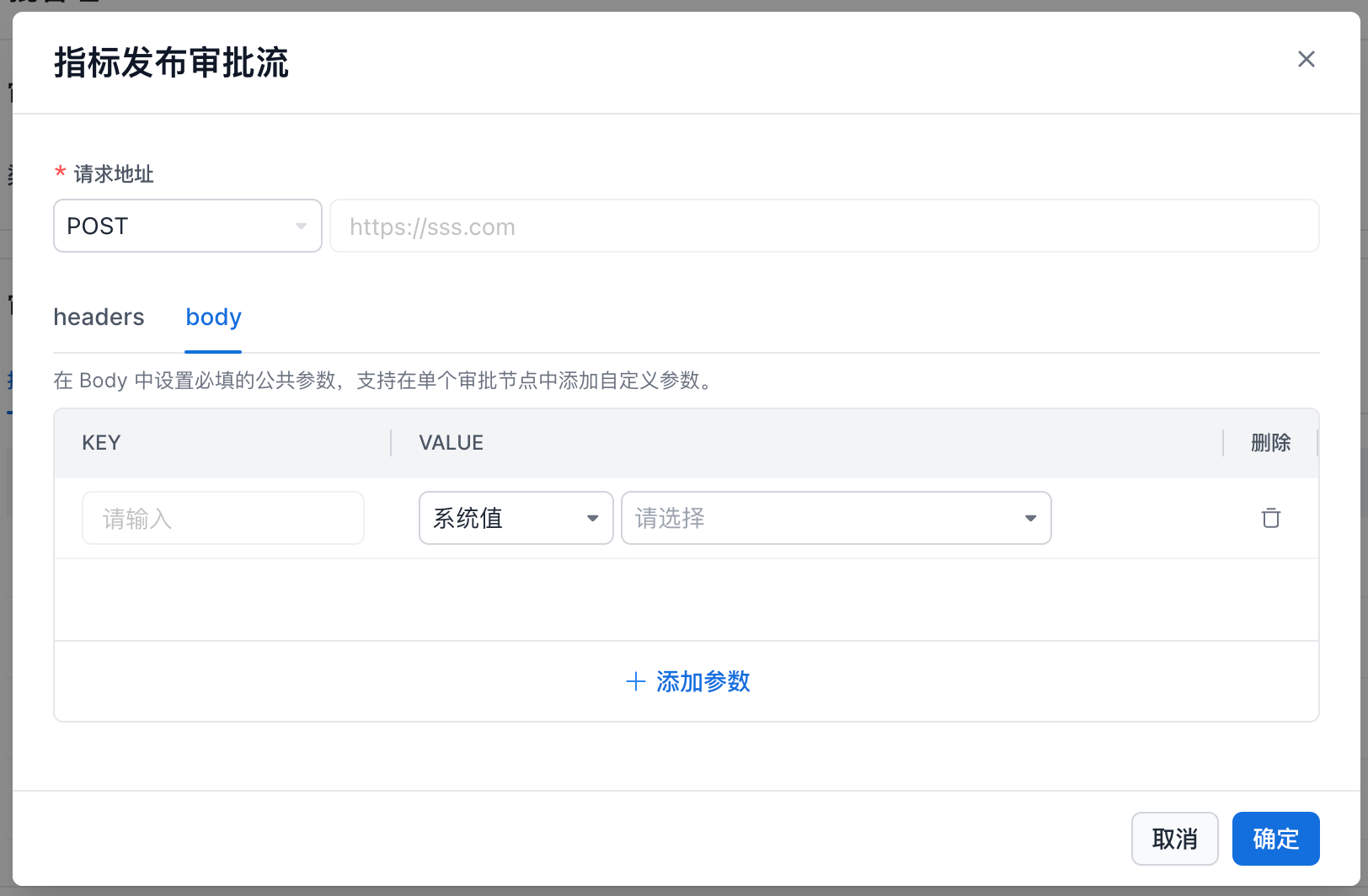
The approval workflow URL and headers are consistent with the global template configuration and cannot be modified. The body can be customized.
Integrate with a Third-Party Approval Workflow Through an Adapter Layer
With a defined adapter layer, you can connect approval workflows between the metric platform and a third-party approval system.
| Product | Configuration / Work Items |
|---|---|
| Metric Platform | 1. Configure the adapter layer connection URL and the approval-related information that must be parsed. For example, fields such as the approval submitter and approval workflow ID are passed through body parameters. The approval workflow ID is generally required. 2. Optional: provide an API for retrieving approval details, so the adapter layer can supplement approval information when needed. 3. Configure an approval callback URL so approval completion information can be sent back to the metric platform and the workflow can proceed. |
| Adapter Layer | 1. Convert approval submission code by translating metric platform approval workflows into third-party approval information calls. This includes handling authentication information. 2. Record the mapping between the metric platform approval workflow ID and the third-party approval workflow ID. 3. After the approval progresses on the third-party platform, notify the adapter layer. The adapter layer uses the ID mapping to convert the update into a metric platform status change, calls the approval callback URL, and synchronizes the approval progress. |
Approval Detail Parameters
| Parameter | Description |
|---|---|
| Approval Workflow ID | The unique ID of the approval workflow. |
| Initiator | The account name of the user who initiated the approval. |
| Resource Type | Metric Dimension |
| Operation Type | Publish, edit, delete, request permission, bring online, or take offline. |
| Root Category Owner | Owner of the top-level root category where the metric is located. |
| Level 1 Category Owner Under Root | Owner of the first-level category under the top-level root category where the metric is located. |
| Level 2 Category Owner Under Root | Owner of the second-level category under the top-level root category where the metric is located. |
| Level 3 Category Owner Under Root | Owner of the third-level category under the top-level root category where the metric is located. |
| Current Category Owner | Owner of the category where the metric is located. |
| Parent Category Owner | Owner of the parent category for the category where the metric is located. |
| Second-Level Parent Category Owner | Owner of the second-level parent category for the category where the metric is located. |
| Third-Level Parent Category Owner | Owner of the third-level parent category for the category where the metric is located. |
| Metric Attribute | Metric attributes defined in the metric specification. 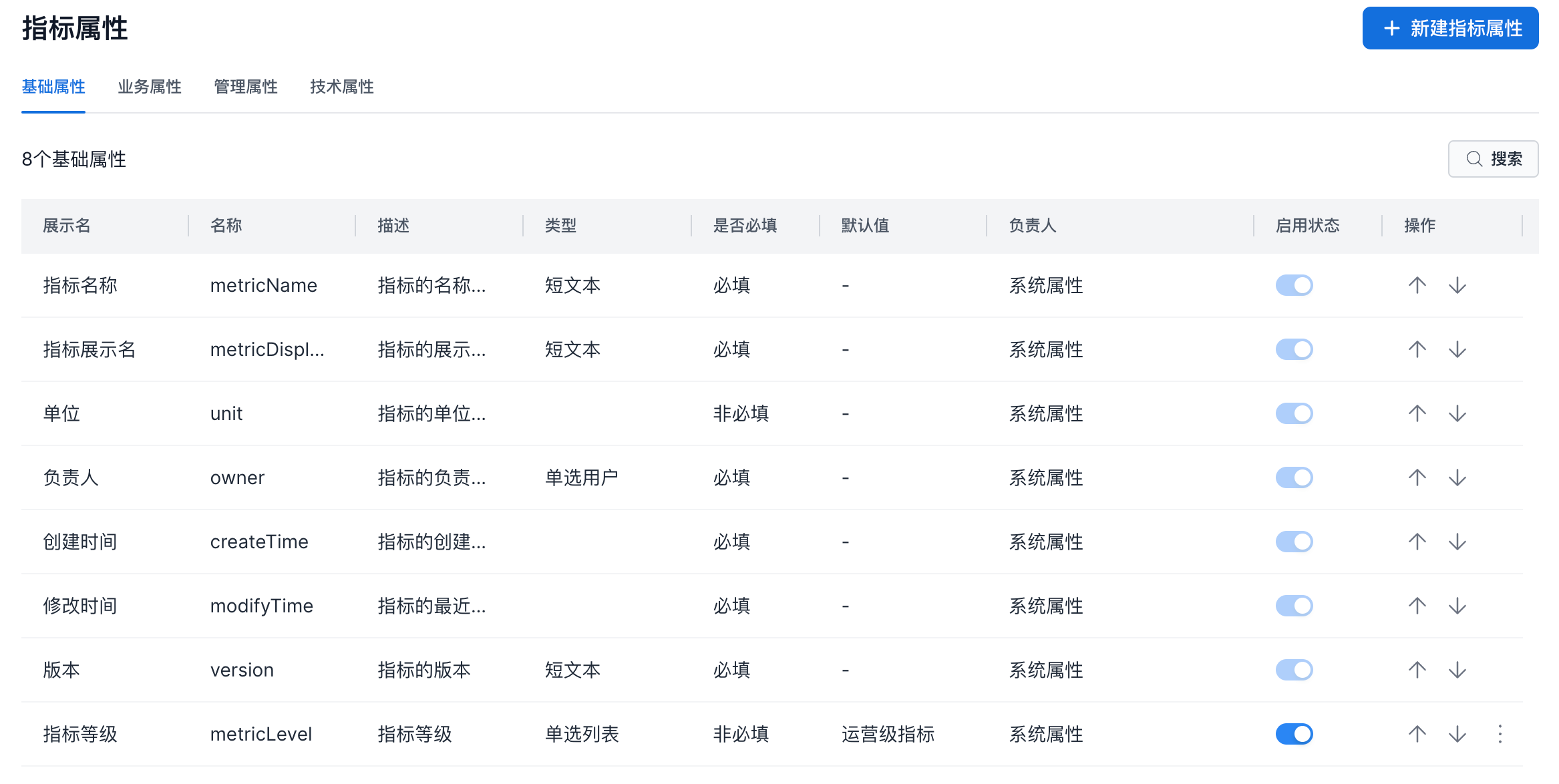 |
| Dimension Attribute | Dimension attributes defined in the metric specification. |