Delete user Attributes
1. API Description
Use this API to delete custom user attribute values.
Version support
This API contract applies to CAN releases: V2.3.0+.
2. API URL
POST http://{anymetrics_host:anymetrics_port}/anymetrics/api/v1/userPropertyValue/delete
To obtain anymetrics_host:anymetrics_port, see Calling APIs.
3. Common Request Headers
| parameter | Type | required | Description |
|---|---|---|---|
| tenant-id | String | Yes | Tenant ID that identifies the tenant to which the resource belongs. |
| auth-type | String | Yes | Authentication method. Supports UID, TOKEN, ACCOUNT, and APIKEY. |
| auth-value | String | Yes | Authentication value corresponding to auth-type. |
3.1 How to Obtain Common parameters
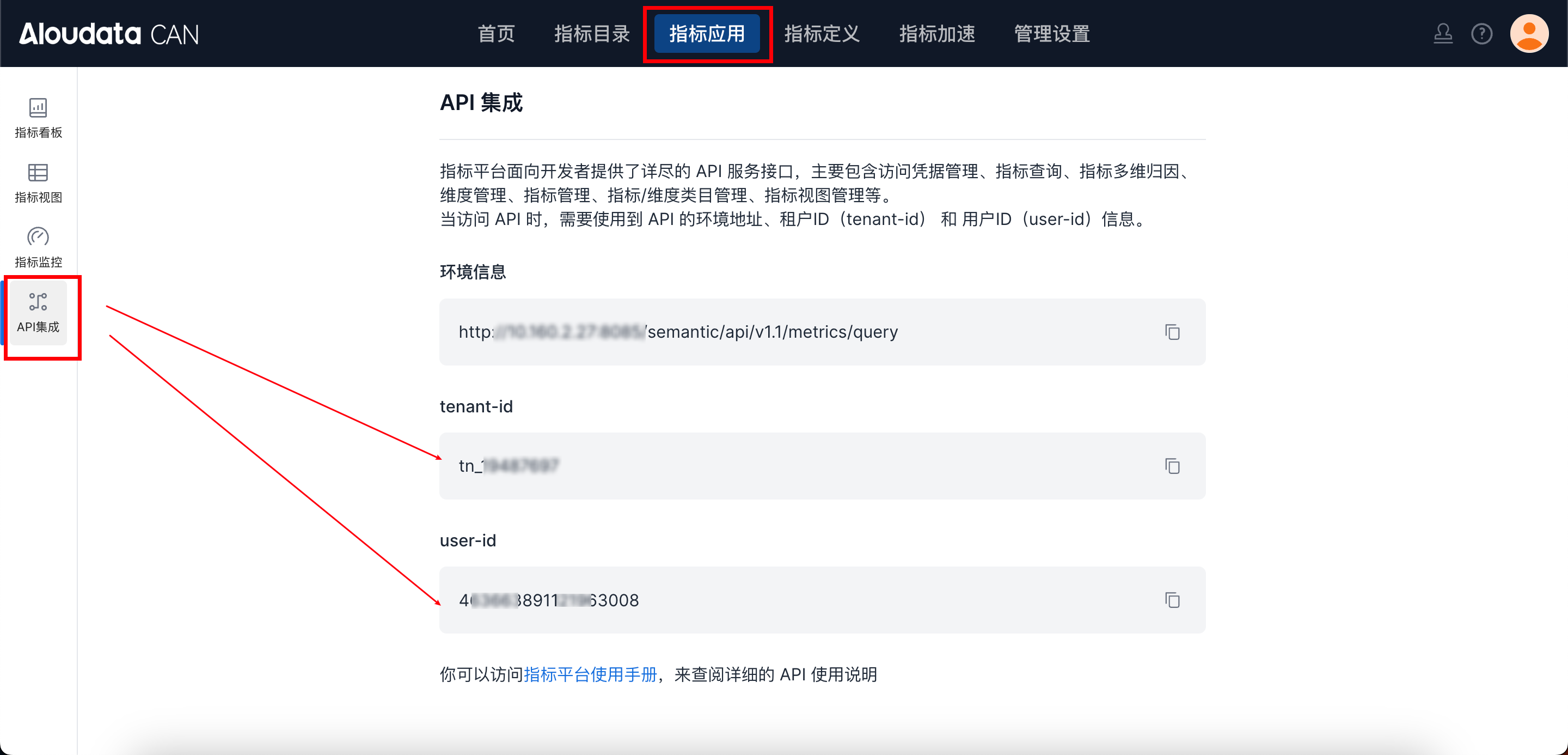
In Aloudata CAN, select Metric Applications in the top navigation bar, then select API Integration in the left navigation menu. You can obtain tenant-id on the API Integration page. Set auth-value according to auth-type.
3.2. Request Body parameters:
| parameter | Type | required | Description |
|---|---|---|---|
| identityType | String | Yes | user identifier type (USER_ID or USER_ACCOUNT) |
| items | Array | Yes | Delete item list |
| ∟ identityValue | String | Yes | user identifier value list (user ID list or user account list) |
| ∟ propertyNames | Array | Yes | List of attribute names to delete |
4. Request Example:
curl --location 'http://localhost:8083/anymetrics/api/v1/userPropertyValue/delete' \
--header 'tenant-id: tn_21571046' \
--header 'auth-value: authority_test' \
--header 'auth-type: ACCOUNT' \
--header 'Content-Type: application/json' \
--data '{
  "identityType": "USER_ACCOUNT",
  "items": [
    {
      "identityValue": "zhangsan",
      "propertyNames": ["job_level", "region"]
    },
    {
      "identityValue": "lisi",
      "propertyNames": ["job_level"]
    }
  ]
}'