List Dimensions
API Description
Use this API to retrieve a list of dimensions that match specified conditions. You can filter by category, owner, keyword, and other criteria to return matching dimension entity details.
API URL
POST Http://{anymetrics_host:anymetrics_port}/anymetrics/api/v1/dimension/list
To obtain anymetrics_host:anymetrics_port, see Calling APIs.
Request Parameters
Common Request Headers
| Parameter | Type | Required | Description |
|---|---|---|---|
| tenant-id | String | Yes | The tenant ID of the tenant that contains the metric query assets. |
| auth-type | String | Yes | Authentication type. Supported values: UID, TOKEN, ACCOUNT, APIKEY. |
| auth-value | String | Yes | Authentication value corresponding to auth-type. |
How to Obtain Common Parameters
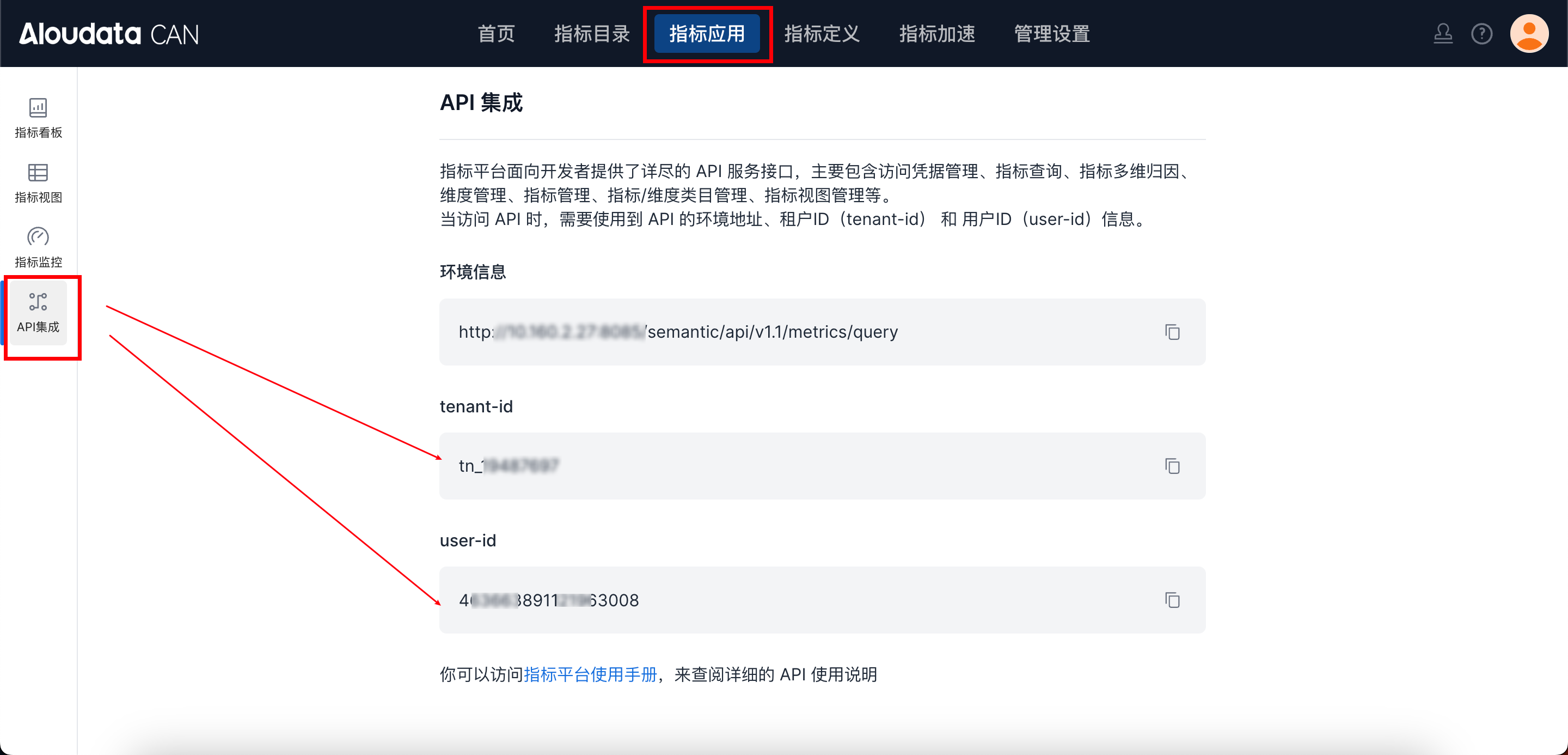
In Aloudata CAN, select the metric application from the top navigation bar, then choose API Integration from the left navigation menu. You can obtain tenant-id on the API Integration page. Set auth-value to the authentication value required by the selected auth-type.
Request Body
| Parameter | Type | Required | Description |
|---|---|---|---|
| categoryId | String | No | Dimension category ID. |
| owners | Array[String] | No | Owner user IDs. |
| keyword | String | No | Searches dimName and dimDisplayName by keyword. |
| statusFilters | List |
No | Dimension status filter. Enumerated values: UNPUBLISHED: unpublished; PUBLISHED: published; SAVED_NOT_PUBLISHED: saved but not published; OFFLINE: offline; PENDING_PUBLISH: publishing; PENDING_OFFLINE: taking offline; PENDING_DELETE: pending deletion. |
| datasetName | String | No | Dataset name. |
| pager | Object | No | Pagination settings. See Subtable 1: pager. |
Subtable 1: pager
| Parameter | Type | Required | Description |
|---|---|---|---|
| pageNumber | Intger | Yes | Page number. |
| pageSize | Intger | Yes | Number of records displayed on the current page. |
Response Parameters
Response Parameter Overview
| Parameter | Type | Required | Description | |
|---|---|---|---|---|
| code | String | Yes | API response code. | |
| success | boolean | Yes | Whether the request succeeded. | |
| errorMsg | String | Yes | Error message. | |
| detailErrorMsg | String | Yes | Detailed error message. | |
| traceId | String | Yes | Trace ID for troubleshooting. | |
| data | Array[Object] | Yes | Dimension entity data. See data Parameters. |
data Parameters
| Parameter | Type | Required | Description | |
|---|---|---|---|---|
| dimName | String | Yes | Dimension name. - Unique within the tenant and cannot be modified. - Supports only letters, digits, and underscores. Two consecutive underscores are not supported. |
|
| dimCode | String | Yes | Dimension code. | |
| datasetName | String | No | Dataset name. | |
| dimDisplayName | String | Yes | Dimension display name. Supports any characters, up to 150 characters. | |
| dimCategoryId | String | No | Dimension category ID. Use the fixed value -1 for Uncategorized. If omitted, the dimension is Uncategorized by default. |
|
| dimDescription | String | No | Dimension description. Supports any characters, up to 300 characters. | |
| displayStatus | String | No | Dimension status. Enumerated values: UNPUBLISHED: unpublished; PUBLISHED: published; SAVED_NOT_PUBLISHED: saved but not published; OFFLINE: offline; PENDING_PUBLISH: publishing; PENDING_OFFLINE: taking offline; PENDING_DELETE: pending deletion. |
|
| config | Yes | Dimension source, either a column or an expression. See config Parameters. |
config Parameters
| Parameter | Type | Required | Description |
|---|---|---|---|
| type | String | Yes | Dimension type, which indicates the source type. Enumerated values: - COLUMN_BIND: column binding- CUSTOM: custom type |
| value | String | Yes | For a column-bound dimension, set value to the column name.For a custom dimension, set value to an expression. The expression is equivalent to adding a calculated column to the dataset. |
Request Example
{
  "owners":[],
  "categoryId": "-1",
  "keyword": "order",
  "datasetName": "region",
  "pager": {
    "pageNumber": 1,
    "pageSize": 50
  }
}
Response Example
{
    "data": {
        "total": 1,
        "pageNumber": 1,
        "pageSize": 50,
        "hasNext": false,
        "data": [
            {
                "basicAttributes": null,
                "businessAttributes": null,
                "technicalAttributes": null,
                "managementAttributes": null,
                "name": "76cb38381976489f9e88248924c69b54",
                "dimName": "column_0",
                "dimDisplayName": "Order ID",
                "dimCategoryId": "-1",
                "dimDescription": null,
                "datasetName": "region",
                "originDataType": "VARCHAR",
                "config": {
                    "type": "COLUMN_BIND",
                    "value": "column_0"
                }
            }
        ]
    },
    "success": true,
    "code": "200",
    "errorMsg": null,
    "detailErrorMsg": null,
    "traceId": "202baf375f5d4791a9f9555ba33afe43.143.17193060863270127"
}