Create a Metric View
API Description
Use this API to create a metric view. You can configure the view name, display name, metrics, dimensions, primary time filter, standard filters, metric result filters, sort rules, and temporary metric definitions.
After the metric view is created, the server marks its creation source as OPENAPI and returns the operation result.
API URL
POST http://{anymetrics_host:anymetrics_port}/anymetrics/api/v1/analysisview/create
For how to obtain anymetrics_host:anymetrics_port, see Calling APIs.
Request Parameters
Common Request Parameters (Headers)
| Parameter | Type | Required | Description |
|---|---|---|---|
| tenant-id | String | Yes | Tenant ID. Identifies the tenant where the metric view belongs |
| auth-type | String | Yes | Authentication type. Supported values: UID, TOKEN, ACCOUNT, and APIKEY |
| auth-value | String | Yes | The authentication value that corresponds to auth-type |
How to Obtain Common Parameters
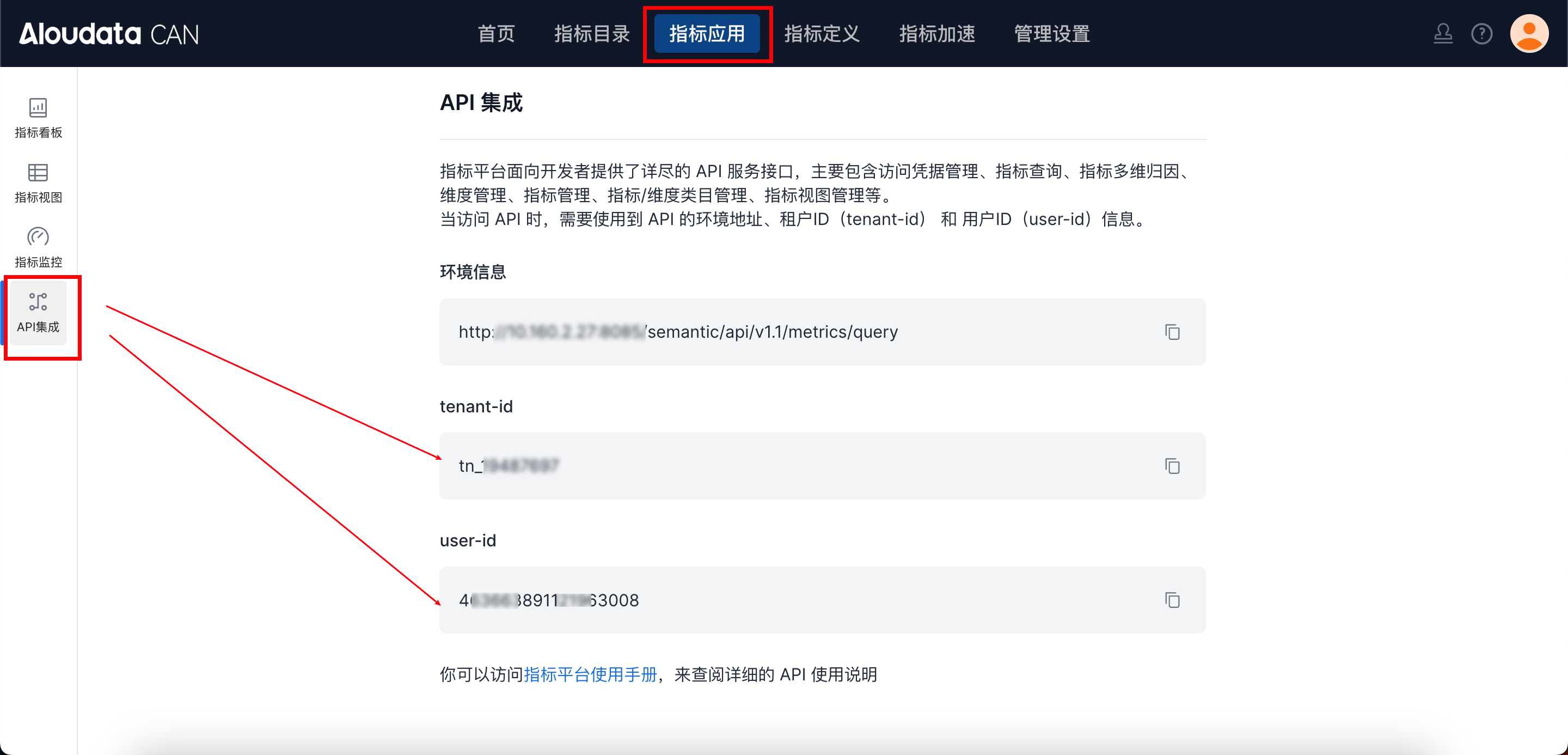
To obtain tenant-id, select a metric application in the top navigation bar of Aloudata CAN, choose API Integration from the left-side menu, and copy it from the API Integration page. Set auth-value to the authentication value that corresponds to the selected auth-type.
Body Parameters
| Parameter | Type | Required | Max Length | Description |
|---|---|---|---|---|
| viewName | String | Yes | 50 | English metric view name. Only letters, digits, and underscores are supported. The value must be unique within the tenant. |
| displayName | String | Yes | 128 | Metric view display name |
| description | String | No | - | Metric view description |
| metrics | Array[String] | Yes | - | Metric list. Elements can be metric names or display names; the API maps them to internal codes in the tenant. For temporary metrics defined in metricDefinitions, use the temporary metric key. |
| dimensions | Array[String] | No | - | Dimension list. Dimension names and display names are supported. To specify a grain, use the dimension__grain format. |
| timeConstraint | String | No | - | Primary time filter expression, saved as a [metric_time] expression |
| filters | Array[String] | No | - | Standard filter expressions. Dimension names and display names in expressions are mapped to internal codes. |
| resultFilters | Array[String] | No | - | Metric result filter expressions. You can filter only metrics or temporary metrics included in this request's metrics. |
| orders | Array[Object] | No | - | Sort rules. Each object configures one field only. The key is a metric or dimension, and the value is ASC or DESC, case-insensitive. |
| metricDefinitions | Object | No | - | Temporary metric definitions. The key is the temporary metric identifier, and the value is the metric definition object. |
metricDefinitions Object
metricDefinitions defines temporary metrics within the view. It is a map where the outer key is the temporary metric identifier and the value is the temporary metric definition object.
metrics, orders, and resultFilters in the request can reference the outer keys of metricDefinitions. When the API processes metrics, orders, and resultFilters, if a field name matches a metricDefinitions key, the field is treated as a temporary metric and is not mapped to an existing metric or dimension internal code.
Example structure:
{
  "metrics": ["orderCountRecent7Days"],
  "orders": [
    {
      "orderCountRecent7Days": "DESC"
    }
  ],
  "metricDefinitions": {
    "orderCountRecent7Days": {
      "id": "orderCountRecent7Days",
      "refMetric": "Order Count",
      "filters": [
        "[Order Date]>=DateAdd(Now(),-7,\"DAY\")"
      ]
    }
  }
}
metricDefinitions.{key} Parameters
| Parameter | Type | Required | Description |
|---|---|---|---|
| id | String | No | Temporary metric identifier. We recommend keeping it consistent with the outer key of metricDefinitions so it can be referenced in metrics, orders, and resultFilters. |
| refMetric | String | Yes | Base metric referenced by the temporary metric. Metric codes, names, and display names are supported. The API maps the value to an internal code in the current tenant. |
| period | String | No | Statistical period identifier. Used for period-based derivations or custom period scenarios. The value must match a period configuration recognized by the system. |
| metricGrain | String | No | Metric calculation grain. Often used for derived metrics that require a calculation grain. Values are usually time grains, such as DAY, WEEK, and MONTH. |
| onlyContainsDateTag | String | No | Date tag restriction. Used in period-based or period-over-period calculations with date tags. The value must match a system date tag configuration. |
| filters | Array[String] | No | Internal filter expressions for the temporary metric. Dimensions in expressions can use names or display names; the API maps them to internal codes. |
| indirections | Array[String] | No | Derived calculation configuration list. Supports protocol strings for period-over-period, ranking, proportion, custom aggregation, and similar derivations. |
| specifyDimension | Object | No | Specified dimension configuration. Limits the dimension scope used when calculating the temporary metric. |
| expr | String | No | Expression. Used for expression-based temporary metrics or formula-based calculations. |
| preAggs | Array[Object] | No | Period pre-aggregation configuration. Used to aggregate by a specified grain before subsequent metric calculation. |
indirections
indirections is an array of derived calculation protocol strings. Each string represents one derived calculation configuration.
Common types:
| Type | Description | Example |
|---|---|---|
| sameperiod | Period-over-period calculation | sameperiod__mom__value |
| rank | Ranking calculation | Order Count__rank__Product Category |
| proportion | Proportion calculation | Order Count__proportion__Product Category |
| multi_level_agg | Multi-level or custom aggregation | multi_level_agg__avg,Product Category |
The short format for period-over-period calculations is usually:
With an offset, the format is usually:
Common period identifiers:
| Identifier | Description |
|---|---|
| yoy | Year over year |
| qoq | Quarter over quarter |
| mom | Month over month |
| wow | Week over week |
| dod | Day over day |
| hod | Hour over hour |
Common calculation methods:
| Identifier | Description |
|---|---|
| value | Period-over-period value |
| growthvalue | Period-over-period growth amount |
| growth | Period-over-period growth rate |
Example:
{
  "metricDefinitions": {
    "orderCountMomGrowth": {
      "id": "orderCountMomGrowth",
      "refMetric": "Order Count",
      "indirections": [
        "sameperiod__mom__growth"
      ]
    }
  }
}
Note: If an indirections string contains metric or dimension names, the API attempts to map them to internal codes by using the resource mappings of the current tenant. Temporary metric keys are not mapped.
specifyDimension Object
| Parameter | Type | Required | Description |
|---|---|---|---|
| type | String | Yes | Specification type. Supported values: INCLUDE and EXCLUDE. INCLUDE includes only specified dimensions; EXCLUDE excludes specified dimensions. |
| dimensions | String | Yes | Dimension list separated by commas. Dimension names and display names are supported. The API maps them to internal codes. |
Example:
preAggs Object
| Parameter | Type | Required | Description |
|---|---|---|---|
| granularity | String | Yes | Time grain. Supported values: YEAR, QUARTER, MONTH, WEEK, DAY, HOUR, MINUTE, and SECOND. |
| calculateType | String | Yes | Aggregation method. Supported values: COUNT, COUNT_DISTINCT, COUNTDISTINCT, SUM, AVG, MAX, and MIN. |
Example:
Request Examples
Basic Create
{
  "viewName": "OrderAnalysisView",
  "displayName": "Order Analysis View",
  "description": "Order metric view",
  "metrics": ["Order Count"],
  "dimensions": ["Product Category"],
  "timeConstraint": "[metric_time]>=Date(\"2023-01-01\",\"yyyy-MM-dd\") AND [metric_time]<=Date(\"2023-01-10\",\"yyyy-MM-dd\")",
  "filters": [
    "[Is Draft]=\"No\""
  ],
  "resultFilters": [
    "[Order Count]>100"
  ],
  "orders": [
    {
      "Product Category": "ASC"
    },
    {
      "Order Count": "DESC"
    }
  ]
}
Use a Temporary Metric
{
  "viewName": "OrderAnalysisViewWithTempMetric",
  "displayName": "Order Analysis View - Temporary Metric",
  "description": "Order metric view with a temporary metric",
  "metrics": ["orderCountRecent7Days"],
  "dimensions": ["Product Category"],
  "filters": [
    "[Is Draft]=\"No\""
  ],
  "resultFilters": [
    "[orderCountRecent7Days]>100"
  ],
  "orders": [
    {
      "orderCountRecent7Days": "DESC"
    }
  ],
  "metricDefinitions": {
    "orderCountRecent7Days": {
      "id": "orderCountRecent7Days",
      "refMetric": "Order Count",
      "filters": [
        "[Order Date]>=DateAdd(Now(),-7,\"DAY\")"
      ]
    }
  }
}
Response Parameters
The response is wrapped by the global response format. When the metric view is created successfully, data is true.
| Parameter | Type | Required | Description |
|---|---|---|---|
| success | Boolean | Yes | Whether the request succeeded |
| code | String | Yes | Response code. 200 indicates success |
| data | Boolean | Yes | Operation result. true indicates creation succeeded |
| traceId | String | Yes | Trace ID for troubleshooting |
| errorMsg | String | No | Error message returned when the request fails |
| detailErrorMsg | String | No | Detailed error message returned when the request fails |
Response Examples
Successful Response
{
  "data": true,
  "success": true,
  "code": "200",
  "traceId": "fdde6861bd554805998343f9ff2dcd70.292.16857691758642861"
}