Scheduling
1. Scheduling Overview
The scheduling system is built on a periodic scheduling framework. It uses Task -> Instance -> DAG as its core model to provide predictable, observable, and maintainable scheduling.
The scheduling system helps you:
-
Define which tasks must run each day or each cycle.
-
Define task dependencies, with support for automatic detection and manual intervention.
-
Support operations such as multiple updates per day, data backfill, and reruns.
2. Core Concepts
1. Tasks and Instances
-
Task: The logical unit of scheduling configuration, such as a data source table task, regular materialization task, or acceleration materialization task.
-
Instance: The concrete execution unit generated from a task for a specific scheduled time or business date.
A task may generate one or more instances in a day, such as minute-level or hourly instances.
2. Cycle Types
The following scheduling cycles are supported:
-
Minute.
-
Hour.
-
Day.
-
Week.
-
Month.
-
Year.
Different cycles use different instance generation rules:
-
Minute and hour: Multiple instances may be generated in one day.
-
Day and above: One instance is generated per day. On non-scheduled days, an empty-run instance is generated.
3. Time Model
1. Scheduled Time
Scheduled time is derived from the task time configuration:
-
Day, week, month, and year:
date_trunc(scheduled_time, DAY) -
Hour:
date_trunc(scheduled_time, HOUR) -
Minute:
date_trunc(scheduled_time, MINUTE)
2. Business Date
-
Periodic instances: Derived from scheduled time.
-
Daily cycle: business date = scheduled time - 1 day.
-
Hourly cycle: business date = scheduled time - 1 hour.
-
Minute cycle: business date = scheduled time - 1 minute.
-
-
Backfill instances: Specified by the user when submitting the backfill.
4. Instance Status Transitions
1. Normal Status Transitions
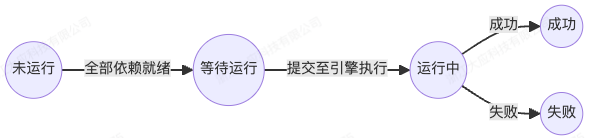
2. Manual Intervention Statuses
-
Mark as successful:
-
Allowed source statuses: Not Run, Waiting, Failed, and Paused.
-
Used to skip the current instance and continue downstream execution.
-
-
Pause:
-
Allowed source statuses: Not Run, Waiting, and Running.
-
After recovery, the instance is treated as a rerun.
-
5. Task Types
1. Data Source Table Tasks
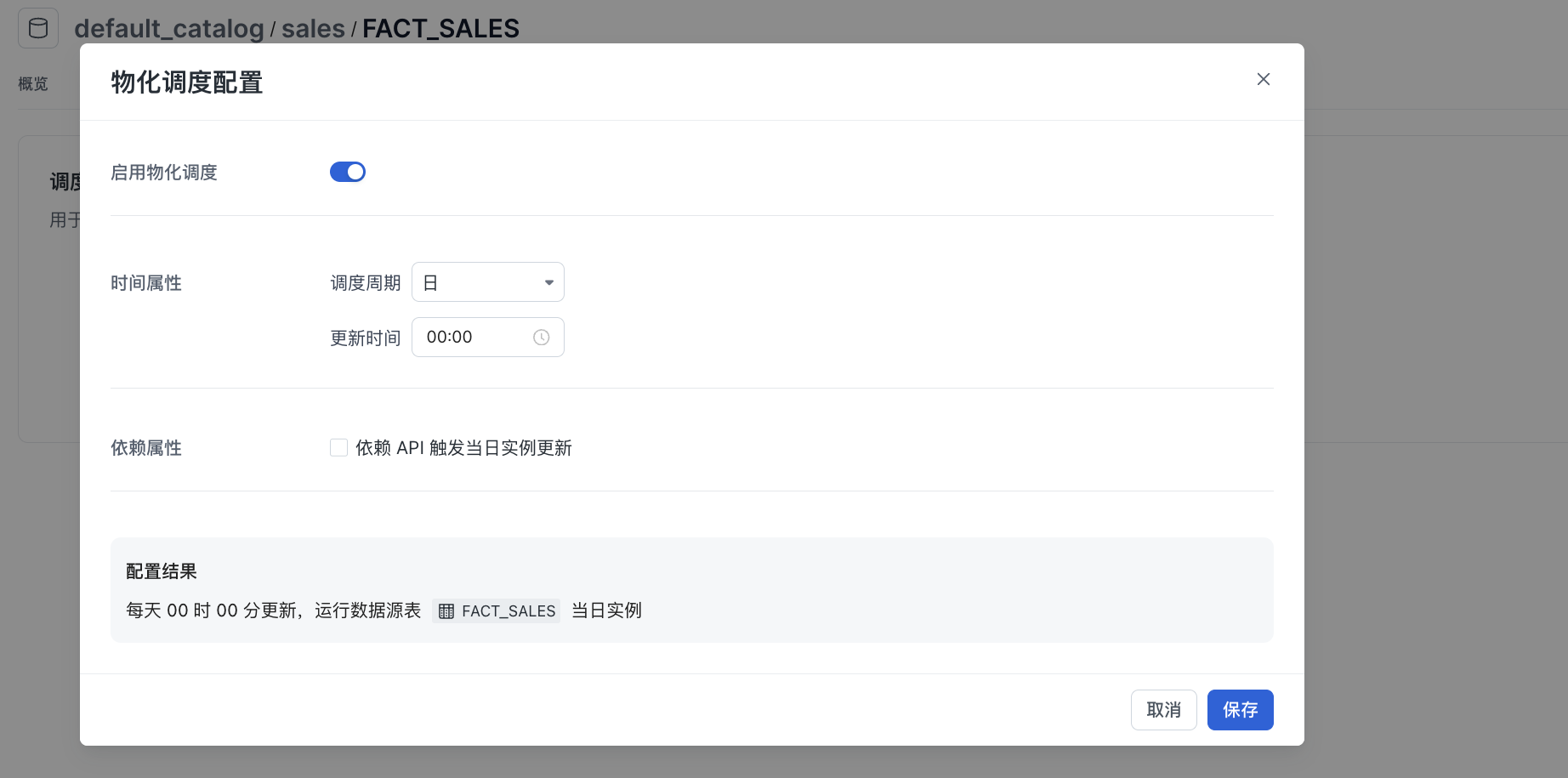
-
Describes update events for a data source.
-
Supports:
-
Enabling or disabling scheduling.
-
Periodic scheduling.
-
Update triggers from external APIs.
-
Data source table tasks are important dependency nodes for downstream materialization tasks.
2. Regular Materialization Tasks
-
Generate result tables for external systems or queries.
-
Characteristics:
-
They do not participate in query rewrite.
-
They support full, partition, and merge updates.
-
3. Acceleration Materialization Tasks
-
Used for query acceleration.
-
Characteristics:
-
They can be hit by queries.
-
They do not support append-style updates, which preserves hit correctness.
-
4. External Materialization Tasks
- Used to register existing externally materialized results.
6. Scheduling Dependencies
Dependency Rules
| Current Instance Cycle | Dependable Instance Cycle | Dependency Condition | Selection Rule |
|---|---|---|---|
| Minute | Minute | Same natural hour and scheduled time <= current instance | Select the nearest one. |
| Minute | Hour | Same natural hour and scheduled time <= current instance | Depend on it if there is exactly one match. |
| Minute | Day / Week / Month / Year | Same natural day and scheduled time <= current instance | Depend on it if there is exactly one match. |
| Hour | Minute | Same natural hour | Select the last one in that hour. |
| Hour | Hour | Same natural day and scheduled time <= current instance | Select the nearest one. |
| Hour | Day / Week / Month / Year | Same natural day and scheduled time <= current instance | Depend on it if there is exactly one match. |
| Day | Minute / Hour | Same natural day | Select the last one of the day. |
| Day | Day / Week / Month / Year | Same natural day | Depend on it if there is exactly one match. |