Calling APIs
This page explains how to find the IP addresses and ports for anymetrics and semantic services in Aloudata CAN.
Tip
API calls in Aloudata CAN use different service addresses: anymetrics for the product layer and semantic for the semantic layer. The sections below explain when to use each address.
-
anymetrics address:
- Used for product-layer API calls, including access credentials, dimension management, category management, metric views except the metric view result query API, metric attribution analysis, metric management, and data updates.
- Example:
- To find HOST_PORT, see Server Address and Port.
-
semantic address:
- Used for semantic-layer API calls, mainly metric queries and metric view result queries.
- Example:
- To find HOST_PORT, see Server Address and Port.
Server Address and Port
{server_host:server_port} is the server IP address and port for the API service.
It can refer to either {semantic_host:semantic_port} or {anymetrics_host:anymetrics_port}.
Replace {server_ip:server_port} based on the API you are calling.
Important
Use {semantic_host:semantic_port} for the Query Metric Data API and Query Metric View Results API.
Use {anymetrics_host:anymetrics_port} for all other APIs.
How to Find the Address
-
{semantic_host:semantic_port}
-
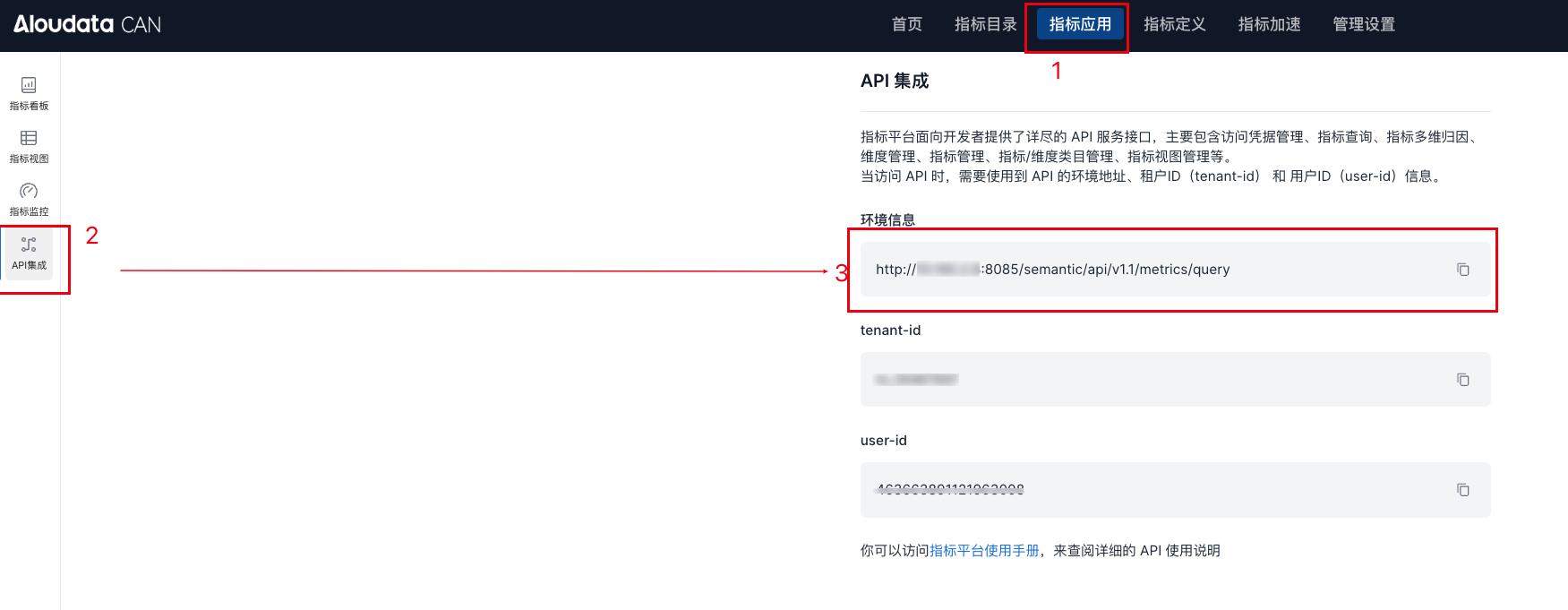
You can find this value in API Integration in Aloudata CAN.
- Entry point: in the top navigation bar, select
Metric Application, then selectAPI Integrationfrom the left menu. - The port is usually 8085.
-
{anymetrics_host:anymetrics_port}
-
anymetrics_host: usually the domain name or platform access address of the Aloudata CAN metric platform. A domain name is equivalent to IP+PORT. anymetrics_port: the port is usually 8083.
How to Call an API
Example Request
Assume the API service IP address is 127.0.0.1, the port is 8083, and the requested API resource is Create a Metric. The example request URL is:
Request URL
Request Body Example
{
  "type": "ATOMIC",
  "metricDisplayName": "Display Name",
  "metricName": "metric01",
  "owner": "aloudatacan",
  "businessOwner": "aloudatacan",
  "businessCaliber": "Metric created through the API",
  "metricCategoryId": "-1",
  "caliber": {
    "expr": "(['sales_volume'])/8"
  }
}
Response Format
APIs usually return response data in JSON format, including query results and other related information.