Dimension Extension for Materialized Acceleration
Dimension extension lets you use more dimensions during query analysis without changing the structure of the acceleration table.
With dimension extension, the system can automatically supplement required dimension fields at query time and perform the necessary aggregation in the background. This keeps query results accurate and efficient.
1. Why Use Dimension Extension?
Metric analysis often encounters the following issues:
-
Query dimensions change frequently during business analysis.
-
Dimension tables are updated frequently, but you do not want every update to trigger recalculation of historical acceleration data.
-
After new query dimensions are added, the existing acceleration plan can no longer be hit.
Dimension extension is designed to solve these problems and make acceleration plans more flexible and stable.
2. Core Idea
Dimension extension follows these principles:
-
The acceleration table stores only the core analysis grain.
-
Examples: metric date and business keys such as user ID, product ID, and store ID.
-
Dimension fields do not have to be written into the acceleration table.
-
Dimensions are supplemented on demand at query time.
-
Query results are aggregated automatically.
-
This ensures the result grain matches the requested query dimensions.
For users, the query method is the same as a regular metric query. You do not need to handle the intermediate process.
3. Examples
Example 1: Basic Dimension Extension with a Single Path
Business scenario: You already have acceleration for order metrics and want to analyze by dimensions such as user level and city.
What the system does: At query time, the system uses user ID to automatically supplement user dimensions and aggregate the results.
What users get: You can flexibly use new dimensions for analysis without changing the acceleration plan.
Without modifying the acceleration plan, the system supplements dimensions such as user level and city based on user ID, and returns results aggregated by the requested query dimensions.
Assume the following model relationship:
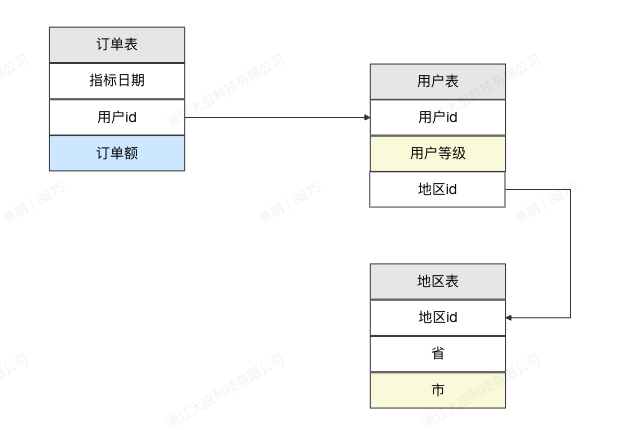
The materialization plan has the following configuration:
Metric date, user ID, and total order amount.
The following query can hit acceleration:
Metric date, user level, user city, and total order amount.
Example 2: Same Dimension from Different Business Paths
Business scenario: The same metric needs to analyze both account-opening organization region and transaction organization region.
What the system does: The system supplements the corresponding dimension fields through different business paths.
What users get: Dimensions with different business meanings remain clearly distinguished, and the analysis results better reflect the business context.
The system supports supplementing the same dimension field through different business paths, keeping dimension semantics clear and accurate in complex analysis scenarios.
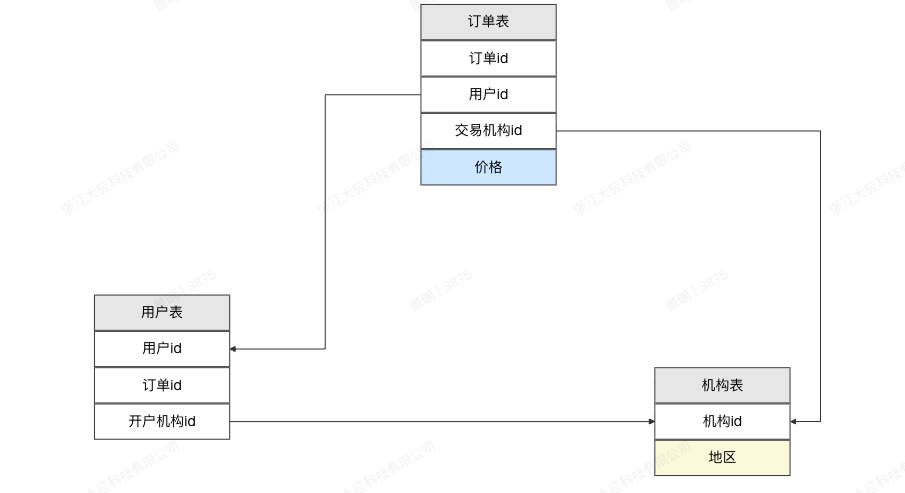
The materialization plan has the following configuration:
User ID, transaction organization ID, and total amount.
The following query can hit acceleration:
Account-opening region, transaction organization region, and total amount.
4. Notes and Limits
Before using dimension extension, review the following limits and recommendations.
Unsupported Scenarios
1. Metrics That Cannot Be Re-Aggregated
-
Detail-level queries.
-
Metrics that cannot roll up or cannot be aggregated.
-
Metrics that strongly depend on unique-row semantics.
2. Missing Join Keys in the Acceleration Table
If the acceleration table:
- Does not contain any field that can join to the query dimension, such as a primary key or business ID,
the system cannot supplement the dimension, and dimension extension will not take effect.
3. Complex Expression Dimensions Are Not Supported
Currently supported:
- Original table fields used as dimensions.
Not supported yet:
-
Complex calculated fields.
-
Expression-based dimensions.