Get Dimension Details
API Description
Use this API to retrieve details for a specified dimension, including its display name, description, associated data type, predefined values, and value descriptions.
API URL
GET Http://{anymetrics_host:anymetrics_port}/anymetrics/api/v1/dimension/detail
To obtain anymetrics_host:anymetrics_port, see Calling APIs.
Request Parameters
Common Request Headers
| Parameter | Type | Required | Description |
|---|---|---|---|
| tenant-id | String | Yes | The tenant ID of the tenant that contains the metric query assets. |
| auth-type | String | Yes | Authentication type. Supported values: UID, TOKEN, ACCOUNT, APIKEY. |
| auth-value | String | Yes | Authentication value corresponding to auth-type. |
| queryBy | String | No | UUID: retrieve details by dimension code. |
How to Obtain Common Parameters
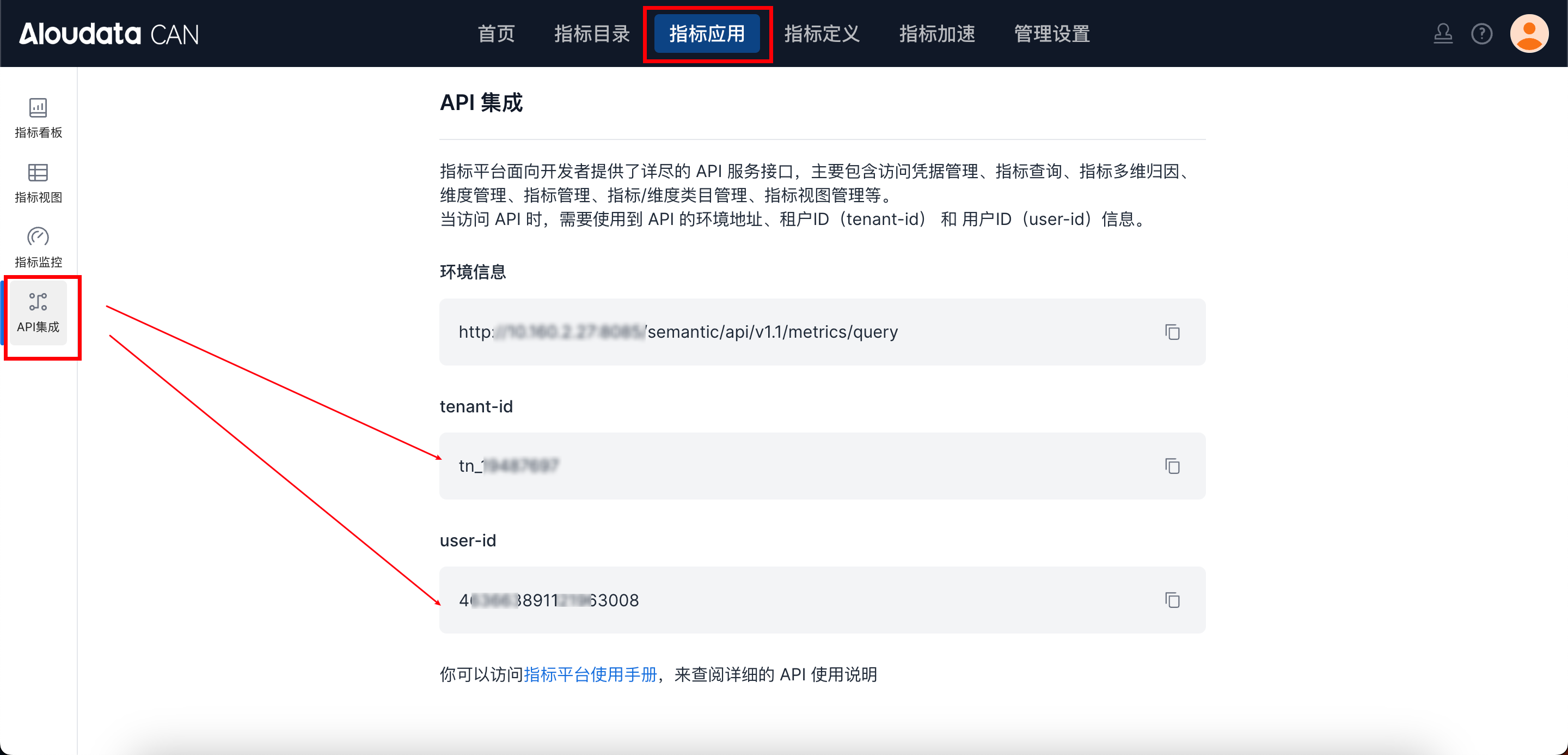
In Aloudata CAN, select the metric application from the top navigation bar, then choose API Integration from the left navigation menu. You can obtain tenant-id on the API Integration page. Set auth-value to the authentication value required by the selected auth-type.
Request Body
| Parameter | Type | Required | Description |
|---|---|---|---|
| dimName | String | Yes | Dimension name. |
Response Parameters
Response Parameter Overview
| Parameter | Type | Required | Description | |
|---|---|---|---|---|
| code | String | Yes | API response code. | |
| success | boolean | Yes | Whether the request succeeded. | |
| errorMsg | String | Yes | Error message. | |
| detailErrorMsg | String | Yes | Detailed error message. | |
| traceId | String | Yes | Trace ID for troubleshooting. | |
| data | Object | Yes | Dimension entity. |
data Parameters
| Parameter | Type | Required | Description | |
|---|---|---|---|---|
| name | String | No | ||
| dimName | String | Yes | Dimension name. - Unique within the tenant and cannot be modified. - Supports only letters, digits, and underscores. Two consecutive underscores are not supported. |
|
| dimCode | String | Yes | Dimension code. | |
| datasetName | String | No | Dataset name. | |
| dimDisplayName | String | Yes | Dimension display name. Supports any characters, up to 150 characters. | |
| dimCategoryId | String | No | Dimension category ID. Use the fixed value -1 for Uncategorized. If omitted, the dimension is Uncategorized by default. |
|
| dimDescription | String | No | Dimension description. Supports any characters, up to 300 characters. | |
| datasetName | string | Yes | Source dataset for the dimension. | |
| originDataType | string | Yes | Original field type of the source dataset for the dimension. | |
| config | object | Yes | Dimension source. See config Parameters. | |
| valueList | object | No | Dimension value list. See valuelist Parameters. | |
| basicAttributes | Map |
No | Basic attributes. | |
| businessAttributes | Map |
No | Business attributes. | |
| technicalAttributes | Map |
No | Technical attributes. | |
| managementAttributes | Map |
No | Management attributes. | |
| displayStatus | String | No | Current dimension status. Enumerated values: UNPUBLISHED: unpublished; PUBLISHED: published; SAVED_NOT_PUBLISHED: saved but not published; OFFLINE: offline; PENDING_PUBLISH: publishing; PENDING_OFFLINE: taking offline; PENDING_DELETE: pending deletion. |
config Parameters
| Parameter | Type | Required | Description |
|---|---|---|---|
| type | String | Yes | Dimension type, which indicates the source type. Enumerated values: - COLUMN_BIND: column binding- CUSTOM: custom type |
| value | String | Yes | For a column-bound dimension, set value to the column name.For a custom dimension, set value to an expression. The expression is equivalent to adding a calculated column to the dataset. |
valuelist Parameters
| Parameter | Type | Required | Description |
|---|---|---|---|
| value | String | No | Original dimension value. Cannot be an empty string or null. |
| name | String | No | Mapped name. Cannot be an empty string or null. |
| description | String | No | Description of the dimension value. |
Request Example
curl --location --request GET 'http://localhost:8083/anymetrics/api/v1/dimension/detail?dimName=dm0b1f947da9746df5bffaa57f6f0527' \
--header 'tenant-id: tn_21571046' \
--header 'auth-value: authority_test' \
--header 'auth-type: ACCOUNT' \
--header 'Content-Type: application/json' \
--header 'queryBy: UUID' \
Response Example
{
    "data": {
        "basicAttributes": null,
        "businessAttributes": null,
        "technicalAttributes": null,
        "managementAttributes": null,
        "name": "219385f66f774698b984f3b95066fb16",
        "dimName": "tb_click_1",
        "dimDisplayName": "tb_click_1",
        "dimCategoryId": "-1",
        "dimDescription": "tb_click_1 dimension update",
        "datasetName": "tb_click",
        "originDataType": "INT",
        "config": {
            "type": "COLUMN_BIND",
            "value": "user_id"
        },
        "valueList": [
            {
                "value": "Dimension value 03",
                "name": "Dimension value 03",
                "description": "Dimension value 03"
            },
            {
                "value": "Dimension value 04",
                "name": "Dimension value 04",
                "description": "Dimension value 04"
            }
        ]
    },
    "success": true,
    "code": "200",
    "errorMsg": null,
    "detailErrorMsg": null,
    "traceId": "ad3cd6c9fd5849b6a271f02f89edc93e.145.17193919044120021"
}