Save user Attributes
1. API Description
Use this API to save or add custom user attribute values. If the same attribute name already exists for the same user, it is overwritten; otherwise it is added.
Version support
This API contract applies to CAN releases: V2.3.0+.
2. API URL
POST http://{anymetrics_host:anymetrics_port}/anymetrics/api/v1/userPropertyValue/save
To obtain anymetrics_host:anymetrics_port, see Calling APIs.
3. Common Request Headers
| parameter | Type | required | Description |
|---|---|---|---|
| tenant-id | String | Yes | Tenant ID that identifies the tenant to which the resource belongs. |
| auth-type | String | Yes | Authentication method. Supports UID, TOKEN, ACCOUNT, and APIKEY. |
| auth-value | String | Yes | Authentication value corresponding to auth-type. |
3.1 How to Obtain Common parameters
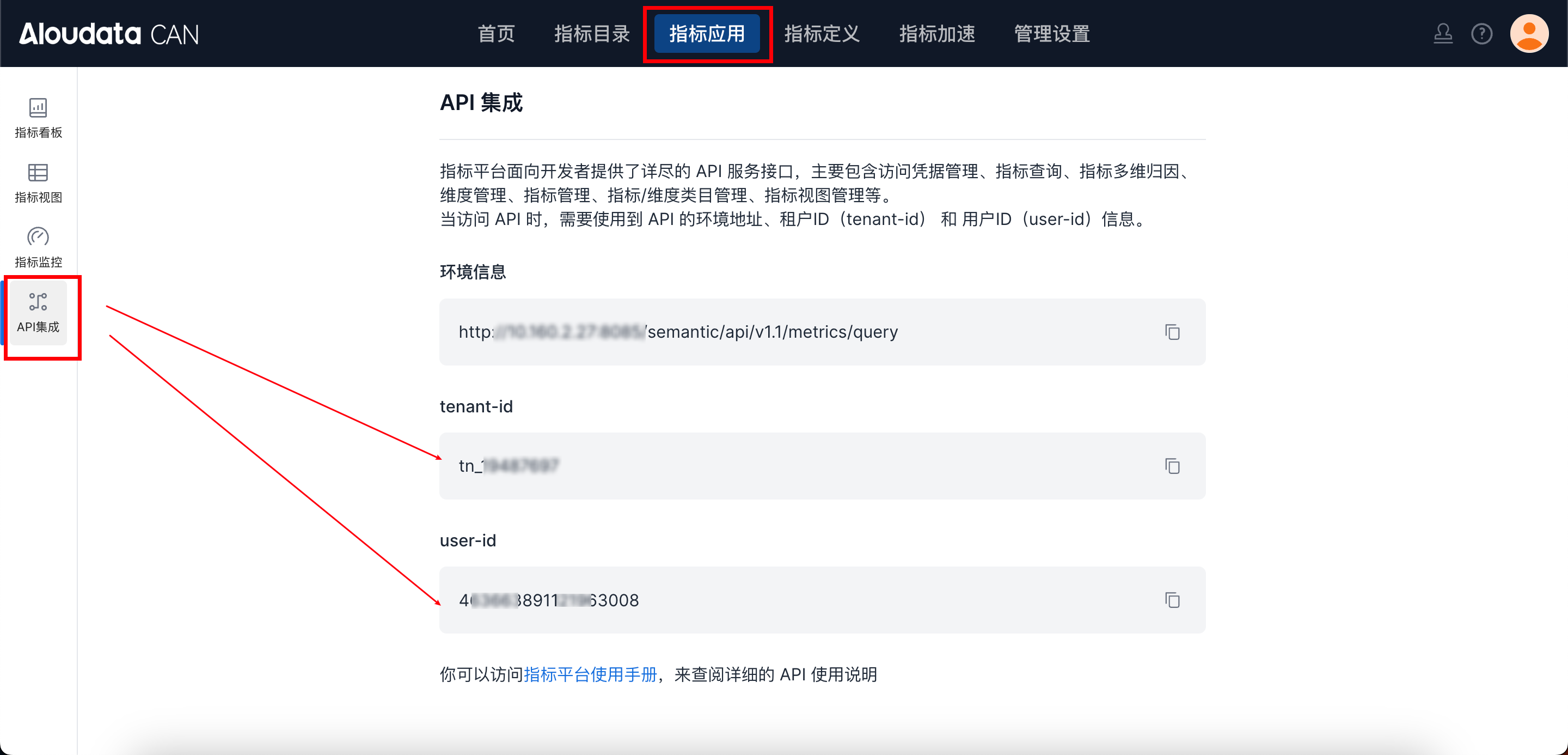
In Aloudata CAN, select Metric Applications in the top navigation bar, then select API Integration in the left navigation menu. You can obtain tenant-id on the API Integration page. Set auth-value according to auth-type.
3.2. Request Body parameters:
| parameter | Type | required | Description |
|---|---|---|---|
| identityType | String | Yes | user identifier type (USER_ID or USER_ACCOUNT) |
| userPropertyRequests | Array | Yes | user attribute request list |
| ∟ identityValue | String | Yes | user identifier value list (user ID list or user account list) |
| ∟ properties | Array | Yes | Attribute list |
| ∟∟ name | String | Yes | Attribute name |
| ∟∟ value | String | Yes | Attribute value |
4. Request Example:
curl --location 'http://localhost:8083/anymetrics/api/v1/userPropertyValue/save' \
--header 'tenant-id: tn_21571046' \
--header 'auth-value: authority_test' \
--header 'auth-type: ACCOUNT' \
--header 'Content-Type: application/json' \
--data '{
  "identityType": "USER_ACCOUNT",
  "userPropertyRequests": [
    {
      "identityValue": "zhangsan",
      "properties": [
        { "name": "job_level", "value": "P6" },
        { "name": "region", "value": "east" }
      ]
    }
  ]
}'