Derived Metric Calculation Logic
Overview
Derived metrics extend the calculation logic of basic metrics.
Derived metrics in the metric platform provide three extension capabilities.
| Configuration Item | Description |
|---|---|
| Time limit | The time-limit extension takes effect by adjusting filter conditions. A time limit adjusts the metric date filter value in the query environment. |
| Business limit | A business limit is equivalent to adding additional filter conditions. These conditions have an AND relationship with the conditions in the query environment. |
| Derivation method | * Period-over-period comparison: adjusts the metric date filter value in the query environment. * Ranking: adjusts the window in the query environment. The window concept is not yet fully open for custom configuration. * Percentage of total: adjusts the specified dimension filter value in the query environment. * Custom aggregation: adjusts the specified dimension filter value in the query. |
Time Limits
Time limits are an important and frequently used concept in the metric platform. Correct use of time limits helps you support many business analysis scenarios.
A time limit converts the metric date in the query environment into a new date according to rules. Before understanding time limits, you need to know the following concepts.
| Concept | Description |
|---|---|
| Time granularity | Every date-type dimension has granularity, and metric date is no exception. The metric platform has built-in granularities: minute, hour, day, week, month, quarter, and year. 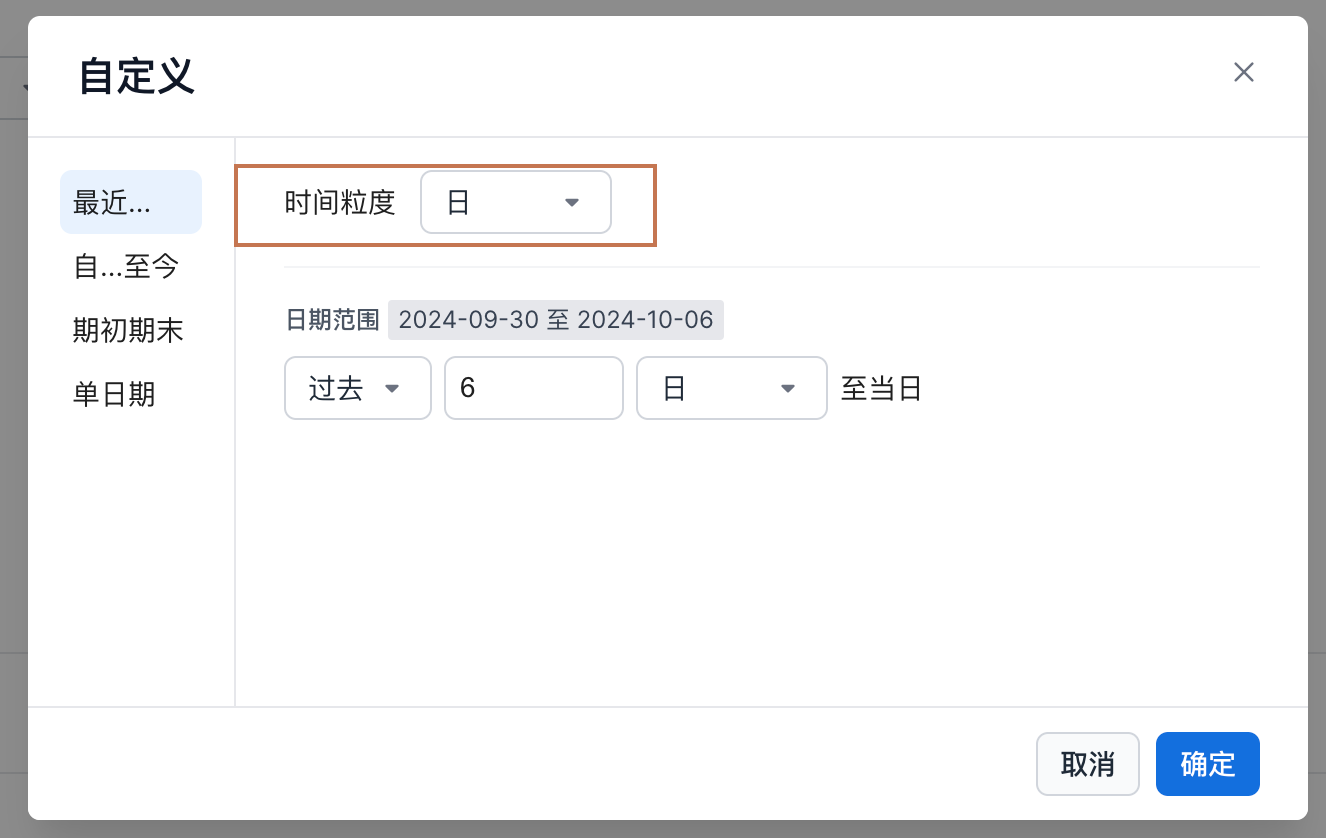 |
| Point-in-time filter and period filter | A point-in-time filter contains only one granularity value. A period filter contains multiple granularity values. For example, to express the full year 2024, a point-in-time filter can be Metric Date (Year) = 2024-01-01, while a period filter is Metric Date (Day) >= 2024-01-01 AND Metric Date (Day) <= 2024-12-31. For basic metrics, these two filters produce the same result. For time-limit adjustment, they differ in terms of supported usage. |
Time Limit - Overall Mode
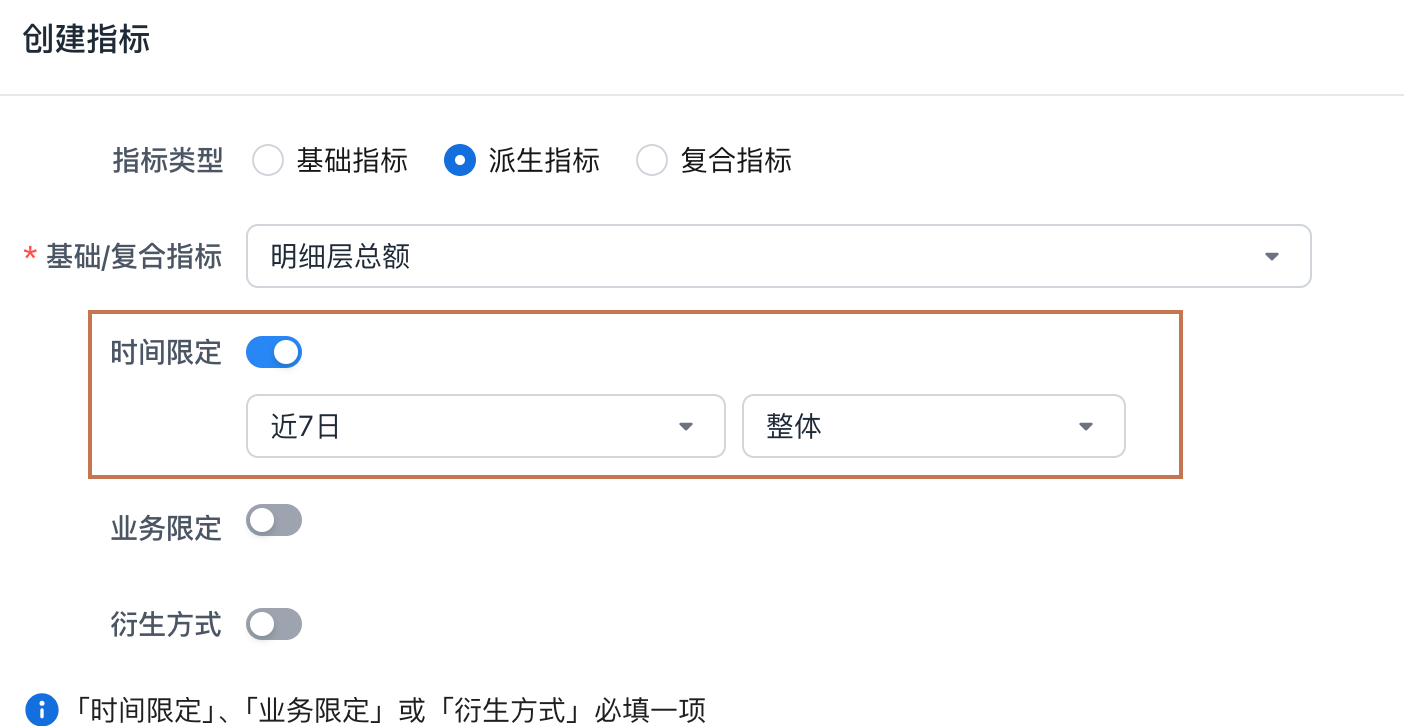
In overall mode, the time limit converts a point-in-time filter into a new point-in-time or period filter.
Note
Because a time limit converts a point-in-time filter, when using a metric with a time limit, make sure one of the following conditions is met:
-
The query grouping dimensions include metric date, such as viewing a metric by Metric Date (Month).
-
The query filters include a point-in-time filter on metric date, such as Metric Date (Day) = 2024-09-30.
The metric platform currently has four built-in time-limit methods:
| Time-Limit Method | Description |
|---|---|
| Recent N days | Principle: converts point-in-time data into period data greater than or equal to the current point-in-time granularity. Example:- Recent 7 days: Metric Date (Day) = 2024-09-30 is converted to 2024-09-24 <= Metric Date (Day) <= 2024-09-30.- The system subtracts 6 days from the input date and creates a period range ending on the current day. |
| MTD | Principle: converts point-in-time data into period data greater than or equal to the current point-in-time granularity. Example:- Year to date: Metric Date (Day) = 2024-09-30 is converted to first day of 2024 <= Metric Date (Day) <= 2024-09-30.- The system converts the input date to the first day of its year and creates a period range ending on the current day. |
| Specific date | Principle: converts point-in-time data into point-in-time data with the same granularity. Example:- End of last month: Metric Date (Day) = 2024-09-30 is converted to Metric Date (Day) = 2024-08-31. |
| Single date | Principle: converts point-in-time data into a point-in-time or period filter at the current point-in-time granularity. Example:- Full current month: Metric Date (Day) = 2024-09-30 is converted to 2024-09-01 <= Metric Date (Day) <= 2024-09-30. |
Rule
When querying a metric with a time limit, the system replaces the metric date time filter with a new date filter.
- If the current query does not contain a point-in-time filter on metric date, or does not filter metric date, the query is blocked.
Time Limit - Peak/Trough/Average Mode
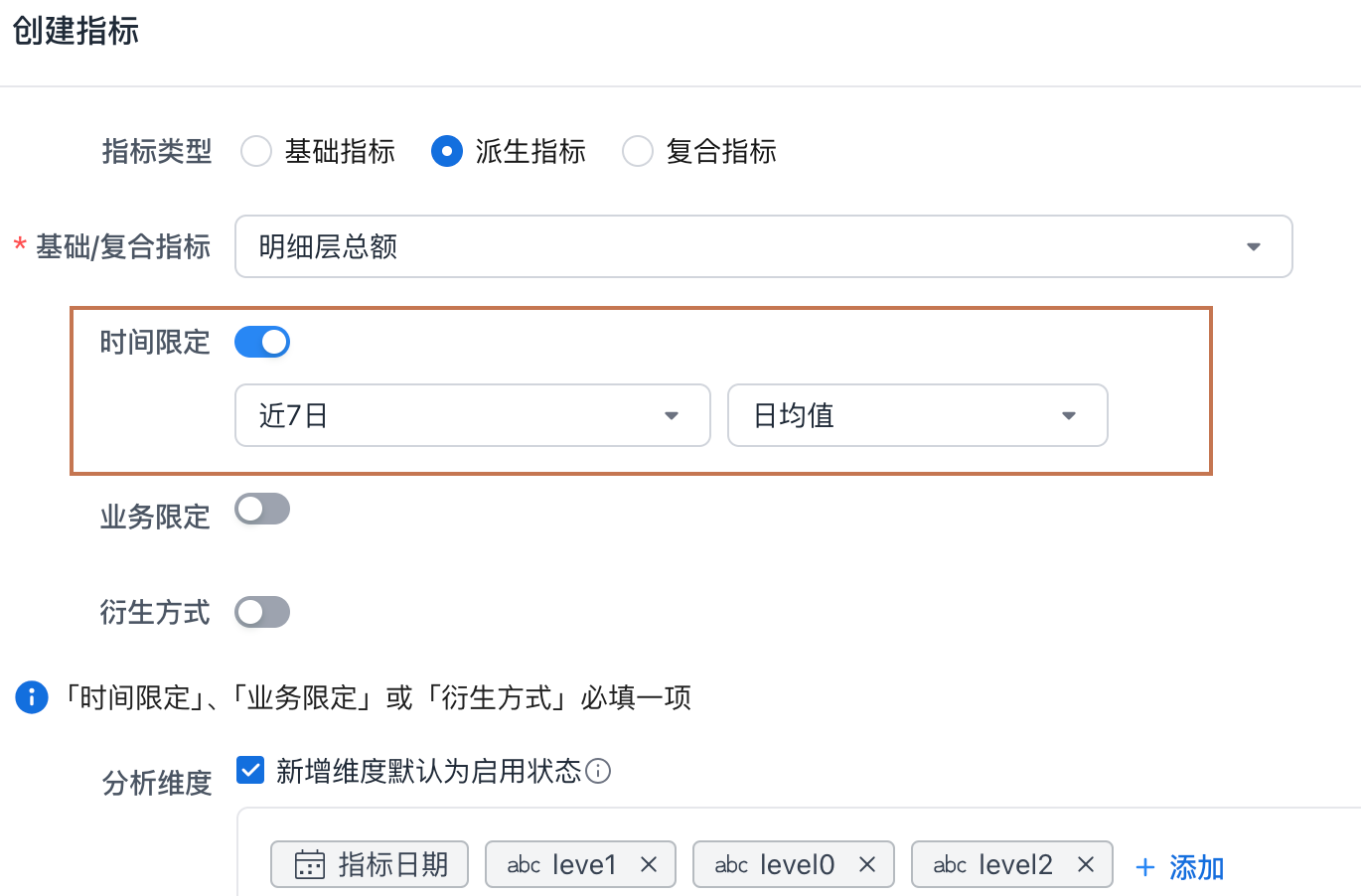
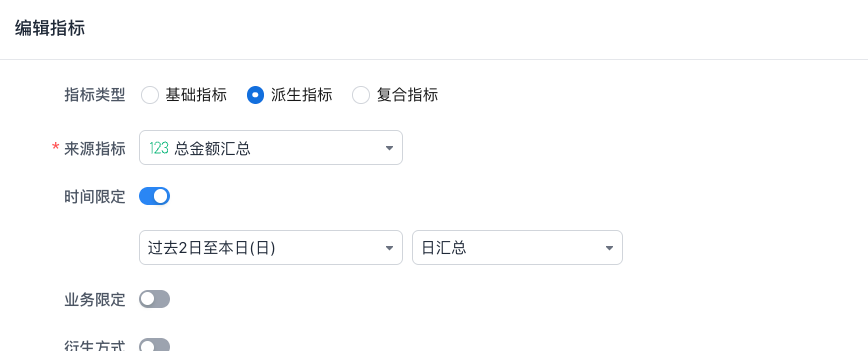
On top of overall mode, the metric platform supports calculating the average, maximum, or minimum value. For example, you can use a time limit to generate order amount in the recent 7 days, or use it to generate daily average order amount in the recent 7 days.
Peak/trough/average mode adds one more calculation step compared with overall mode.
-
Convert the point-in-time filter into a new date filter, the same as overall mode.
-
Within the new date range, first aggregate by the specified date granularity, and then perform a second calculation on the aggregated results.
Example
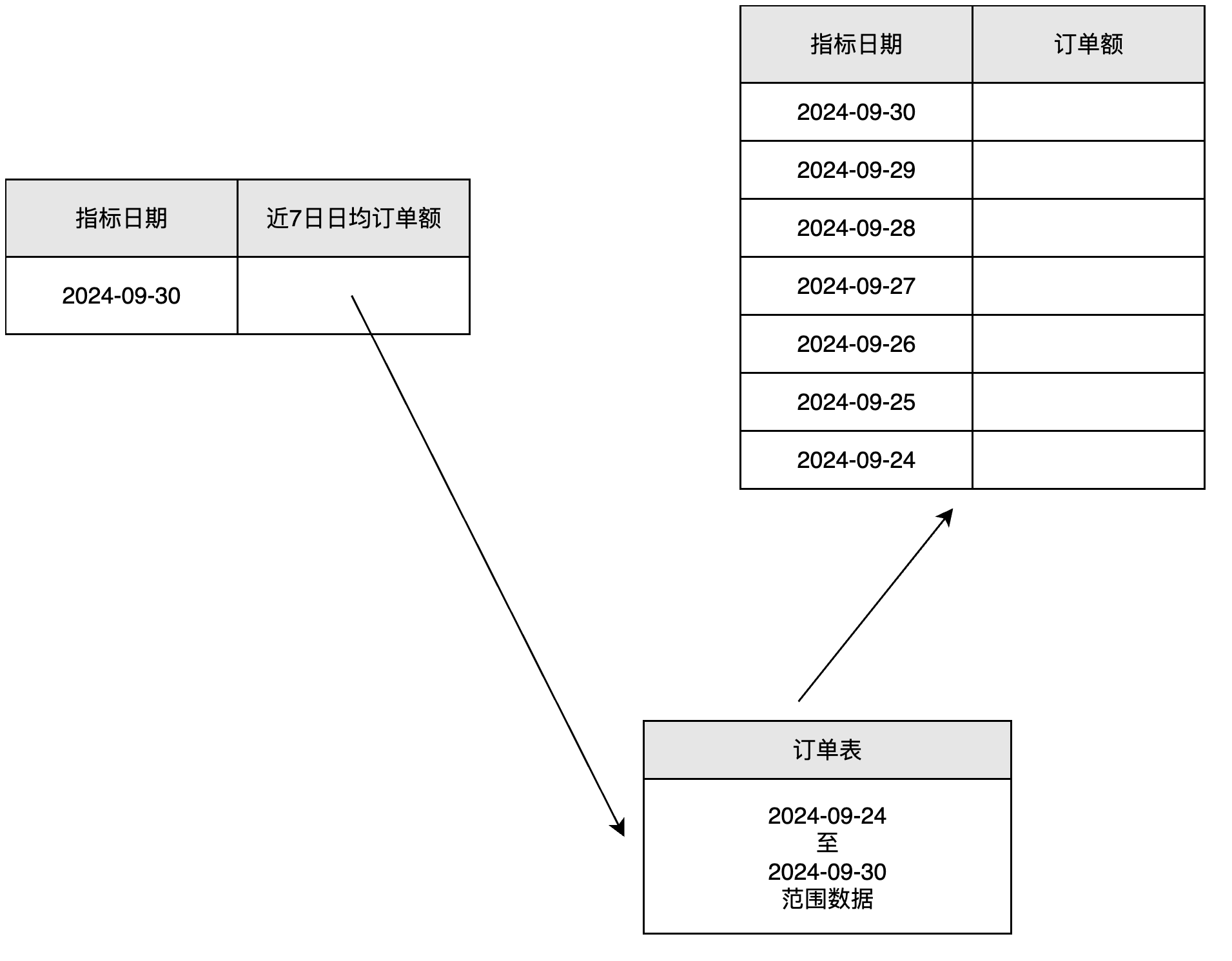
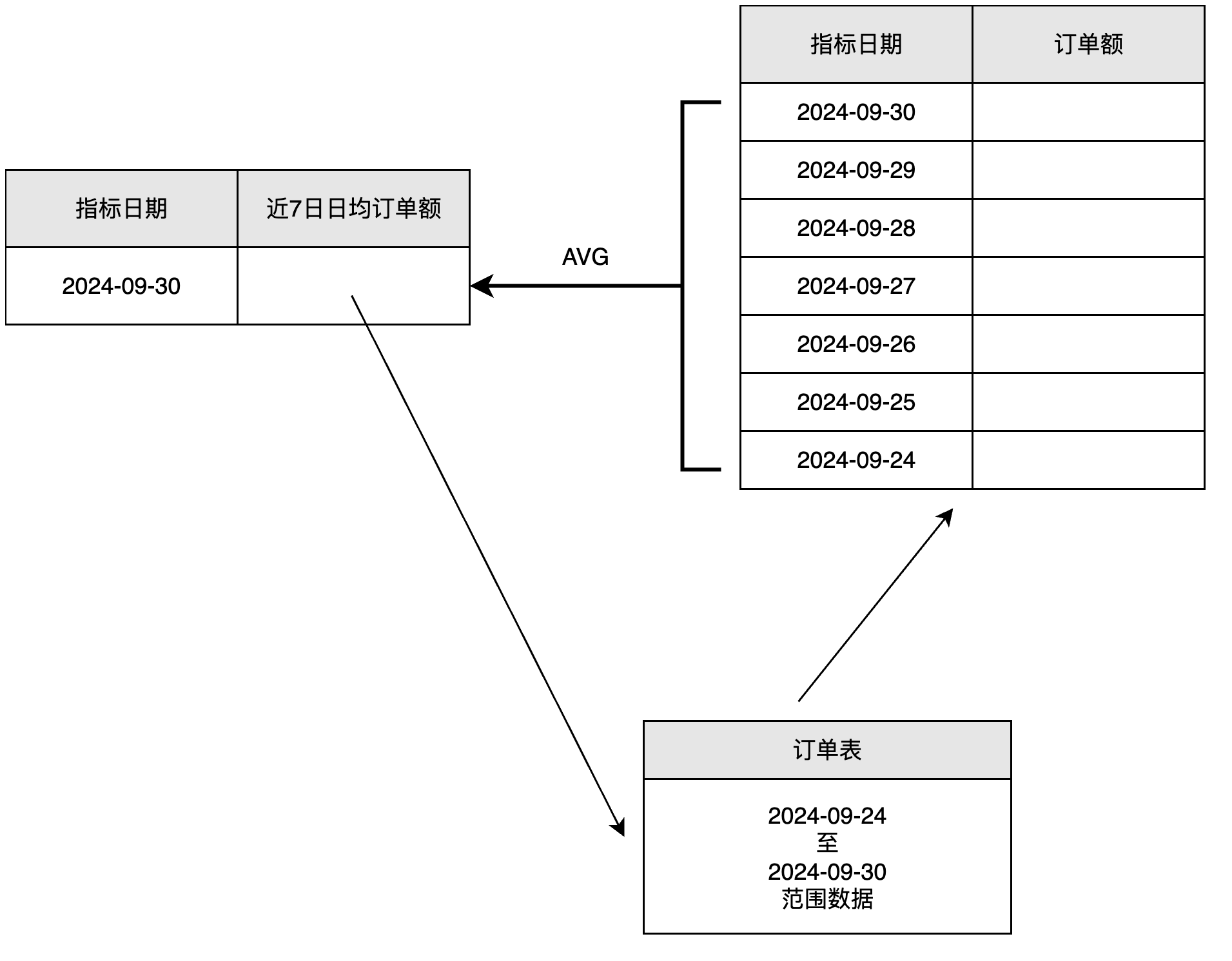
Query `daily average order amount in the recent 7 days`, passing in `Metric Date (Day) = 2024-09-30`.
Step 1: Adjust Metric Date (Day) = 2024-09-30 to Metric Date (Day) = 2024-09-24 ~ 2024-09-30.
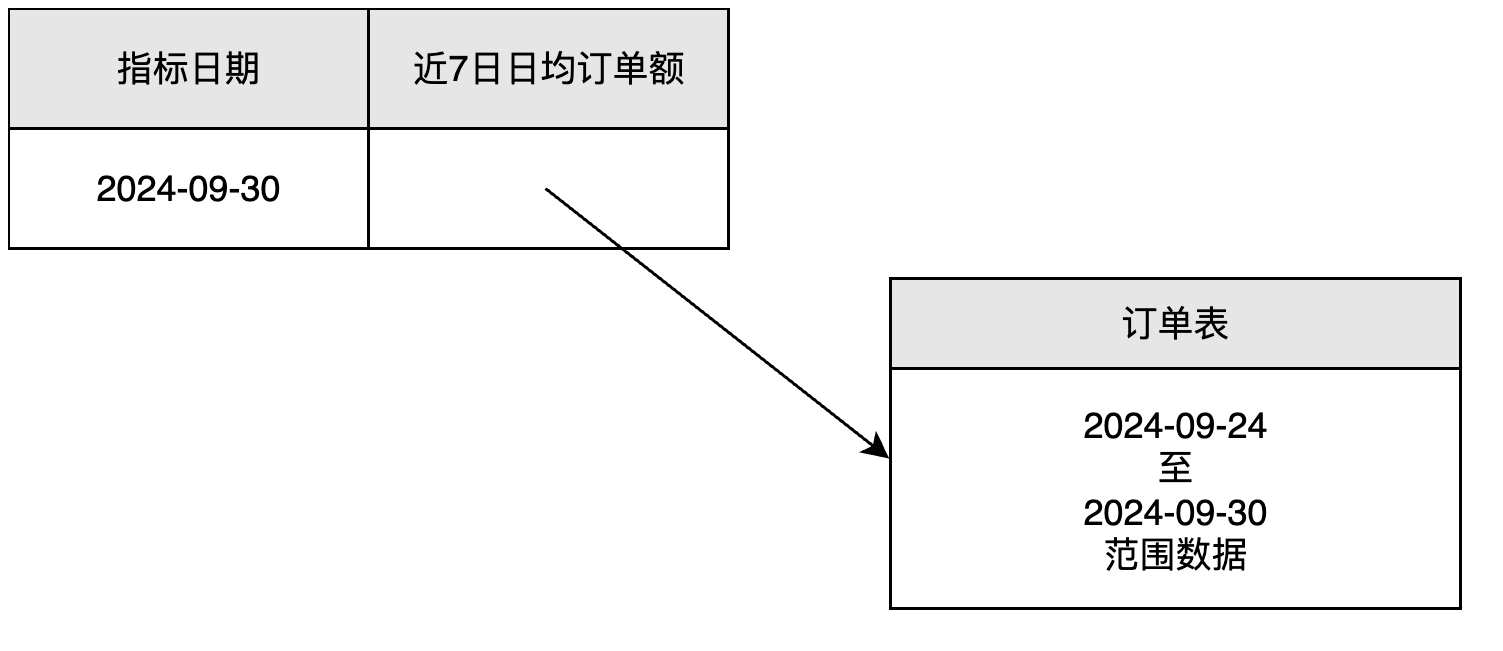
Step 2: Within this period, first calculate metric result values by Metric Date (Day).
Step 3: Calculate the average (AVG) of the daily results to obtain the metric value.
Time Limit - Daily Summary Mode
Example
Using "transaction amount" calculation as an example, the business rule is: first use the transaction amount from source A; if A is null, use source B. The final result must calculate "daily total transaction amount" and "total transaction amount in the recent three days".
Step 1: Create Daily Transaction Amount based on A/B source metrics
Data split: split the raw data by date into three independent daily datasets: 2025-07-29, 2025-07-30, and 2025-07-31.
| Day | Transaction Amount from Source A | Transaction Amount from Source B |
|---|---|---|
| 29 | 100 | 40 |
| 30 | null | 50 |
| 31 | 20 | 40 |
Daily value logic:
For each row of data on the day, apply the rule: Daily Transaction Amount = if(isnotnull(A), A, B).
Example result (daily level):
| Date | Transaction Amount from Source A | Transaction Amount from Source B | Daily Transaction Amount |
|---|---|---|---|
| 2025-07-29 | 100 | 40 | 100 |
| 2025-07-30 | null | 50 | 50 |
| 2025-07-31 | 20 | 40 | 20 |
Step 2: Derive a cross-day metric based on the daily result
Using "total transaction amount in the recent three days" as an example:
Time window definition: recent three days
Window aggregation calculation: sum
Example result:
| Date | Daily Transaction Amount | Recent Three Days - Sum |
|---|---|---|
| 2025-07-29 | 100 | 100 (current day only) |
| 2025-07-30 | 50 | 100 + 50 = 150 |
| 2025-07-31 | 20 | 100 + 50 + 20 = 170 |
The sum ensures that the daily base logic (if(isnotnull(A), A, B)) is strictly applied.
Business Limits
A business limit is a dimension filter added in the metric definition. Its calculation logic is the same as adding a dimension filter in the query environment.
For the effective order of filters in a metric, see the dedicated article for details.
Derivation Methods
Period-Over-Period Comparison
Period-over-period comparison adjusts the metric date filter. It works by offsetting the date. When using period-over-period comparison, metric date must exist in the query environment. The calculation steps are:
-
First, offset and adjust the
metric datein the query environment. -
If a time limit is configured, pass the adjusted
metric dateinto thetime limitto generate the finalmetric daterange.
Ranking

Use the following example to understand ranking scope.

When province is set as the ranking scope, the ranking result uses province as the window and generates rankings within that window.
Purpose of the ranking dimension:
Set city as the ranking dimension and filter city during the query.
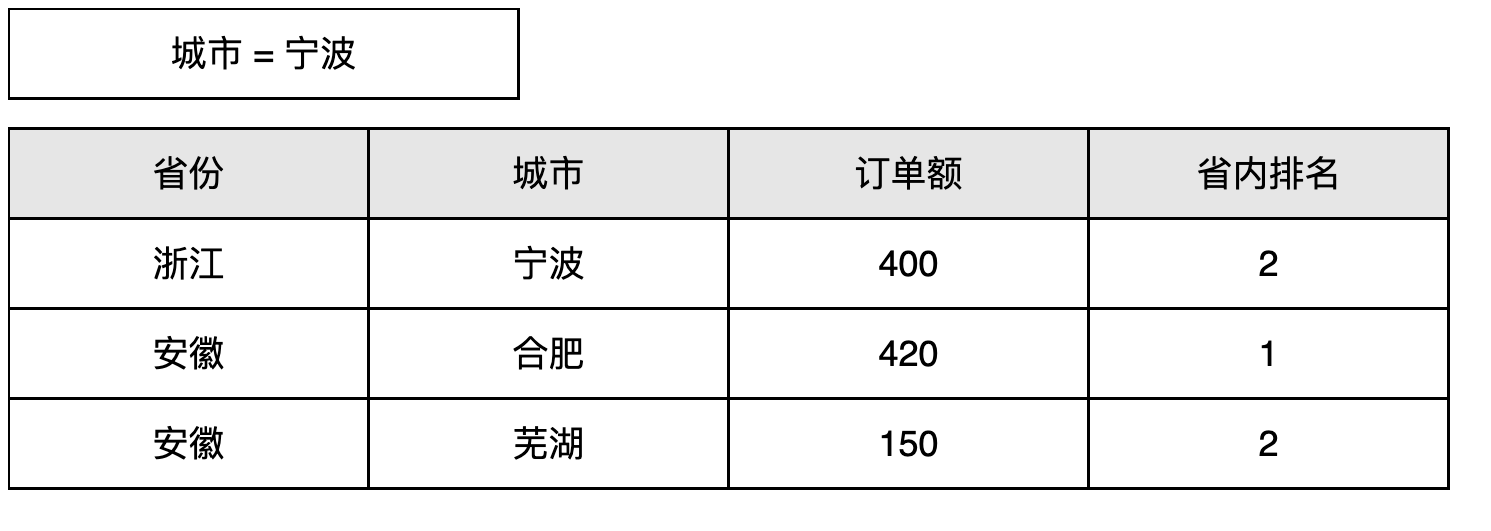
Do not set a ranking dimension and filter city during the query.
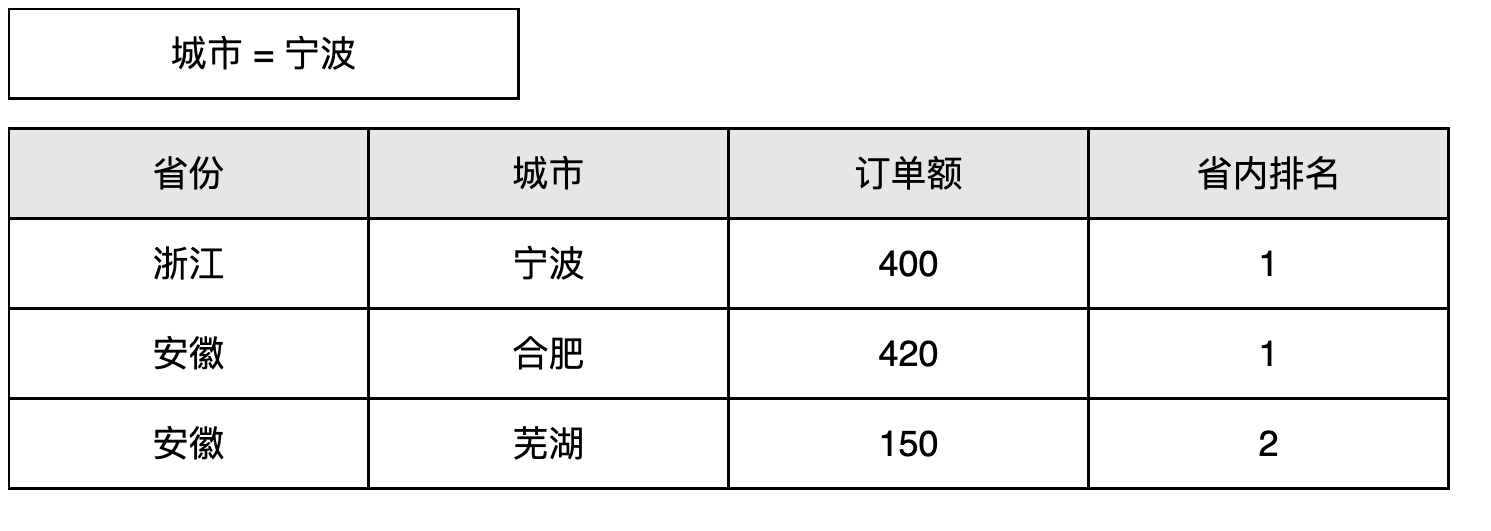
By comparing these examples, we can see that after a ranking dimension is specified, the query does not filter the data first. Instead, the data is filtered after ranking results are calculated.
Percentage of Total

Use the following example to understand percentage-of-total scope.

When province is set as the percentage-of-total scope, the numerator calculation logic does not change, but the denominator calculation logic changes:
-
Keep only the dimensions within the percentage-of-total dimension scope and calculate the metric.
-
Calculate order amount using
provinceas the dimension, without usingcity. -
Divide the numerator by the denominator to obtain the final result.
The role of the percentage-of-total dimension is similar to the ranking dimension described in section 4.2, so it is not repeated here.
Custom Aggregation

Custom aggregation adds an extra dimension in the current query environment and performs aggregation in a specific way.
For example, assume we define the basic metric Sales Amount, but during analysis we want to obtain the highest city sales amount within each province by first calculating sales amount for each city and then displaying the maximum sales amount within each province.
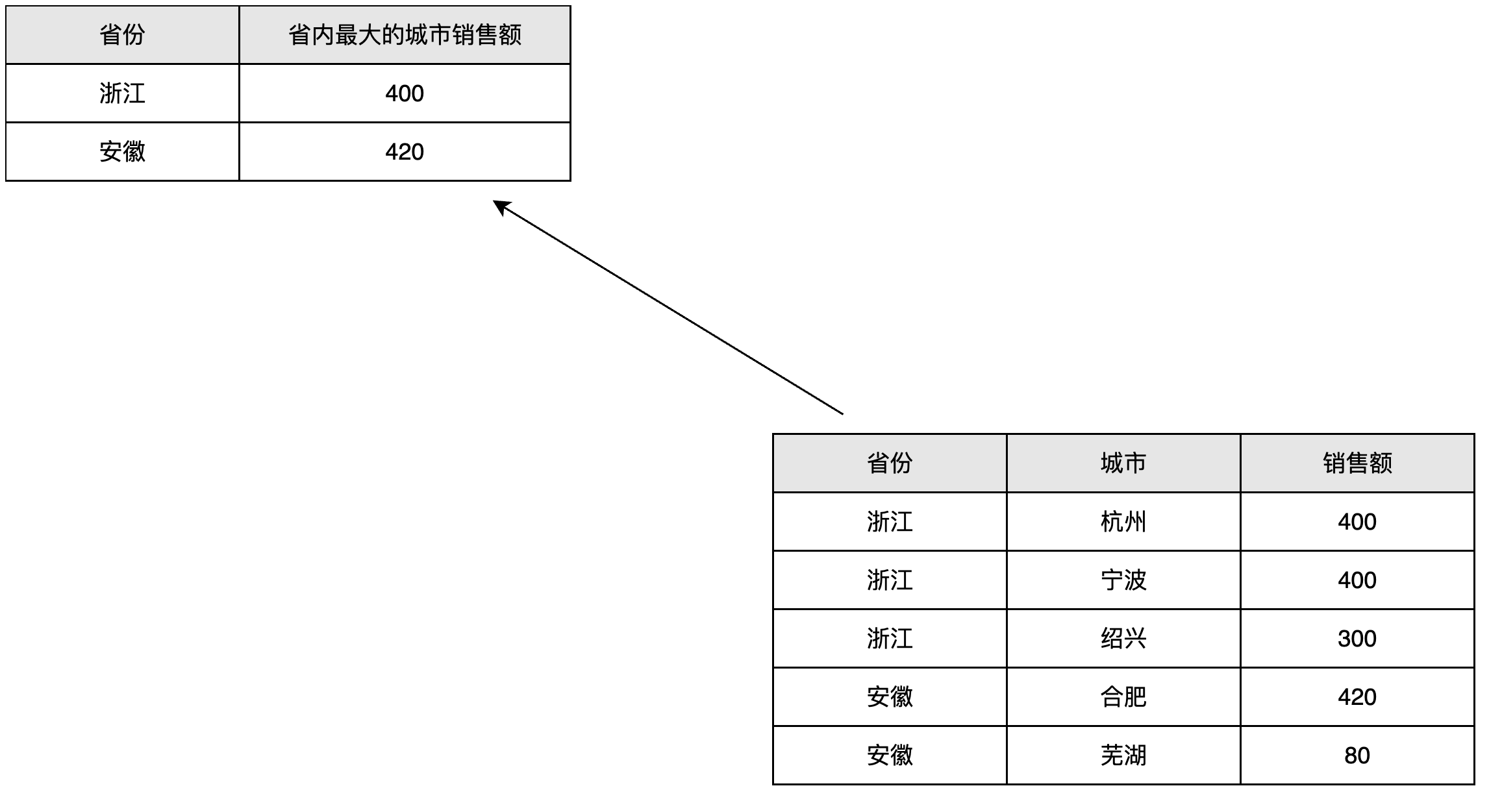
As shown on the left, we can add the city dimension and select maximum.
In the query, add province as a dimension to obtain the correct calculation result.
During the query, custom aggregation adds extra dimension filter conditions and combines them with data aggregation to select the maximum, minimum, or average value.
Summary
Definition items in derived metrics are mainly used to adjust filters in the query environment. Using a derived metric imposes required dimension conditions on the query environment. See the following table:
| Configuration Item | Requirement |
|---|---|
| Time limit | * The query contains the metric date dimension and meets any of the following conditions: * Used as a grouping dimension. * Used as a filter and is a point-in-time filter. * The minimum metric date granularity is less than or equal to the time-limit granularity. |
| Period-over-period comparison | * The query contains the metric date dimension and meets either of the following conditions: * Used as a grouping dimension. * Used as a filter. |
| Ranking | * The query contains the configured ranking scope and ranking dimension and meets either of the following conditions: * Used as a grouping dimension. * Used as a filter. |
| Percentage of total | * The query contains the configured percentage-of-total scope and percentage-of-total dimension. * Used as a grouping dimension. * Used as a filter. |
If a derived metric contains a time limit, it also has date granularity requirements for the metric date used in the query.
-
For example, derived metric: order amount in the recent 4 months (month granularity)
-
During the query, you can use
Metric Date (Day) = 2024-09-30orMetric Date (Month) = 2024-09-01. Both return the total order amount for 4 months starting from September.