Split Metrics in a Materialization Plan
API Description
This API parses and splits the original metrics selected by the user. It supports automatic splitting for average metrics, such as generating sum and count metrics from an avg metric. The split metrics are later used to generate the complete materialized-field structure when saving the materialization plan.
For an external materialization plan, this API must be called first to generate the complete metric tree structure and aggregatable dimension information.
API URL
anymetrics_host:anymetrics_port For how to obtain this value, see Calling APIs
Request parameters
Common Request Headers
| parameter | Type | required | Description |
|---|---|---|---|
| tenant-id | String | Yes | Tenant ID, used to identify the tenant for metric query content. |
| auth-type | String | Yes | Authentication method. Supports UID, TOKEN, ACCOUNT, and APIKEY. |
| auth-value | String | Yes | Authentication value corresponding to auth-type. |
How to Obtain Common parameters
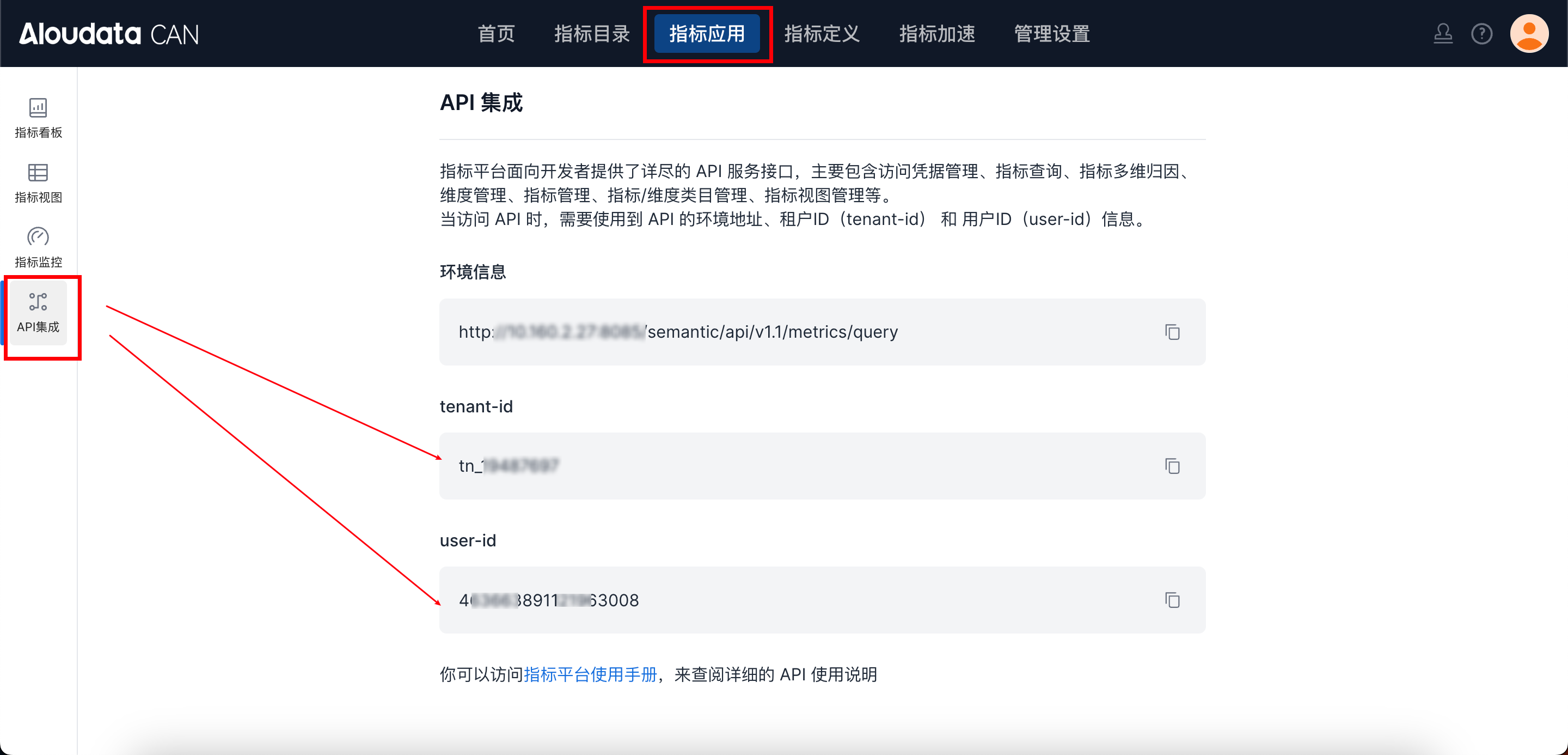
In Aloudata CAN, select Metric Applications in the top navigation bar, then select API Integration in the left navigation menu. You can obtain tenant-id on the API Integration page. Set auth-value according to auth-type.
Request Body parameters
| Field | Type | required | Description |
|---|---|---|---|
| type | String | Yes | Must be "EXTERNAL" |
| metrics | List | Yes | List of original metrics selected by the user |
| dimensions | List | Yes | List of dimensions selected by the user |
| metricDefinitions | Map |
No | Quick derivation configuration. Applies only to original metrics |
Request Example
{
  "metrics": [
    { "name": "avg_order_amount" },
    { "name": "sum_order_amount" }
  ],
  "dimensions": [
    { "name": "metric_time__DAY" },
    { "name": "username" }
  ],
  "type": "EXTERNAL"
}
Response parameters
| Field | Type | Description |
|---|---|---|
| success | Boolean | Whether successful |
| code | String | Response code |
| errorMsg | String | Error message |
| detailErrorMsg | String | Detailed error message |
| traceId | String | Trace ID |
| data | Object | Split metric and dimension structure |
data Field Structure
| Field | Type | Description |
|---|---|---|
| splitMetric | List | Split metric tree structure, including original metrics and split metrics |
| dimensions | List | Dimension list, including granularity information |
Response Example
{
  "data": {
    "splitMetric": [
      {
        "id": "mce5493438bb57b4e71b087aead42a03",
        "name": "avg_order_amount",
        "code": "mce5493438bb57b4e71b087aead42a03",
        "forceRollupDimensionList": [],
        "notRollupDimensionList": [],
        "desc": "Average order_amount",
        "children": [
          {
            "id": "fe8c75ce30ff36b9ae92aa35f5fcce85",
            "name": "avg_order_amount_sum",
            "code": null,
            "forceRollupDimensionList": [
              "dmb9b604484bd9f5dd9bb8f1a2f22cb7",
              "metric_time__DAY"
            ],
            "notRollupDimensionList": [],
            "desc": "Average order_amount_sum",
            "children": null
          },
          {
            "id": "6e1b93fb4b5d6299cce9471f2abd6604",
            "name": "avg_order_amount_count",
            "code": null,
            "forceRollupDimensionList": [
              "dmb9b604484bd9f5dd9bb8f1a2f22cb7",
              "metric_time__DAY"
            ],
            "notRollupDimensionList": [],
            "desc": "Average order_amount_count",
            "children": null
          }
        ]
      }
    ],
    "dimensions": [
      {
        "id": "metric_time__DAY",
        "name": null,
        "code": "metric_time",
        "granularity": "DAY"
      },
      {
        "id": "dmb9b604484bd9f5dd9bb8f1a2f22cb7",
        "name": "username",
        "code": "dmb9b604484bd9f5dd9bb8f1a2f22cb7",
        "granularity": null
      }
    ]
  },
  "success": true,
  "code": "200",
  "errorMsg": null,
  "detailErrorMsg": null,
  "traceId": "d0a72329966f49c9bc12734d7a9ab077.527.17628509311680003"
}
Usage Notes
-
This API generates the complete metric split structure. You must use the split result in
createAccelerateResultPlan. -
metricscontains only original metrics. Split metrics are not added automatically. -
Each split metric needs a materialized column name when the plan is saved, using
mtConfig.columnConfigs.