Update Acceleration Scheduling Configuration
API Description
This API is used to modify the refresh/scheduling configuration of a materialization plan, including:
whether scheduling is enabled
cron expression
full/incremental configuration
time-window upper and lower bounds
⚠️ For external materialization (
EXTERNAL) plans:
This configuration is used only for frontend display
The system does not actually schedule execution
-
API URL
Request parameters
Common Request Headers
| parameter | Type | required | Description |
|---|---|---|---|
| tenant-id | String | Yes | Tenant ID, used to identify the tenant for metric query content. |
| auth-type | String | Yes | Authentication method. Supports UID, TOKEN, ACCOUNT, and APIKEY. |
| auth-value | String | Yes | Authentication value corresponding to auth-type. |
How to Obtain Common parameters
View this in the top navigation of Aloudata CAN under Metric Applications > API Integration.
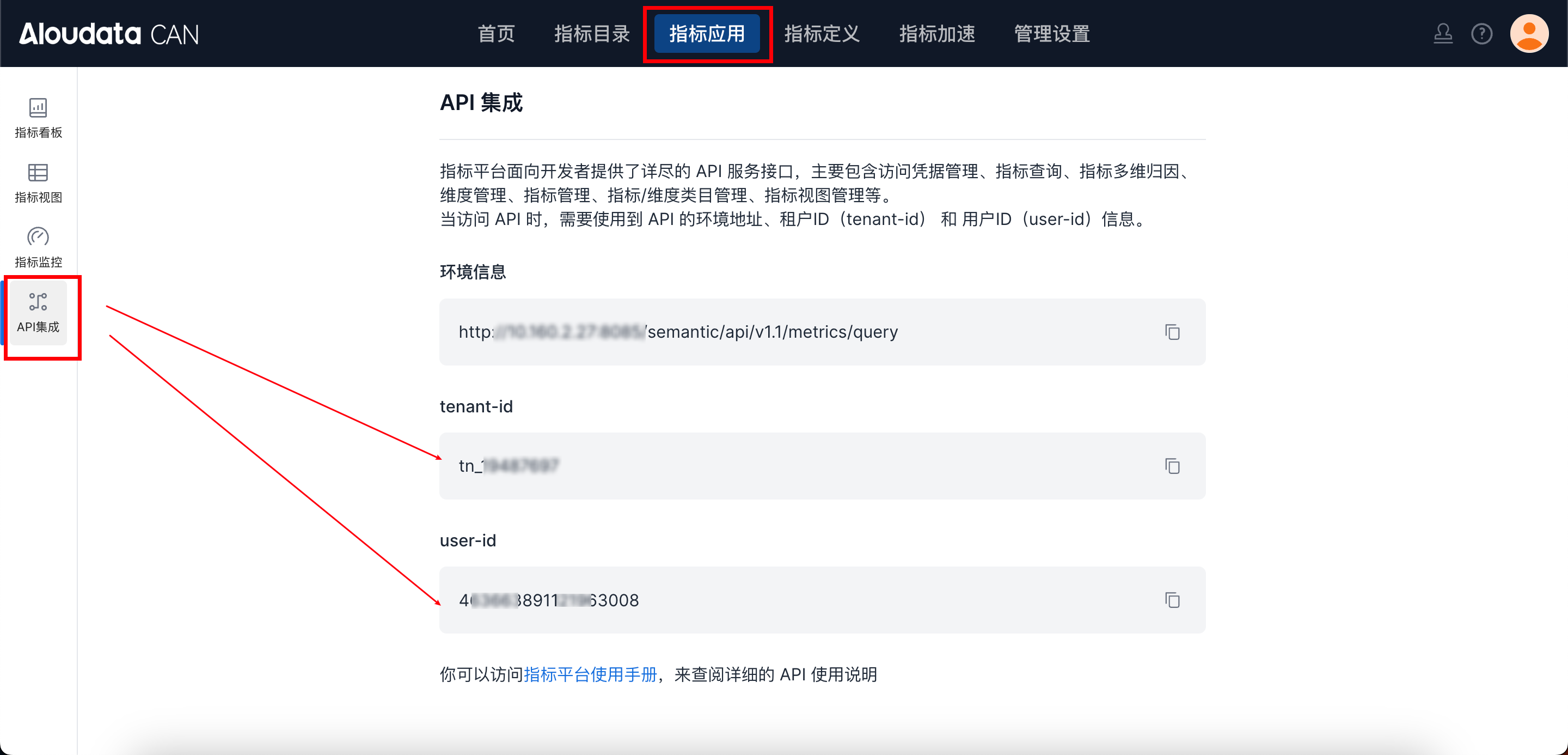
Request parameters
| Field | Type | required | Description |
|---|---|---|---|
| uuid | String | Yes | Plan unique ID |
| refreshConfig.cron | String | No | Scheduling expression. required when scheduling is enabled |
| refreshConfig.isScheduleUpdate | Boolean | No | Whether scheduling is enabled |
| refreshConfig.updateUpperInterval | Integer | No | Upper bound offset |
| refreshConfig.updateLowerInterval | Integer | No | Lower bound offset |
| refreshConfig.granularity | String | No | Time granularity, such as DAY |
| refreshConfig.isFullRefresh | Boolean | No | Whether to perform full refresh. Used for acceleration materialization and external materialization |
| refreshConfig.increment | Boolean | No | Whether incremental mode is enabled. Used only for result materialization |
Request Example
{
  "uuid": "ecfc2a9539a04ef49897a9b4e3d65e7f",
  "refreshConfig": {
    "cron": "0 0 0 * * ?",
    "isScheduleUpdate": true,
    "updateUpperInterval": -1,
    "updateLowerInterval": -3,
    "granularity": "DAY",
    "isFullRefresh": true
  }
}
Response parameter Description
| Field | Type | Description |
|---|---|---|
| data | String | Fixed value "success" |
| success | Boolean | Whether successful |
| code | String | Status code |
| errorMsg | String | Error message |
| detailErrorMsg | String | Detailed error message |