Trigger Source Table Dependencies
This document describes how to trigger source-table dependency task instances through OpenAPI in the scheduling system:
-
Trigger by Scheduling Time Point
-
Trigger by Scheduling Time Range
API Capability Overview
| Trigger Method | API Name | Scenario |
|---|---|---|
| By scheduling time point | triggerTableTaskInstanceByScheduleTime | Precisely trigger instances for specified scheduling times. Multiple time points are supported |
| By scheduling time range | triggerTableTaskInstanceByScheduleTimeRange | Batch trigger instances within a specified time range |
Trigger Source-Table Instances by Scheduling Time Point
1. API Description
Trigger new scheduled source-table instances by scheduling time point
Used to trigger source-table dependency task instances for specified scheduling time points.
-
Supports passing multiple scheduling time points in one request
-
If an instance already exists, triggering again reruns the current instance and its downstream tasks
2. API URL
POST Http://{anymetrics_host:anymetrics_port}/anymetrics/api/v1/scheduler/task/triggerTableTaskInstanceByScheduleTime
anymetrics_host:anymetrics_port For how to obtain this value, see Calling APIs
3. Request parameters
3.1 Common Request Headers
| parameter | Type | required | Max Length | Description |
|---|---|---|---|---|
| tenant-id | String | Yes | 32 | Tenant ID, used to identify the tenant for metric query content. |
| auth-type | String | Yes | 32 | Authentication method. Supports UID, TOKEN, ACCOUNT, and APIKEY. |
| auth-value | String | Yes | 32 | Authentication value corresponding to auth-type. |
3.2 How to Obtain Common parameters
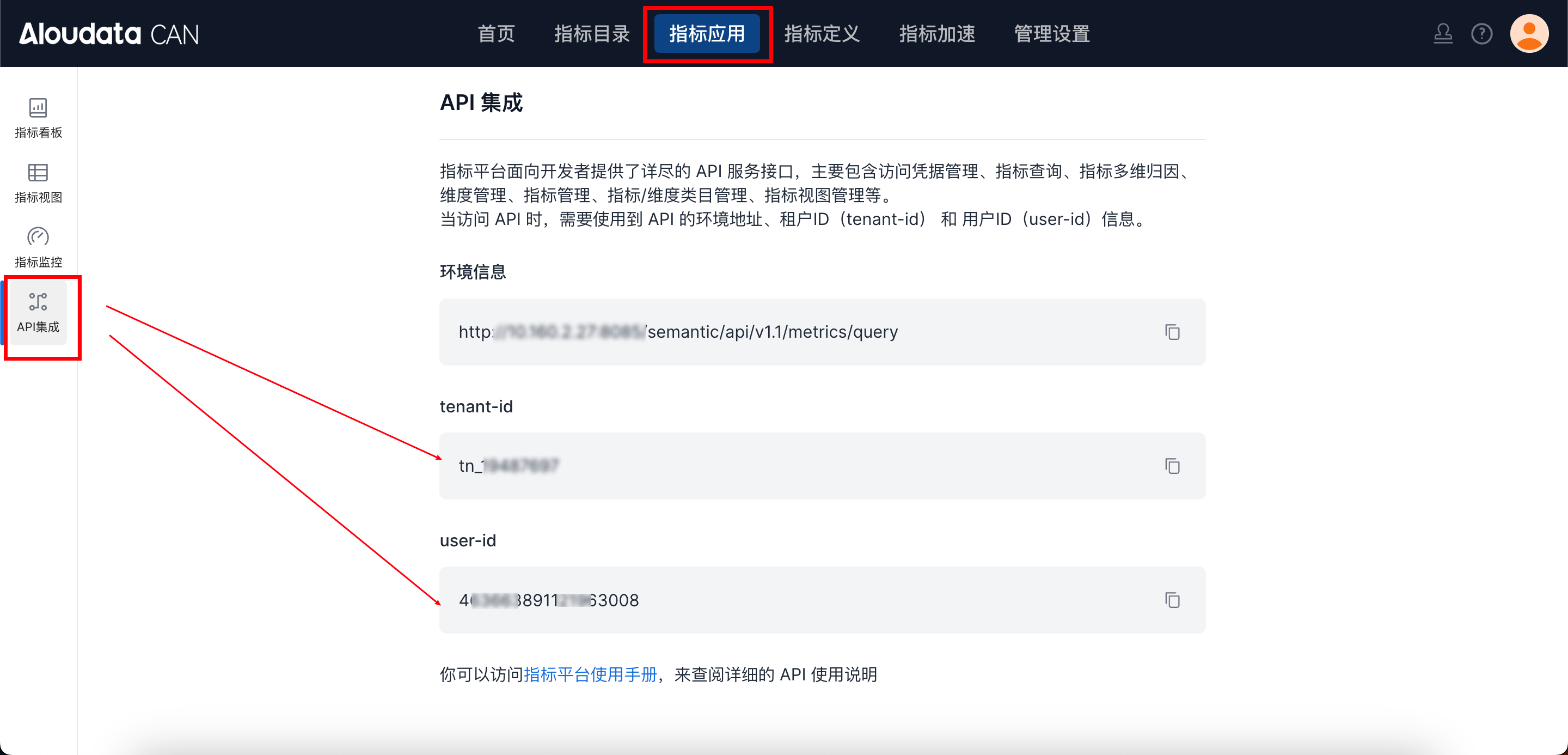
In Aloudata CAN, select Metric Applications in the top navigation bar, then select API Integration in the left navigation menu. You can obtain tenant-id on the API Integration page. Set auth-value according to auth-type.
4. Request Body
| parameter Name | Type | required | Description |
|---|---|---|---|
| tableName | String | Yes | Source table name. catalog.db.table is supported |
| tenantId | String | Yes | Tenant ID |
| scheduleTimes | Array |
Yes | List of scheduling time points (yyyy-MM-dd HH:mm:ss) |
5. Request Example
curl --location --request POST 'http://anymetrics:8083/anymetrics/api/v1/scheduler/task/triggerTableTaskInstanceByScheduleTime' \
--header 'tenant-id: tn_19487697' \
--header 'auth-value: 463663891121963008' \
--header 'auth-type: UID' \
--data-raw '{
  "tableName":"kehuzhisheng.chaos_prod.chaos_onsite_bug",
  "tenantId":"tn_19487697",
  "scheduleTimes":[
    "2026-01-20 00:00:00",
    "2026-01-20 01:00:00"
  ]
}'
6. Response Example
{
    "data": true,
    "success": true,
    "code": "200",
    "errorMsg": null,
    "detailErrorMsg": null,
    "traceId": "fbb0da5c96fb481bbadc8b7722307480.188.17688821533020289"
}
Trigger Source-Table Instances by Scheduling Time Range
1. API Description
Trigger new scheduled source-table instances by scheduling time range
Used to trigger source-table dependency task instances in a specified time range.
-
Scans and triggers all scheduled instances in the time range
-
If an instance already exists, triggering again reruns the current instance and its downstream tasks
2. API URL
POST Http://{anymetrics_host:anymetrics_port}/anymetrics/api/v1/scheduler/task/triggerTableTaskInstanceByScheduleTimeRange
anymetrics_host:anymetrics_port For how to obtain this value, see Calling APIs
3. Request parameters
3.1 Common Request Headers
| parameter | Type | required | Max Length | Description |
|---|---|---|---|---|
| tenant-id | String | Yes | 32 | Tenant ID, used to identify the tenant for metric query content. |
| auth-type | String | Yes | 32 | Authentication method. Supports UID, TOKEN, ACCOUNT, and APIKEY. |
| auth-value | String | Yes | 32 | Authentication value corresponding to auth-type. |
3.2 How to Obtain Common parameters
In Aloudata CAN, select Metric Applications in the top navigation bar, then select API Integration in the left navigation menu. You can obtain tenant-id on the API Integration page. Set auth-value according to auth-type.
4. Request Body
| parameter Name | Type | required | Description |
|---|---|---|---|
| tableName | String | Yes | Source table name |
| tenantId | String | Yes | Tenant ID |
| startTime | String | Yes | Start scheduling time(yyyy-MM-dd HH:mm:ss) |
| endTime | String | Yes | End scheduling time(yyyy-MM-dd HH:mm:ss) |
5. Request Example
curl --location --request POST 'http://anymetrics:8083/anymetrics/api/v1/scheduler/task/triggerTableTaskInstanceByScheduleTimeRange' \
--header 'tenant-id: tn_19487697' \
--header 'auth-value: 463663891121963008' \
--header 'auth-type: UID' \
--data-raw '{
  "tableName":"default_catalog.sales.FACT_SALES",
  "tenantId":"tn_19487697",
  "startTime":"2026-01-20 01:00:00",
  "endTime":"2026-01-20 05:00:00"
}'