Update Metric View
API Description
Use this API to update an existing metric view. Provide the metric view configuration to adjust its structure, metrics, dimensions, filters, and other settings.
API URL
POST Http://{anymetrics_host:anymetrics_port}/anymetrics/api/v1/analysisview/update
For how to obtain anymetrics_host:anymetrics_port, see Calling APIs.
Request Parameters
Common Request Parameters (HEADERS)
| Parameter | Type | Required | Description |
|---|---|---|---|
| tenant-id | String | Yes | The tenant ID that identifies the tenant where the metric view belongs |
| auth-type | String | Yes | Authentication type. Supported values: UID, TOKEN, ACCOUNT, and APIKEY |
| auth-value | String | Yes | The authentication value that corresponds to auth-type |
How to Obtain Common Parameters
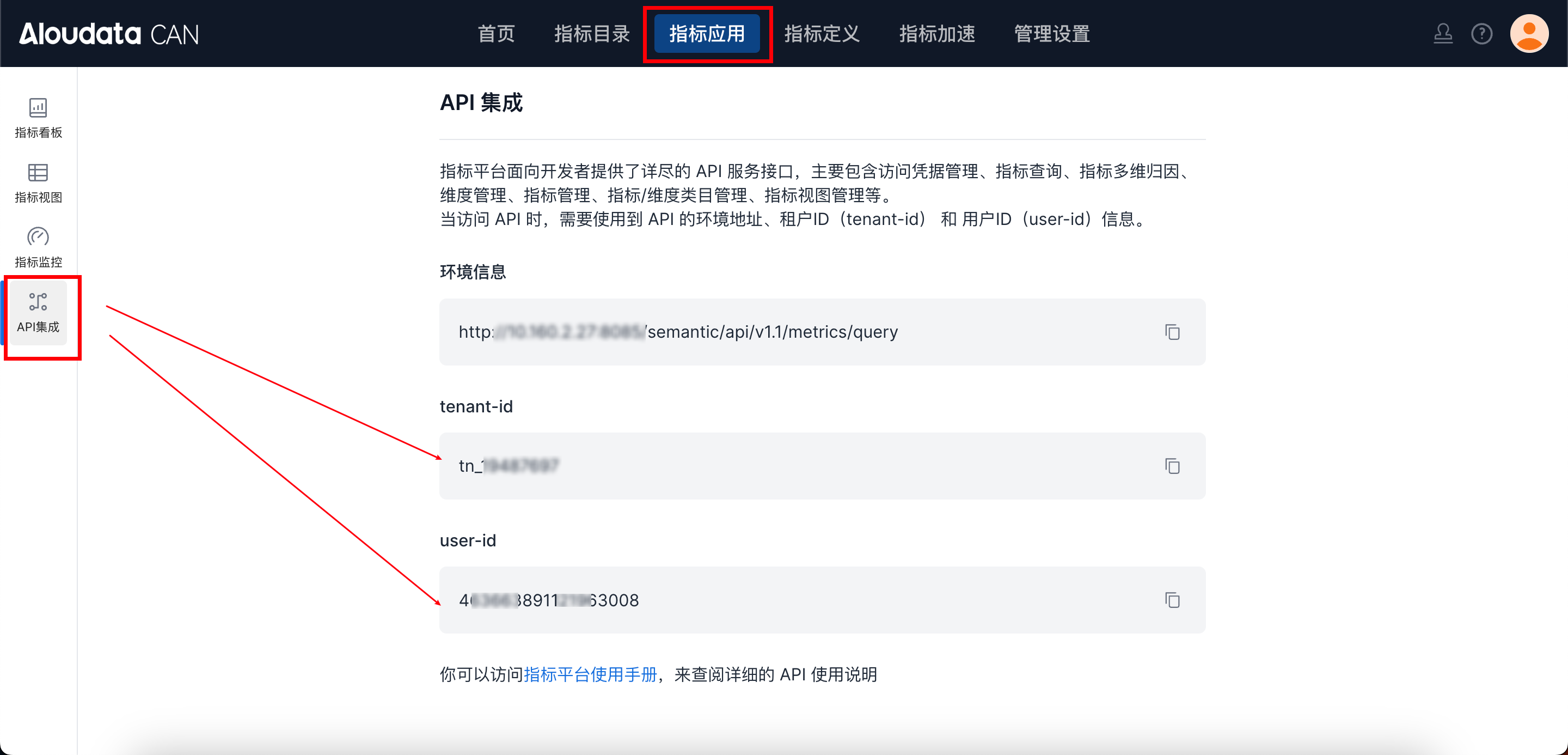
To obtain tenant-id, select a metric application in the top navigation bar of Aloudata CAN, choose API Integration from the left-side menu, and copy it from the API Integration page. Set auth-value to the authentication value that corresponds to the selected auth-type.
Request Parameters
| Parameter | Type | Required | Max Length | Description |
|---|---|---|---|---|
| id | Long | Yes | Metric view ID | |
| viewName | String | Yes | 50 | Metric view name |
| displayName | String | Yes | Metric view display name | |
| description | String | No | Metric view description | |
| metrics | Array[String] | Yes | Metric list | |
| dimensions | Array[String] | No | Dimension list | |
| filters | Array[String] | No | Filters | |
| time_constraint | String | No | Date range | |
| orders | Array[String] | No | Query sort rules. Referenced dimensions must be included in dimensions. |
Response Parameters
| Parameter | Type | Required | Max Length | Description |
|---|---|---|---|---|
| code | String | Yes | 32 | API response code |
| message | String | Yes | 512 | Message body |
| traceId | String | Yes | 128 | Trace ID for troubleshooting |
| data | Boolean | Yes | Operation result |
Request Example
{
  "id": 463,
  "viewName": "biuse_11",
  "description": "",
  "metrics": [
    "6b219c300d45496297f7f191ba99e91a"
  ],
  "dimensions": [
    "metric_time__day"
  ],
  "timeConstraint": null,
  "filters": [],
  "orders": [],
  "createFrom": "WEBUI",
  "categoryId": "71324644-9512-41a3-821b-86c031798b58",
  "displayName": "BI View",
  "metricDefinitions": {},
  "displayNameMap": null
}