BI Tool Integration Guide
You can access analysis view data in Aloudata CAN by adding a StarRocks data source in your BI tool. You can also connect by using Doris or MySQL. To obtain the access address and account credentials, choose Metric Applications in the top navigation bar, select Metric Views on the left, and click "BI Tool Integration Guide" in the lower-left corner of the metric views page. The guide provides the address, port, account, catalog, and schema, as shown below:
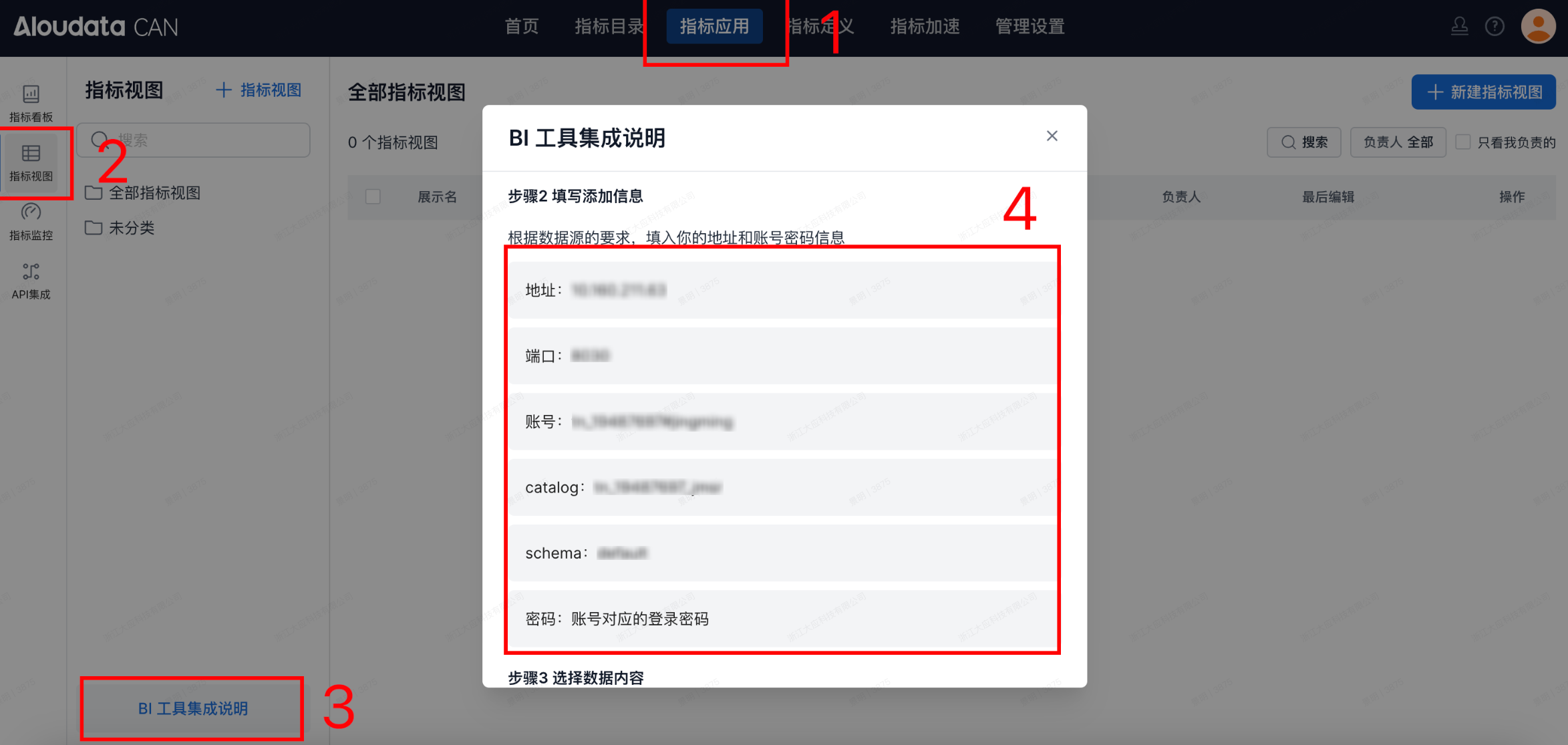
Description
The platform provides different port configurations based on the bound data source:
Doris/StarRocks uses port 8030.
AIR/Databricks uses port 31010.
Prerequisites
When Aloudata CAN is connected to a BI tool, the BI tool can access only the data in metric views that have already been created in Aloudata CAN. Metric dashboards, metrics, and other data are not supported. To create a metric view, see Create a Metric View.
Connect BI Tools
The following sections describe how to connect common BI tools to Aloudata CAN.
| Name | Documentation Link |
|---|---|
| Guandata BI | Guandata BI |
| FineBI | FineBI |