Create a Relationship
API Description
Use this API to create a dataset relationship in the metrics platform.
API URL
POST Http://{anymetrics_host:anymetrics_port}/anymetrics/api/v1/relation/create
For how to obtain anymetrics_host:anymetrics_port, see Calling APIs.
Request Parameters
Common Request Parameters (Headers)
| Parameter | Type | Required | Description |
|---|---|---|---|
| tenant-id | String | Yes | Tenant ID. Identifies the tenant for metric query content. |
| auth-type | String | Yes | Authentication method. Supported values: UID, TOKEN, ACCOUNT, and APIKEY. |
| auth-value | String | Yes | Authentication value corresponding to auth-type. |
How to Obtain Common Parameters
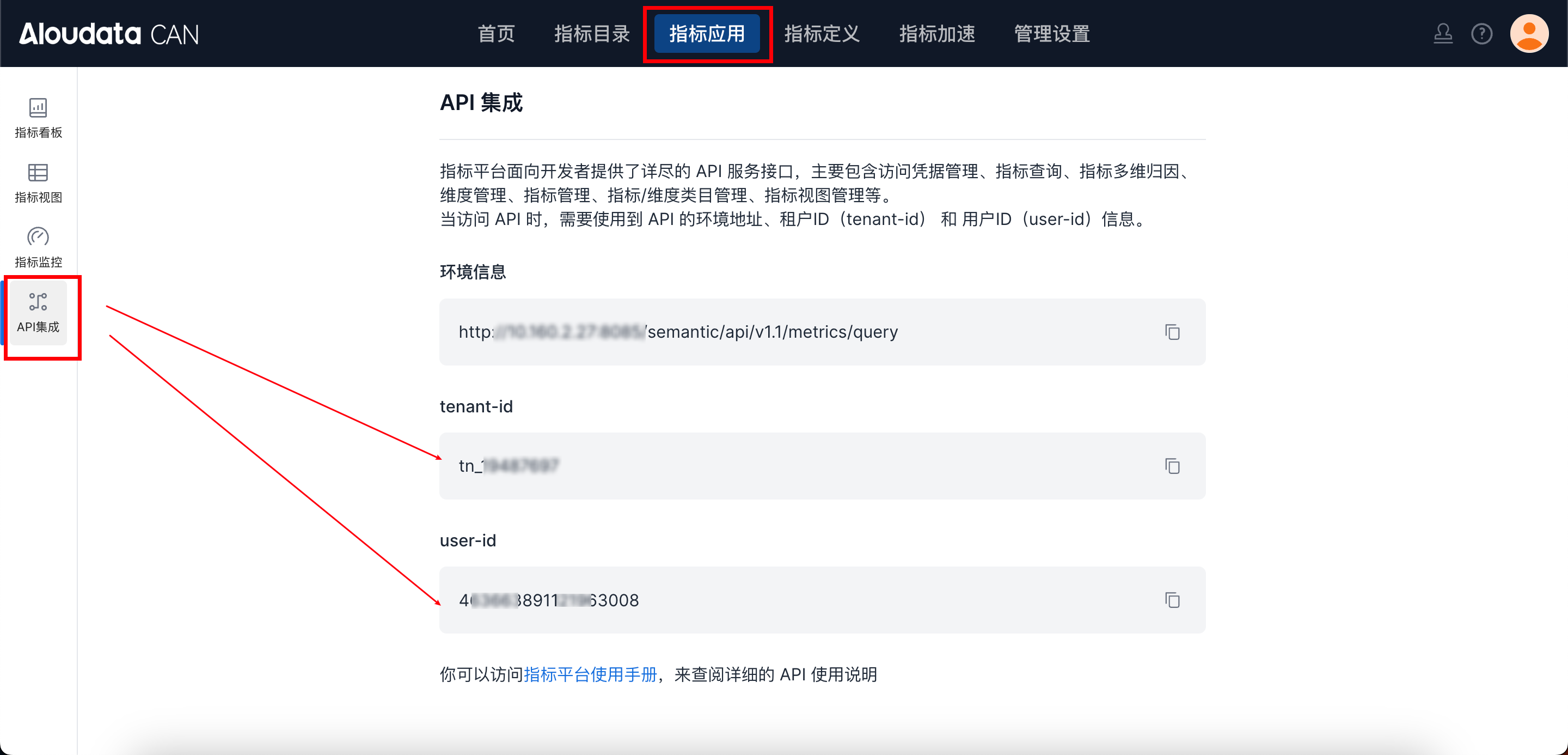
To obtain tenant-id, select a metrics application in the top navigation bar of Aloudata CAN, choose API Integration from the left navigation menu, and copy it from the API Integration page. Set auth-value according to the selected auth-type.
Body Request Parameters
| Parameter | Type | Required | Maximum Length | Description | Example |
|---|---|---|---|---|---|
| relationName | String | Yes | 128 | Relationship English name or identifier. We recommend keeping it unique within the tenant. | rel_product_shop |
| relationDisplayName | String | Yes | 128 | Relationship display name. | Product-store relationship |
| type | String | Yes | 32 | Relationship type. Enumerated values: ONE_TO_ONE, MANY_TO_ONE. |
MANY_TO_ONE |
| srcDatasetName | String | Yes | 128 | Source dataset name. Enter the AnyMetrics dataset name, not the physical table name. | oracle_product_1 |
| dstDatasetName | String | Yes | 128 | Destination dataset name. Enter the AnyMetrics dataset name, not the physical table name. | oracle_shop |
| relationConditions | List | Yes | - | Relationship condition list. See the relationConditions parameter description. | - |
| filterExprList | List |
No | - | Relationship constraint expression list. | ["[oracle_product_1/STATUS] = \"VALID\""] |
relationConditions Parameter Description
| Parameter | Type | Required | Description | Example |
|---|---|---|---|---|
| srcExpr | String | Yes | Source dataset field expression. | [oracle_product_1/SHOP_ID] |
| dstExpr | String | Yes | Destination dataset field expression. | [oracle_shop/SHOP_ID] |
Response Parameters
| Parameter | Type | Required | Description |
|---|---|---|---|
| code | String | Yes | API response code. |
| success | Boolean | Yes | Whether the request succeeded. |
| errorMsg | String | No | Error message. |
| detailErrorMsg | String | No | Detailed error message. |
| traceId | String | Yes | Trace ID for troubleshooting. |
| data | String | Yes | Relationship ID created successfully. |
Request Example
{
  "relationName": "rel_product_shop",
  "relationDisplayName": "Product-store relationship",
  "srcDatasetName": "oracle_product_1",
  "type": "MANY_TO_ONE",
  "relationConditions": [
    {
      "srcExpr": "[oracle_product_1/SHOP_ID]",
      "dstExpr": "[oracle_shop/SHOP_ID]"
    }
  ],
  "dstDatasetName": "oracle_shop"
}