Create a Metric
API Description
Use this API to create a metric in the metric management system.
Version support
This API contract applies to CAN releases: V1.62.10+ and V2.3.0+.
API URL
POST Http://{anymetrics_host:anymetrics_port}/anymetrics/api/v1/metrics/createV2
For how to obtain anymetrics_host:anymetrics_port, see Calling APIs.
Request Parameters
| Parameter |
Type |
Required |
Description |
| tenant-id |
String |
Yes |
The tenant ID for the tenant that contains the metric query content. |
| auth-type |
String |
Yes |
Authentication method. Supported values: UID, TOKEN, ACCOUNT, APIKEY. |
| auth-value |
String |
Yes |
Authentication value that corresponds to auth-type. |
How to Obtain Common Parameters
To obtain tenant-id, select the metric application from the top navigation bar in Aloudata CAN, choose API Integration from the left navigation menu, and copy it from the API Integration page. Set auth-value based on the selected auth-type.
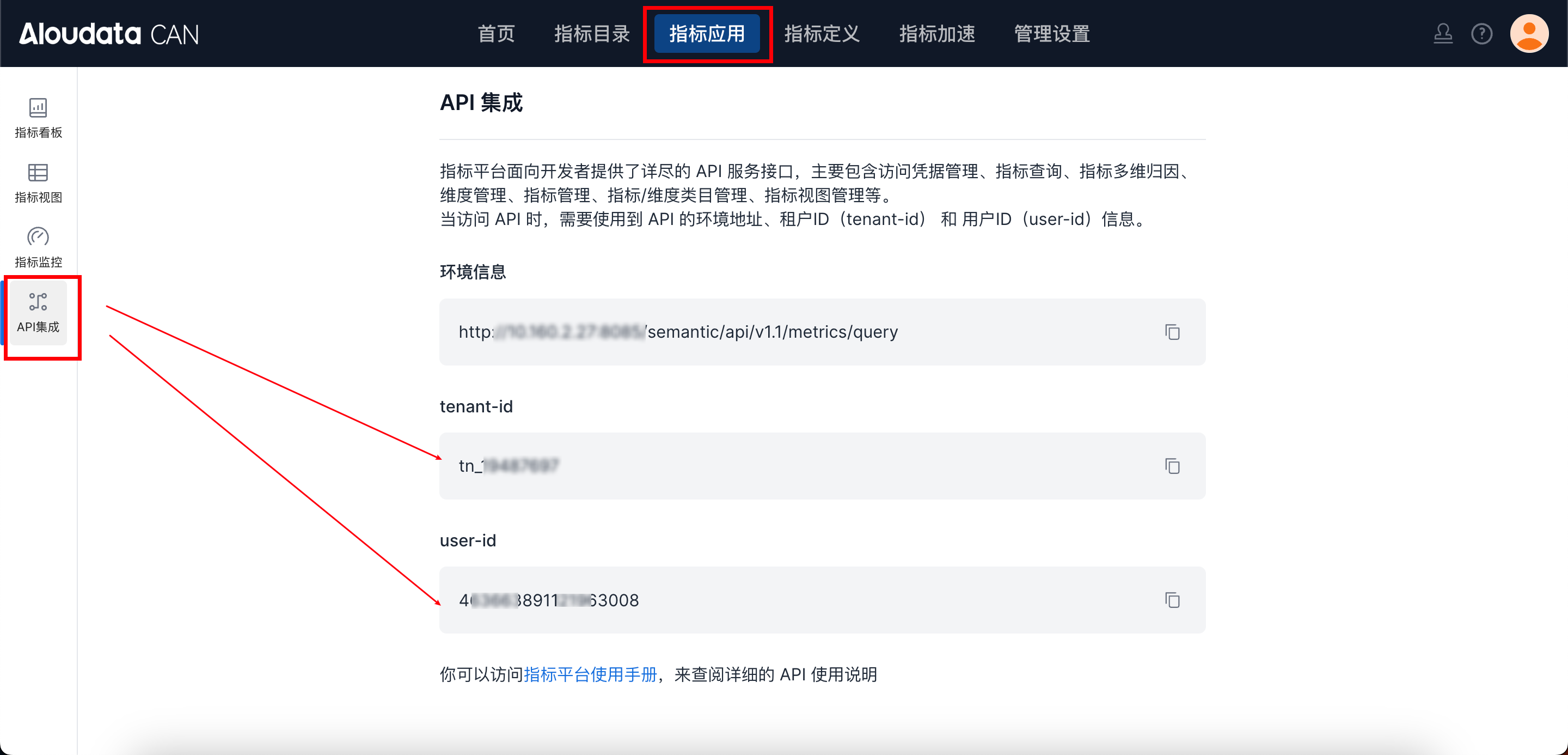
Request Parameters
Request Parameter Description
| Parameter |
Type |
Required |
Description |
| metricName |
String |
Yes |
English metric identifier, mapped to enDisplayName in code. Required when publishing. Maximum length: 120. The code validates this field with the regular expression ^[a-z0-9A-Z_(\\-)]{1,128}$. |
| metricDisplayName |
String |
Yes |
Metric display name. Required when publishing. Maximum length: 120. |
| metricCode |
String |
No |
Metric code. If metric-code capabilities are enabled for the tenant, we recommend always passing this field. Maximum length: 120. |
| type |
String |
Yes |
Metric type. This API currently supports ATOMIC, DERIVED, and COMPOSITE. |
| owner |
String |
No |
Technical owner account. The API converts the account value to a user userId internally. |
| businessOwner |
String |
No |
Business owner account. The API converts the account value to a user userId internally. |
| businessCaliber |
String |
No |
Business definition. Maximum length: 5000. |
| caliber |
Object |
Yes |
Metric calculation definition. The structure differs by metric type. See the sections below. |
| unit |
String |
No |
Metric unit. See "Metric Unit Enum". |
| metricCategoryId |
String |
No |
Category ID. If omitted, the default is -1, which indicates "Uncategorized". |
| isPublish |
Boolean |
No |
Whether to publish immediately. true: publish; false: save as draft. Default: true. |
| isNewDimensionDefaultEnable |
Boolean |
No |
Whether newly added dimensions are enabled by default for this metric. |
| availableDimensions |
Array[String] |
No |
Dimensions explicitly enabled for the current metric. |
| disableDimensions |
Array[String] |
No |
Dimensions explicitly disabled for the current metric. |
| basicAttributes |
Map[String, Object] |
No |
Basic attributes. |
| businessAttributes |
Map[String, Object] |
No |
Business attributes. |
| technicalAttributes |
Map[String, Object] |
No |
Technical attributes. |
| managementAttributes |
Map[String, Object] |
No |
Management attributes. |
Metric Calculation Definition
1. Atomic Metric ATOMIC
| Parameter |
Type |
Required |
Description |
| datasetName |
String |
Yes |
Dataset name. |
| expr |
String |
Yes |
Aggregation expression. |
| filters |
Array[Object] |
No |
Business constraint list. For reference, see Business Constraints. |
| metricTime |
String |
Yes |
Metric time field name. The field must exist in datasetName, and its field type must be DATE, DATE_TIME, DATETIME, or TIMESTAMP. |
| enableNonAdditiveDimensions |
Boolean |
No |
Whether to enable semi-additive dimensions. |
| nonAdditiveDimensions |
Array[Object] |
No |
Semi-additive dimension configuration. |
nonAdditiveDimensions Parameter Description
| Parameter |
Type |
Required |
Description |
| dimensions |
Array[String] |
Yes |
Semi-additive dimension list. |
| windowChoice |
String |
Yes |
Window aggregation method. The code model is AggType; semi-additive scenarios usually use MAX or MIN. |
| windowGroupings |
Array[String] |
No |
Window grouping field list. |
2. Derived Metric DERIVED
| Parameter |
Type |
Required |
Description |
| refMetricCode |
String |
Yes |
System code of the referenced upstream metric. |
| period |
Object |
No |
Statistical period. For syntax details, see API Time Constraint Syntax. |
| filters |
Array[Object] |
No |
Business constraint list. |
| preAggs |
Array[Object] |
No |
Pre-aggregation method. |
| indirection |
Object |
No |
Derivation method. |
When creating and publishing a derived metric, period, filters, and indirection cannot all be empty.
General indirection Description
indirection.type supports the following four values:
SAME_PERIODRANKPROPORTIONCUSTOM_AGG
Same-Period Comparison SAME_PERIOD
| Parameter |
Type |
Required |
Description |
| type |
String |
Yes |
Fixed value: SAME_PERIOD. |
| samePeriodType |
String |
Yes |
Supported values: VALUE, GROWTH_VALUE, GROWTH. |
| granularity |
String |
No |
Compatibility field. You can omit it. |
| offset |
Object |
Yes |
Offset configuration. The current code relies on this field to determine granularity and offset. |
offset parameter description:
| Parameter |
Type |
Required |
Description |
| granularity |
String |
Yes |
Granularity, such as DAY, WEEK, MONTH, QUARTER, or YEAR. |
| offset |
Integer |
No |
Offset value, such as -1. |
| dateTag |
String |
No |
Date tag. |
| specifyDateInPeriod |
String |
No |
Specific date within the period. |
Ranking RANK
| Parameter |
Type |
Required |
Description |
| type |
String |
Yes |
Fixed value: RANK. |
| rankRanges |
Array[String] |
No |
Ranking ranges. |
| rankDimensions |
Array[String] |
No |
Ranking dimensions. |
| rankType |
String |
No |
Supported values: RANK, RANK_DENSE, ROW_NUMBER. |
| asc |
Boolean |
No |
Whether to sort in ascending order. |
Proportion PROPORTION
| Parameter |
Type |
Required |
Description |
| type |
String |
Yes |
Fixed value: PROPORTION. |
| proportionRanges |
Array[String] |
No |
Proportion ranges. |
| proportionDimensions |
Array[String] |
No |
Proportion dimensions. |
Custom Aggregation CUSTOM_AGG
| Parameter |
Type |
Required |
Description |
| type |
String |
Yes |
Fixed value: CUSTOM_AGG. |
| customDimensionGroups |
Array[Object] |
Yes |
Custom aggregation dimension groups. This field cannot be empty. |
customDimensionGroups parameter description:
| Parameter |
Type |
Required |
Description |
| calculateType |
String |
Yes |
Supported values: MAX, MIN, AVG, SUM. |
| dimensions |
Array[Object] |
Yes |
Dimension combination. This field cannot be empty. |
dimensions parameter description:
| Parameter |
Type |
Required |
Description |
| name |
String |
Yes |
Dimension name. |
| granularity |
String |
No |
Required only for time dimensions, such as DAY. |
3. Composite Metric COMPOSITE
| Parameter |
Type |
Required |
Description |
| expr |
String |
Yes |
Composite metric expression. Use [xxx] to reference metrics in the expression. |
| metricDefinitions |
Map[String, Object] |
No |
Temporary derived metric definitions. |
The key of metricDefinitions is the temporary metric name. The value uses the following structure:
| Parameter |
Type |
Required |
Description |
| refMetricCode |
String |
Yes |
System code of the referenced upstream metric. |
| period |
Object |
No |
Statistical period. |
| filters |
Array[Object] |
No |
Business constraints. |
| preAggs |
Array[Object] |
No |
Pre-aggregation. |
| indirection |
Object |
No |
Derivation method. The structure is the same as for a derived metric. |
| displayName |
String |
No |
Temporary metric display name. |
| dimensionConfig |
Object |
No |
Available-dimension configuration for the temporary metric. |
Correct dimensionConfig Structure for Composite Metrics
Unlike earlier documentation, the current code recognizes the following structure:
{
  "isNewDimensionDefaultEnable": true,
  "publicDimension": {
    "availableDimensionNames": [
      "province"
    ],
    "disableDimensionNames": [
      "city"
    ]
  },
  "factorDimensions": [
    "dt"
  ]
}
Notes:
availableDimensionNames is used only when isNewDimensionDefaultEnable=false.disableDimensionNames is used only when isNewDimensionDefaultEnable=true.factorDimensions declares factor dimensions.
Metric Unit Parameter Description
| Category |
Unit Code |
Description |
| Currency |
CNY_FEN |
Fen |
| CNY_YUAN |
Yuan |
|
| CNY_WAN |
Ten thousand yuan |
|
| CNY_BAI_WAN |
Million yuan |
|
| CNY_YI_YUAN |
Hundred million yuan |
|
| USD_CENT |
US cent |
|
| USD_DOLLAR |
US dollar |
|
| EUR_EURO |
Euro |
|
| HKD_DOLLAR |
Hong Kong dollar |
|
| Time |
DAY |
Day |
| MONTH |
Month |
|
| WEEK |
Week |
|
| YEAR |
Year |
|
| HOUR |
Hour |
|
| MINUTE |
Minute |
|
| SECOND |
Second |
|
| QUARTER |
Quarter |
|
| MILLISECOND |
Millisecond |
|
| Ratio |
DECIMAL |
Decimal |
| PERCENTAGE |
Percentage |
|
| PERMILLE |
Per mille |
|
| Noun |
RANK |
Rank |
| Object Count |
HOUSEHOLD |
Household |
| TRANSACTION |
Transaction |
|
| ITEM |
Item |
|
| INDIVIDUAL |
Individual |
|
| OCCURRENCE |
Occurrence |
|
| PERSON_DAY |
Person-day |
|
| FAMILY |
Family |
|
| HAND |
Hand |
|
| SHEET |
Sheet |
|
| PACKAGE |
Package |
|
| Weight |
TON |
Ton |
| KILOGRAM |
Kilogram |
|
| Other |
OTHER |
Other |
Request Examples
Example 1: Create and Publish an Atomic Metric
{
  "type": "ATOMIC",
  "metricName": "order_amount_sum_api_v2",
  "metricDisplayName": "Order Amount",
  "metricCode": "ORDER_AMOUNT_SUM_API_V2",
  "owner": "can1",
  "businessOwner": "can1",
  "businessCaliber": "Calculates the total order amount.",
  "metricCategoryId": "-1",
  "unit": "CNY_YUAN",
  "isPublish": true,
  "isNewDimensionDefaultEnable": true,
  "disableDimensions": [
    "city"
  ],
  "caliber": {
    "datasetName": "can_order",
    "expr": "SUM(['can_order'/'order_amount'])",
    "metricTime": "order_date",
    "filters": [
      {
        "type": "EXPR",
        "expr": "IN(['can_order'/'order_status'],\"paid\")"
      }
    ]
  },
  "basicAttributes": {},
  "businessAttributes": {},
  "technicalAttributes": {},
  "managementAttributes": {}
}
Example 2: Temporary Derived Dimension Configuration in a Composite Metric
{
  "type": "COMPOSITE",
  "metricName": "order_amount_ratio_api_v2",
  "metricDisplayName": "Order Amount Proportion",
  "owner": "can1",
  "businessOwner": "can1",
  "unit": "PERCENTAGE",
  "isPublish": true,
  "caliber": {
    "expr": "[tmp_same_period]/[total_amount]",
    "metricDefinitions": {
      "tmp_same_period": {
        "refMetricCode": "total_amount",
        "indirection": {
          "type": "SAME_PERIOD",
          "samePeriodType": "VALUE",
          "offset": {
            "granularity": "YEAR",
            "offset": -1
          }
        },
        "dimensionConfig": {
          "isNewDimensionDefaultEnable": true,
          "publicDimension": {
            "disableDimensionNames": [
              "is_weekend"
            ]
          }
        }
      }
    }
  }
}
Example 3: Create a Derived Metric
{
    "type": "DERIVED",
    "metricName": "cyl0year_ordercount_3",
    "metricDisplayName": "Derived Metric Proportion",
    "businessCaliber": "Derived metric",
    "owner": null,
    "businessOwner": "correctness_test_qq",
    "caliber": {
        "refMetricCode": "ordercount_3",
        "period": {
            "type": "TO_DATE",
            "typeParams": "-29 day of 0 day"
        },
        "preAggs": [
            {
                "granularity": "DAY",
                "calculateType": "AVG"
            }
        ],
        "indirection": {
            "type": "PROPORTION",
            "proportionRanges": [
                "can_order_region"
            ],
            "proportionDimensions": [
                "can_shop_city"
            ]
        }
    },
    "unit": "OTHER",
    "metricCategoryId": "-1",
    "basicAttributes": null,
    "businessAttributes": null,
    "technicalAttributes": null,
    "managementAttributes": null
}
Example 4: Create a Composite Metric
{
    "type": "COMPOSITE",
    "metricName": "apitest",
    "metricDisplayName": "apitest",
    "owner": "can1",
    "businessOwner": "can1",
    "unit": "OTHER",
    "businessCaliber": "This is a composite metric example for the documentation.",
    "caliber": {
        "expr": "[GeYpElmCMBtZehtg]/[sum_PZJERMB]", /* GeYpElmCMBtZehtg references the temporary derived metric below. sum_PZJERMB is the original metric name. */
        "metricDefinitions": {
                "GeYpElmCMBtZehtg": { /* We recommend using a 16-character UUID as the temporary derived metric name. */
                    "refMetricCode": "sum_rmb",
                    "period": {
                        "type": "RELATIVE_DATE",
                        "periodGrain": null,
                        "onlyContainsDateTag": n    ull,
                        "typeParams": "0 day of 0 day",
                        "customDateTag": null,
                        "granularity": "DAY"
                    },
                    "filters": [
                        {
                            "type": "EXPR",
                            "periodGrain": null,
                            "onlyContainsDateTag": null,
                            "expr": "NotNull(['is_weekend'])"
                        }
                    ],
                    "preAggs": null,
                    "indirection": {
                        "type": "SAME_PERIOD",
                        "samePeriodType": "VALUE",
                        "granularity": null,
                        "offset": {
                            "granularity": "YEAR",
                            "offset": -1,
                            "dateTag": null,
                            "specifyDateInPeriod": null
                        }
                    },
                    "dimensionConfig": {
                        "isNewDimensionDefaultEnable": true,
                        "disableDimensions": [
                            "is_weekend"

                        ],
                        "availableDimensions": null,
                        "factorDimensions": null
                    },
                    "displayName": null
                }
            }
    },
    "metricCode": "api_up_radio2",
    "basicAttributes": {
    },
    "businessAttributes": {
    },
    "technicalAttributes": {
    },
    "managementAttributes": {
    }
}
Response Parameters
| Parameter |
Type |
Description |
| data |
String |
System code of the metric returned after successful creation. |
| success |
Boolean |
Whether the request succeeded. |
| code |
String |
Response code. |
| errorMsg |
String |
Error message. |
| detailErrorMsg |
String |
Detailed error message. |
| traceId |
String |
Request trace ID. |
Response Example
{
  "data": "mcadb2046729c26c67c355bc4e32",
  "success": true,
  "code": "200",
  "errorMsg": null,
  "detailErrorMsg": null,
  "traceId": "9644bd804e2747088086bb04730e20ba.144.17194894357700043"
}